View your licence and subscription details
You can view your assigned licences and the subscription accounts paying for them using the SHIP-HATS User License widget in Console.
The widget shows:
- Your assigned licences
- The subscription ID
- The subscription name funding each licence
This information is useful when raising support requests or reporting subscription-related issues.
Your licences may be funded by one or more subscriptions.
Prerequisites
- An active TechPass account.
- A non-SE GSIB, COMET, or GMD (SEED) device.
Steps
Log in to Console.
On the Dashboard, locate the SHIP-HATS User License widget.
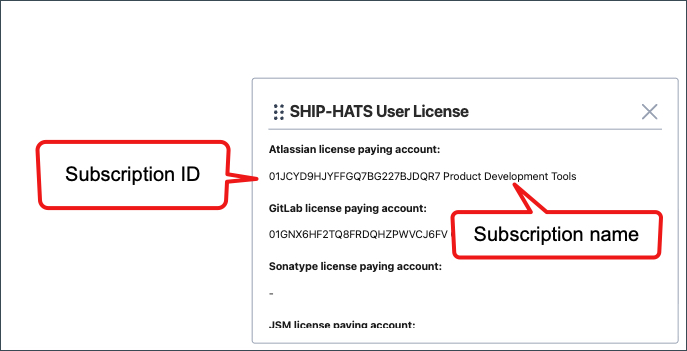
Review the licence details displayed.
Each entry shows:
- Subscription ID
- Subscription name
If a licence shows N/A, it means no subscription is currently assigned to it.
Only tools that require licences appear in this widget. See Overview of licences.
If the widget is not visible on your Dashboard, add it manually. See Manage widgets on Console.
