Automate subscription management using APIs
You can automate end-to-end subscription administration tasks—including creating, updating, and deleting projects, applications, and user groups—using the following APIs.
SHIP-HATS APIs to:
TechBiz APIs to:
Prerequisites
You need a valid API key to authenticate requests.
API keys
- Only a Subscription Admin can generate an API key because it is tied to the subscription.
- Once generated, anyone with the API key can call the endpoints.
- Store API keys securely.
- To learn how to generate and use API keys, see Use API keys to authenticate API requests.
SHIP-HATS API
Use the SHIP-HATS APIs to manage projects, applications, user groups, and users.
For detailed endpoints, request and response examples, and authentication methods, see the SHIP-HATS API documentation.
Manage SHIP-HATS projects
- Create new SHIP-HATS projects
- Retrieve all SHIP-HATS projects within a subscription
- Delete SHIP-HATS projects that no longer have applications
You can delete a project only if it does not contain any applications.
Manage applications and tools
You can manage applications for supported tools within a project, subject to available quota.
Retrieve available details and remaining quota for:
- Jira and JSM projects
- Confluence spaces
- Atlassian Dedicated sites
- GitLab group
- FOD, Nexus IQ, and SonarQube applications
- Nexus repositories
Create new resources depending on available quota for:
- Jira and JSM projects
- Confluence spaces
- Atlassian Dedicated sites
- GitLab groups
- FOD, Nexus IQ, and SonarQube applications
Update application-level access for:
- Jira projects
- Confluence spaces
- Nexus IQ applications
- SonarQube applications
Manage user groups
Applicable for Jira, Confluence, FOD, SonarQube, Nexus IQ, and Atlassian Dedicated sites.
You can:
- Create user groups within a subscription
- Retrieve details of existing user groups
- Update roles and permissions for user groups in supported applications:
- Jira projects
- Confluence spaces
- Nexus IQ applications
- SonarQube applications
- Delete user group
- Retrieve members of a user group
- Add members to user group
- Remove member from a user group
Manage users
- Update user roles and permissions for:
- Nexus IQ at organisation level
- Search for users by username, email, first name, or last name.
TechBiz API
Use the TechBiz API to assign or revoke licences for tools such as Atlassian (Jira & Confluence), Jira Service Management, Sonatype, and GitLab.
- Each tool has a licence group. Adding a user to this licence group grants a licence; removing a user revokes it
- Licence groups differ from user groups, which control roles and permissions
- You need a valid API key to authenticate requests
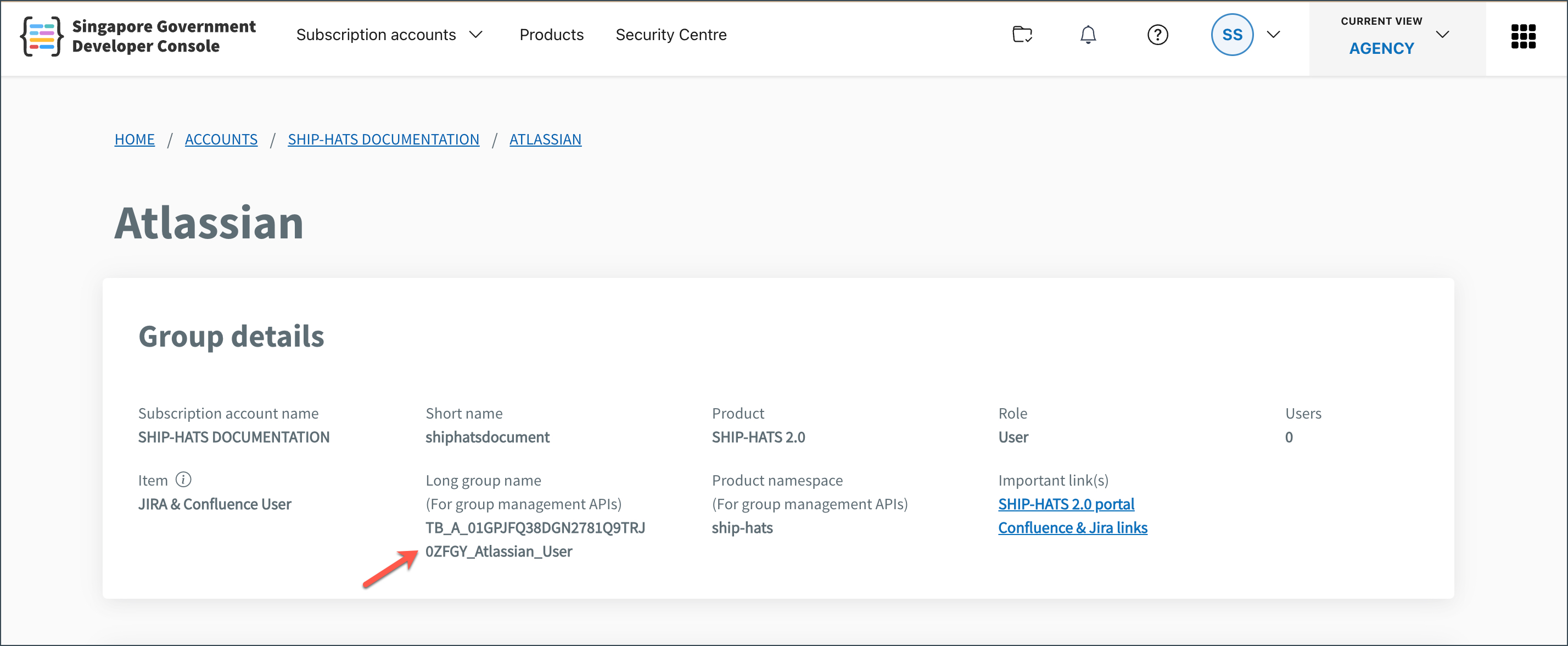
- You can locate
longGroupNamewhich is one of the required parameters for this API.
Tip: How to find your
longGroupName?
1. Go to Console, go to the Subscription accounts > View subscription accounts and select the required SHIP-HATS subscription.
2. Click USER MANAGEMENT and select the required tool.
3. Click Manage. The tool’s Group details are displayed.
You can use the TechBiz API to:
- Add users to a licence group (assign a licence)
- Remove users from a licence group (revoke a licence)
For detailed endpoints, request and response examples, and authentication methods, see the TechBiz API documentation.
