SOA EOL software detection
SOA has evolved into StackOps Resiliency Accelerator (SORA) and will be deprecated by 31 Aug 2026. Learn more in StackOps Resiliency Accelerator (SORA).
When software reaches the end-of-life (EOL) status, it poses significant security risks:
- No security updates—Software vendors stop releasing patches for known vulnerabilities.
- Increased attack surface—Unpatched software becomes an easy target for attackers.
- Compliance issues—Your systems will fail compliance standards, because many security frameworks require up-to-date software.
EOL software detection is a security feature provided by SOA. It automatically monitors your infrastructure for EOL software and sends high-priority security alerts when an EOL software is detected.
Detection coverage
The feature tracks EOL status for 300+ software packages including:
- Programming languages—Python, Node.js, PHP, Java
- Databases—MySQL, PostgreSQL, Redis, MongoDB
- Operating systems—Various Linux distributions, Windows versions
- Web servers—Apache, Nginx, IIS
- And many more
To provide the latest EOL information, our EOL database is updated monthly with current EOL statuses from trusted sources.
Getting started
Prerequisites:
- Your Elastic deployment must be version 8.19.x or higher.
- Your Elastic deployment must be onboarded with SOA for software BOM collection.
To activate the EOL software detection feature, raise a service request to StackOps.
Receiving alerts
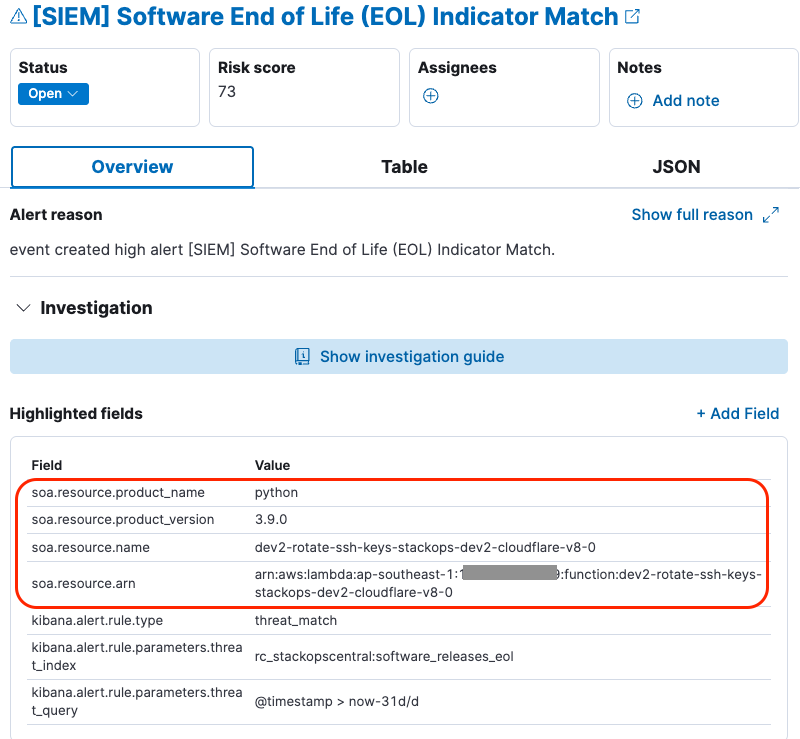
When an EOL software is detected, you will receive an alert in Kibana (Security > Alerts). Here is an example alert, with the key information about the EOL software and impacted resource highlighted:
Handling EOL alerts
Once the feature is activated, you can start tracking alerts and taking action to secure your environment. Here is an overview for what you should do:
- Review the alert—Check which software and since when it has reached EOL status.
- Assess impact—Determine which systems are affected by the EOL software.
- Plan upgrade—Schedule software updates during maintenance windows.
- Verify resolution—Confirm that alerts have stopped after upgrading the software.
Example EOL scenarios
Here are some example EOL scenarios, security risks, and the recommended action to take:
Scenario 1: Legacy Python installation
- Alert: Python 2.7 detected (EOL: January 2020)
- Risk: No security updates for 5+ years
- Action: Upgrade to Python 3.12
Scenario 2: Unsupported OS
- Alert: Ubuntu 16.04 detected (EOL: April 2021)
- Risk: No security patches available
- Action: Upgrade to Ubuntu 22.04 LTS
