Tail-based sampling in Elastic APM
Overview
Tail-based sampling can help eliminate application performance blind spots by providing finer-grain control over trace sampling in high-volume systems. It’s particularly effective for complex application environments with millions of transactions, where storing every trace would be overwhelming and costly.
In large-scale applications, APM may generate millions of traces. Storing all of them can be expensive and unnecessary — especially since successful or fast requests may not be useful for debugging. Tail-based sampling helps retain only the most important or meaningful traces, such as those that are slow, have errors, or originate from specific parts of your system.
Benefits of tail-based sampling
Why tail-based sampling (vs. head-based)?
Head-based sampling is efficient in low-volume systems due to its simplicity but has limitations. Because it decides upfront which traces to keep without knowing whether the transaction succeeded or failed, it may miss slow or failed requests that only become evident later.
With tail-based sampling, the decision to keep or discard a trace is made after the full trace is completed and observed.
With tail-based sampling, you can:
- Maximise visibility while fine-tuning performance overhead of data collection
- Reduce total cost of ownership (TCO) by storing only high-value transactions
- Eliminate blind spots and ensure you capture critical issues
- Retain all data necessary to troubleshoot problematic transactions
- Monitor and report business objectives and goals
Tail-based sampling requirements
Tail-based sampling may require additional resource usage or storage space.
In an APM Server implementation, the events are stored temporarily on disk instead of in memory for better scalability. Therefore, it requires local disk storage proportional to the APM event ingestion rate and additional memory to facilitate disk reads and writes. If the storage limit is insufficient, sampling will be bypassed.
In StackOps Elastic
In StackOps Elastic, the APM integration (APM Server) is part of the Integration Server.
By default, StackOps provides a deployment with an Integration server using 1 GB of RAM (c6gd) in two zones, each with 27 GB of storage space.
Refer to Elastic documentation to read more about tail-based sampling performance and requirements.
Configure tail-based sampling
Follow these steps to enable and configure tail-based sampling.
From Kibana, go to Fleet > Agent Policies.
Select the agent policy of your APM integration.
Select Elastic APM.
In the Tail-based sampling section, toggle Enable tail-based sampling.
Configure the following settings.
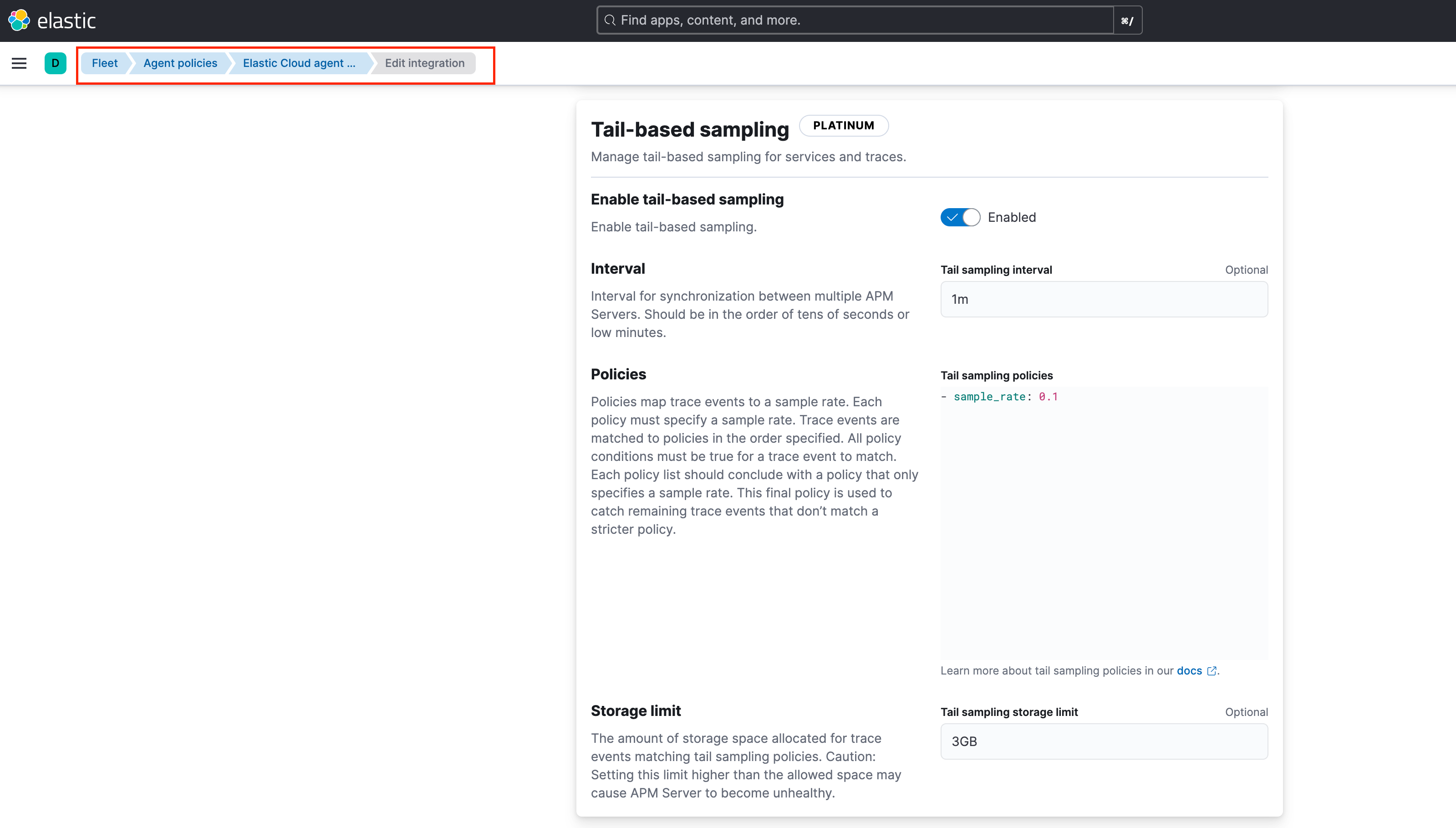
Setting Description Interval The interval for synchronisation between multiple APM Servers. In StackOps Elastic, since the APM server is part of the deployment, you can ignore this setting or maintain the default value. Policies The criteria used to match a root transaction to a sample rate. The sampling policy must specify the sample_rateand other optional conditions. Trace events are matched to policies in the order specified. Refer to Policy configurations below for more details and examples.Storage Limit The amount of storage space allocated for trace events matching tail sampling policies.
Note: If you enable tail-based sampling and send a transaction that does not match any of the specified policies, APM Server will reject the transaction with the error no matching policy.
Caution: Setting the Storage Limit higher than the allowed space may cause the APM Server to become unhealthy.
Policy configurations
The table below lists the available policy configuration options.
| Configuration Option | Description |
|---|---|
sample_rate |
The sample rate must be greater than or equal to 0 and less than or equal to 1. For example, a sample_rate of 0.01 means that 1% of trace events matching the policy will be sampled. A sample_rate of 1 means that 100% of trace events matching the policy will be sampled. |
trace.name |
The trace name for events to match a policy. A match occurs when the configured trace.name matches the transaction.name of the root transaction of a trace. A root transaction is any transaction without a parent.id. |
trace.outcome |
The trace outcome for events to match a policy. A match occurs when the configured trace.outcome matches a trace’s event.outcome field. Trace outcome can be success, failure, or unknown. |
service.name |
The service name for events to match a policy. |
service.environment |
The service environment for events to match a policy. |
Example policy configurations
Here are some sample policy configurations to illustrate how tail-based sampling can be applied.
Example configuration 1: Sampling based on service environment and trace name
This example defines three tail-based sampling polices:
- sample_rate: 1
service.environment: production
trace.name: "GET /very_important_route"
- sample_rate: .01
service.environment: production
trace.name: "GET /not_important_route"
- sample_rate: .01| Sampling policy | Description |
|---|---|
sample_rate: 1service.environment: productiontrace.name: "GET /very_important_route" |
Samples 100% of traces in production with trace name "GET /very_important_route" |
sample_rate: .01service.environment: productiontrace.name: "GET /not_important_route" |
Samples 1% of traces in production with trace name "GET /not_important_route" |
sample_rate: .01 |
Samples 1% of all remaining traces (e.g., traces in dev environment or traces with any other name). You should always set a default for remaining traces. |
Example configuration 2: Sampling based on trace origin
When a trace originates in Service A and then calls Service B, the sampling is determined by the service where the trace starts:
- sample_rate: 0.3
service.name: B
- sample_rate: 0.5
service.name: A
- sample_rate: 0.1- Because Service A is the root of the trace, its policy (0.5) is applied while Service B’s policy (0.3) is ignored.
- If instead the trace began in Service B (and then passed to Service A), the policy for Service B would apply.
sample_rate: 0.1is the default fallback for all remaining traces.
Note: Tail‑based sampling rules are evaluated at the trace level based on which service initiated the distributed trace, not the service of the transaction or span.
Example configuration 3: Sampling based on the trace outcome
The sampling is based on the trace outcome.
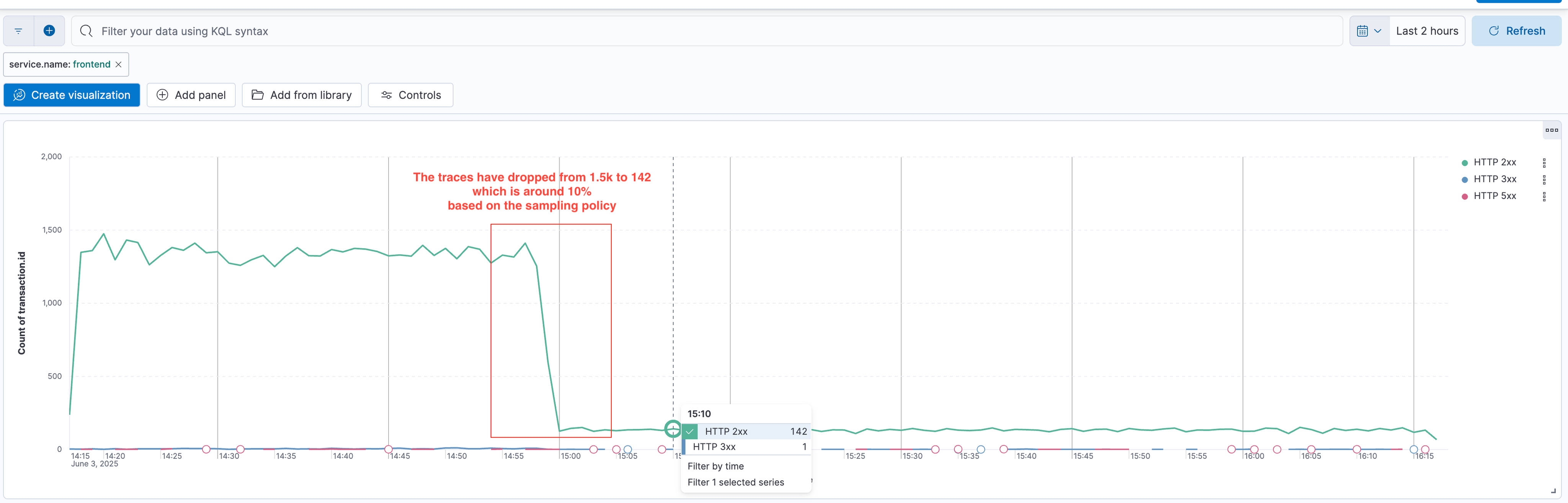
- sample_rate: 1
trace.outcome: failure
service.name: frontend
- sample_rate: 1
trace.outcome: unknown
service.name: frontend
- sample_rate: 0.1| Sampling policy | Description |
|---|---|
sample_rate: 1trace.outcome: failureservice.name: frontend |
Samples 100% of failed traces in service frontend |
sample_rate: 1trace.outcome: unknownservice.name: frontend |
Samples 100% of unknown traces in service frontend |
sample_rate: 0.1 |
Samples 10% of all remaining traces (e.g., traces with different outcomes, like success) |
Example configuration 4: Sampling based on the trace name
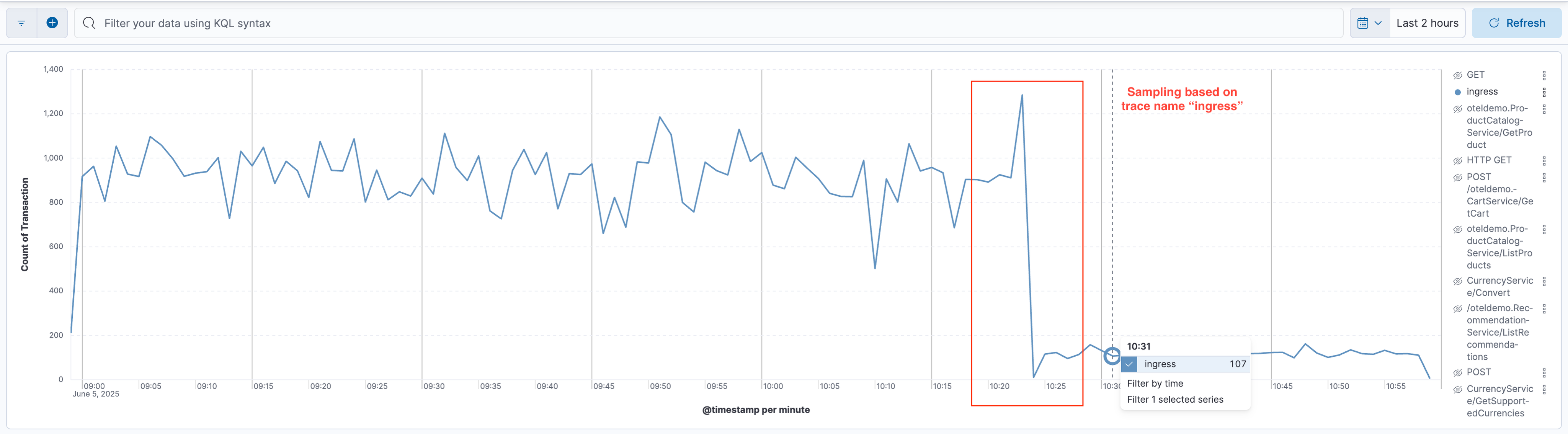
The sampling is based on the trace name.
- sample_rate: 0.01
trace.name: "ingress"
- sample_rate: 1| Sampling policy | Description |
|---|---|
sample_rate: 0.01trace.name: "ingress" |
Samples 1% of traces with transaction.name as "ingress" |
sample_rate: 1 |
Samples 100% of all remaining traces |
Refer to Elastic documentation for more examples and details.
