Filtering and interpreting ML alerts
This guide provides the steps on how to quickly filter, correlate, and interpret Machine Learning (ML) alerts in the StackOps SIEM using tags and the ML anomaly fields.
Create a control for tags
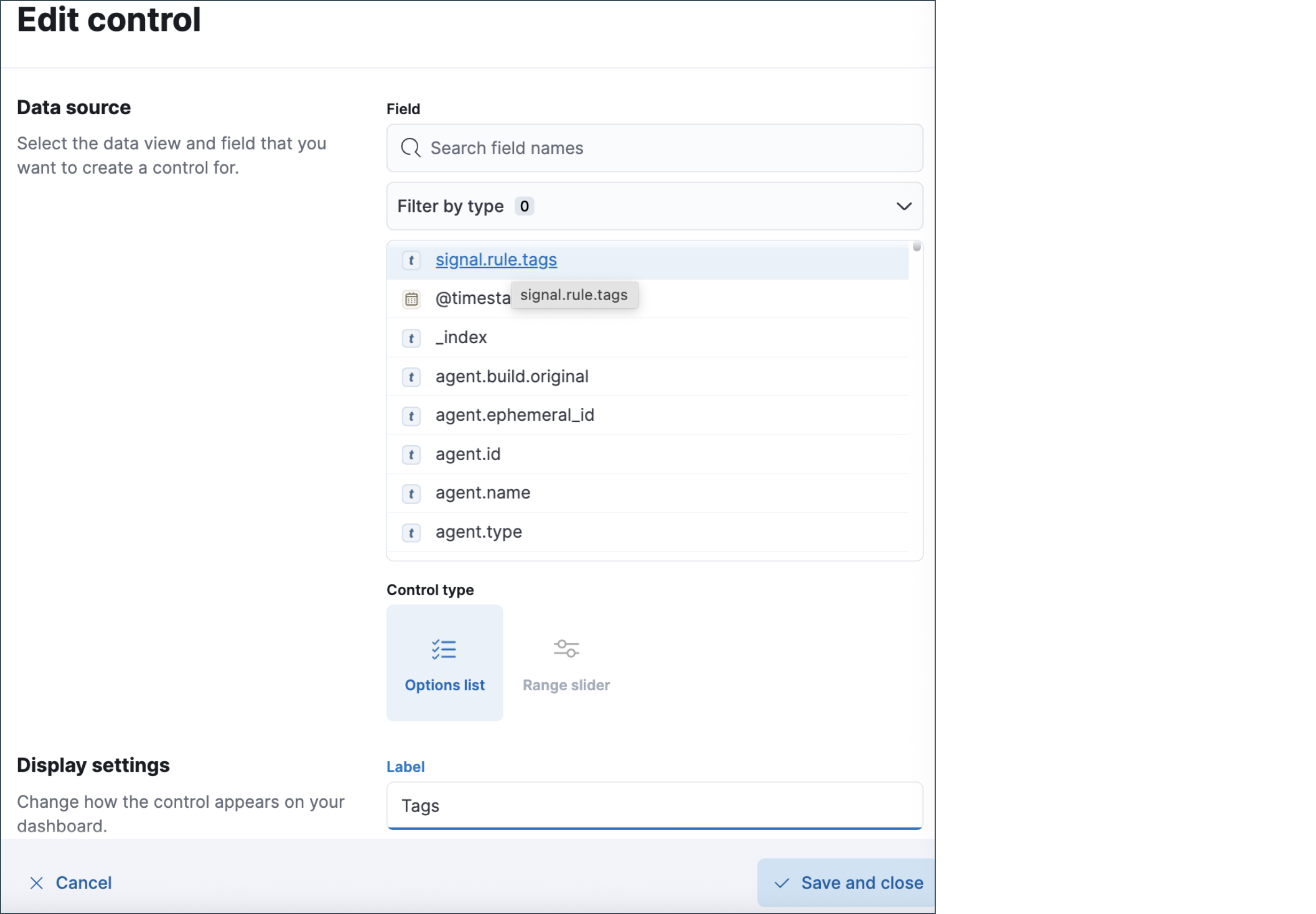
Use a Control (Options list) to toggle alert tags without typing queries.
Open Kibana Security → Alerts.
Click Add control (or Customize controls) above the grid.
Add Options list control.
Set Field to
signal.rule.tags.(Optional) Set Title to Tags and enable Multiselect.
Click Save. You can now filter alerts by selecting tags from the control.
Correlate ML alerts using correlation tag
All ML rules include correlation-friendly tags such as StackOps-ML-<Platform/UseCase>.
Use the Tags control you created.
In the Options list, search/select the wildcard group matching
StackOps-ML-*.The Alerts table will filter to alerts correlated to StackOps Elastic ML detections.
You can further refine by picking specific correlation tags (e.g.,
StackOps-ML-AWS-IAM,StackOps-ML-Linux-Process).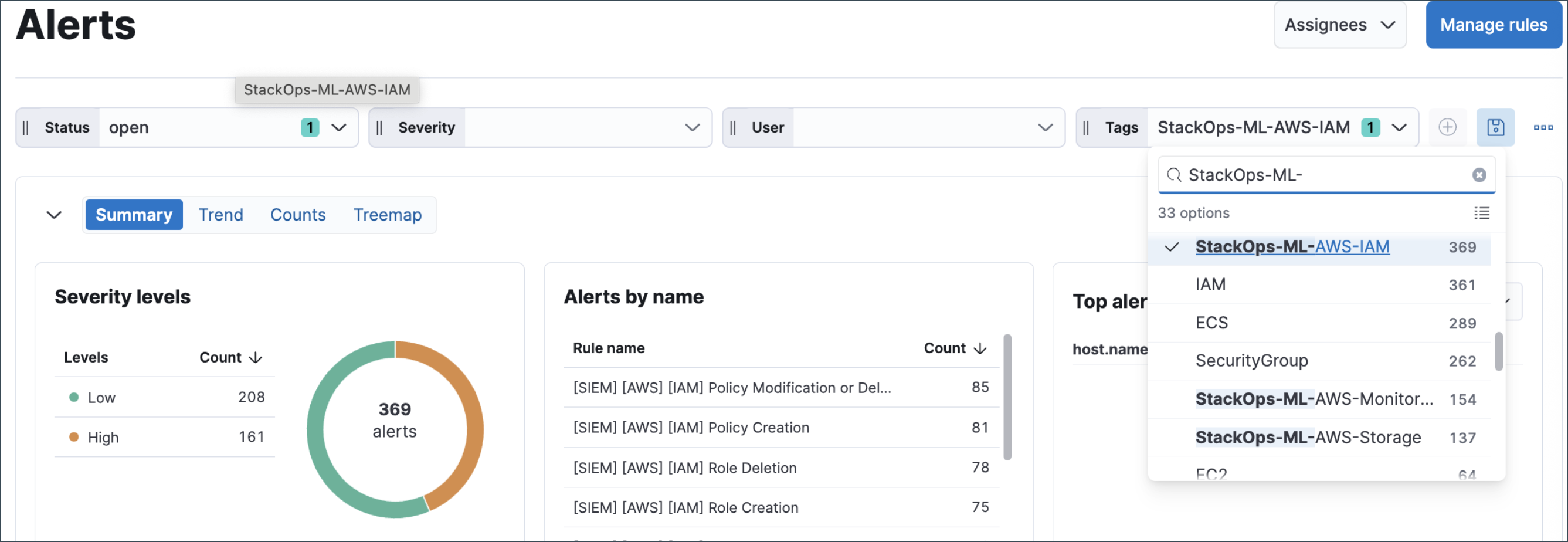
Tip: Combine with time range and user/host filters to focus investigations.
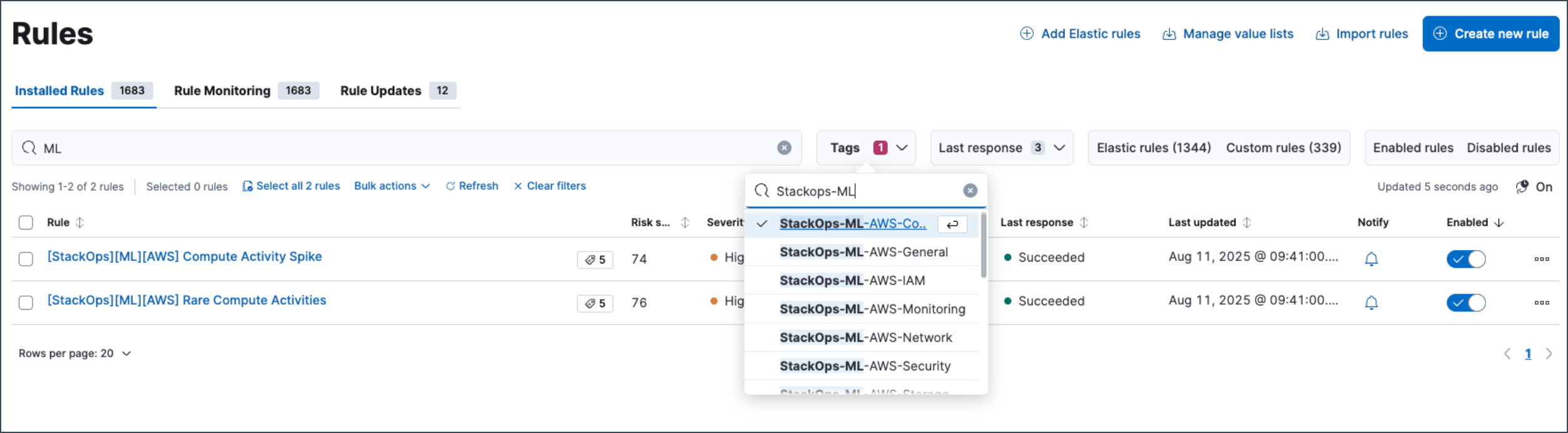
Filter only ML alerts by the generic tag
Many ML rules add the simple tag ML for one-click filtering.
- Use the Tags control.
- Select ML.
- The Alerts table will now show only ML-related alerts.
Note: If your deployment uses custom tag sets, ensure ML rules include ML or adopt a consistent ML tag for easy filtering.
Generic ML Filtering
- Simple approach: Filter by
MLtag - Best practice: Ensure consistent ML tagging across rules
Correlating ML SIEM Rules with Normal SIEM Rules
Use these approaches to correlate ML-driven alerts with classic SIEM detections:
Filter by Tag to Isolate ML Alerts
- Many ML rules include the tag
ML_Analysed - In Kibana Security > Alerts, filter by
Tag = MLto focus on ML alerts - Filter by correlation tag
StackOps-ML-xx-xxxxto correlate ML alerts with SIEM alerts
Related Alerts by Entity
- Open an ML alert to find alerts from normal rules that share entities like
user.name,host.name, orsource.ipwithin the same time window - Refer to
all_field_valuesfor comprehensive entity context
Filter by ML Rule Tags for Focused Analysis
- In Kibana Security > Alerts, use filter controls to target
signal.rule.tagsfield - Filter by specific ML tags like
ML_Analysed,StackOps-ML-AWS-*, orStackOps-ML-Azure-* - Create saved filters for quick access to different ML rule categories
Use Tag-based Filtering to Correlate ML Alerts with SIEM Alerts
Tenants may filter ML rules with StackOps ML rule tags for correlation analysis.
Interpret ML Alert fields
The following fields are the key fields found in ML anomaly alerts. These fields explain why a record was flagged and indicate the strength of the anomaly.
| Field | Meaning / How to use it |
|---|---|
| all_field_values | Key-value snapshot of the fields considered by the ML detector for this record. Use this to understand the full context that influenced scoring. |
| anomaly_score_explanation.anomaly_characteristics_impact | Contribution to score from the anomaly’s characteristics (e.g., shape/structure). Higher values indicate stronger impact. |
| anomaly_score_explanation.anomaly_length | Duration in buckets that the anomaly persisted. Longer anomalies can affect scores differently than single-bucket spikes. |
| anomaly_score_explanation.anomaly_type | Type of anomaly (e.g., spike, rare) inferred by the model. This is useful for labelling the behaviour. |
| anomaly_score_explanation.high_variance_penalty | Penalty applied when baseline variance is high, reducing confidence in spikes. Higher penalties lower the final score. |
| anomaly_score_explanation.lower_confidence_bound | Lower bound of the model’s expected value range for this bucket. Actual values below this suggest a dip anomaly. |
| anomaly_score_explanation.multi_bucket_impact | Impact from multi-bucket analysis (trend context). High values indicate deviation sustained over multiple buckets. |
| anomaly_score_explanation.single_bucket_impact | Impact from a single bucket’s deviation. High values indicate a sharp spike in that bucket. |
| anomaly_score_explanation.typical_value | The model’s expected (typical) value for the metric in this context. Compare this against actual/typical values to gauge severity. |
| anomaly_score_explanation.upper_confidence_bound | Upper bound of the expected range. Actual values above this suggest an upward spike anomaly. |
| bucket_span | Time size of each analysis bucket (e.g., 15m, 1h). Use this to verify that test data spans multiple buckets. |
| by_field_name | Name of the “by” field (e.g., event.outcome). This indicates which category dimension the detector split on. |
| by_field_value | Value of the by_field_name for the record (e.g., failure). This shows the specific category that was anomalous. |
| detector_index | Index of the detector in the job (0-based). This is helpful for mapping to the detector definition in the ML job JSON. |
| function | Detector function used: high_count, high_distinct_count, or rare. This explains the statistical lens of the anomaly. |
| influencers.influencer_field_name | Influencer field used to stratify/associate anomalies (e.g., user.name, host.name). |
| influencers.influencer_field_values | Values for the influencer fields contributing to the anomaly (e.g., the specific user.name). |
| initial_record_score | Raw score before post-processing. This is useful for debugging changes after normalisation. |
| is_interim | Returns true if the record is interim (partial) and may change; false if final. Prefer final scores for decisions. |
| job_id | ML job identifier that produced the record. Use this to trace back to job configuration and related rules. |
| multi_bucket_impact | Additional multi-bucket impact value used in scoring (aggregated). Larger values indicate stronger trend-based anomalies. |
| partition_field_name | Field used to partition the analysis (e.g., per user/host). This ensures separate baselines per partition. |
| partition_field_value | Value of the partition for this record (e.g., alice). This identifies which partition was anomalous. |
| probability | Probability of observing this record under the model (e.g., 6.78131030864167e-9). Lower probabilities indicate more anomalous behaviour. |
| record_score | Final anomaly score (0-100). Use thresholds (e.g., >25 significant, >50 high) for prioritisation. |
| result_type | ML result document type (e.g., record). This is primarily for internal model output categorisation. |
| typical | Typical (expected) value for the function (e.g., 1.841…). Compare this to the actual or observed bucket metric. |
Practical interpretation tips
Use these guidelines to effectively analyse and prioritise ML anomaly alerts:
Severity assessment:
Combine record_score, probability, and single_bucket_impact/multi_bucket_impact to judge severity and context.
Root cause identification:
Check by_field_* and partition_field_* to identify which category and partition deviated from normal behaviour.
Investigation pivoting: Use influencer fields to pivot investigations and drill into specific users, hosts, or IP addresses that contributed to the anomalous behaviour.
Data validation:
Verify bucket_span and ensure your payloads span multiple buckets for reliable scoring. Single-bucket anomalies may be less significant than multi-bucket patterns.
