Elastic APM
Elastic APM is an application performance monitoring capability that is built atop the Elastic Stack. It enables real-time monitoring by collecting detailed performance information on response time for incoming requests, database queries, calls to caches, external HTTP requests, and more. Besides response time, APM also collects unhandled errors and exceptions, as well as picks up application-level metrics.
This means you can quickly identify errors as soon as they arise and monitor how often specific errors happen, making it easy to perform root cause analysis to pinpoint and fix performance problems quickly.
To learn more about Elastic APM, refer to the official Elastic documentation.
Elastic APM components
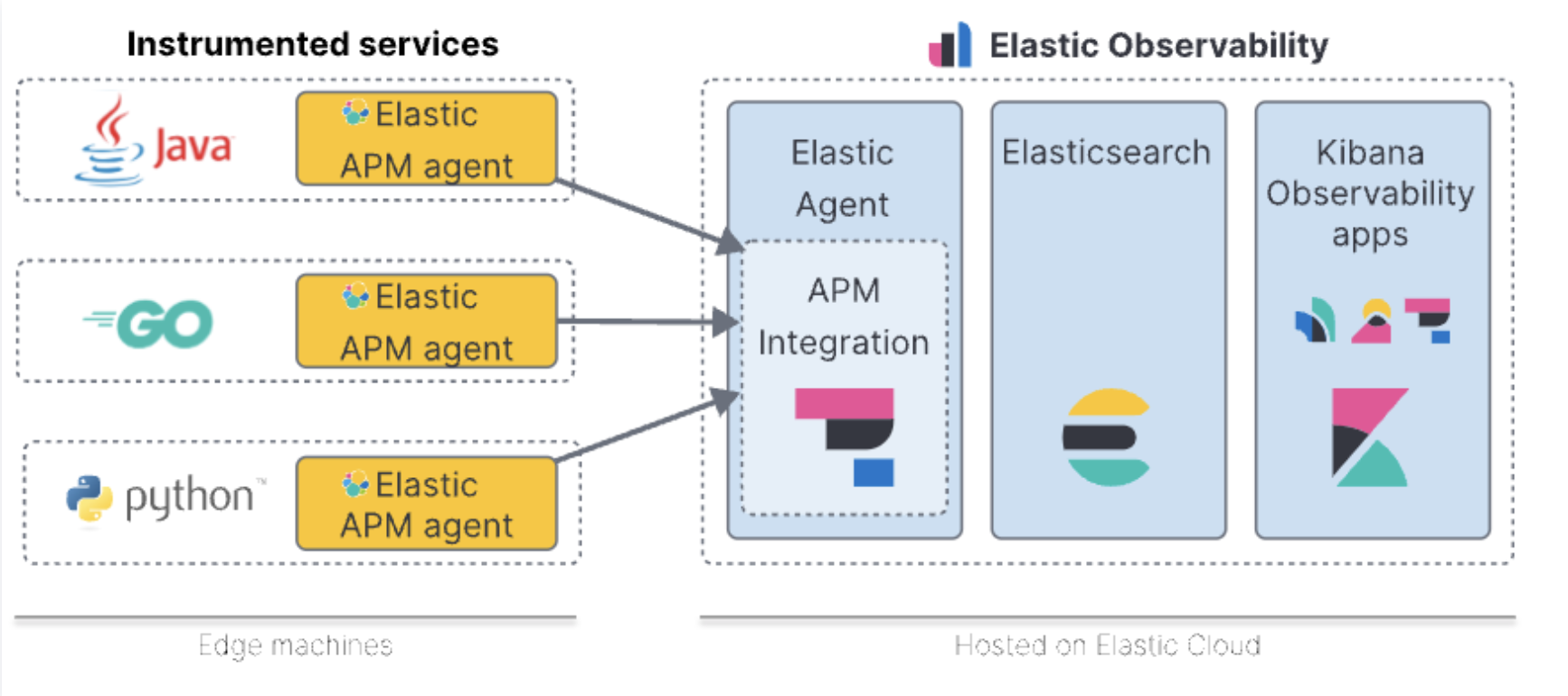
Elastic APM consists of three components: APM agents, APM server, and Elastic Stack. Click on each tab to learn more.
APM agents establish a link between your service and Elastic so you can implement APM for your service. They are written in the same language as your application or service. To monitor a new service, you must instrument your code using APM agent and configure it with a service name, APM server host, and secret token.
The supported Elastic APM Agents can be found here.
The APM server receives performance data from APM agents, validates and processes it, before transforming the data for Elasticsearch. In StackOps Elastic, the APM server is part of the deployment and you can get the APM server URL and token from Kibana UI.
To learn more about APM servers, refer to the Elastic documentation.
The APM events collected by the Elastic APM agent from instrumented services is indexed in Elasticsearch and this data can be visualised using Kibana.
Data model
Elastic APM agents capture different types of information from within their instrumented applications. These are known as events, and can be spans, transactions, errors, or metrics. The events can also contain additional metadata to further enrich your data. For more information on the metadata, refer to the Elastic documentation.
Spans: Contain information about the execution of a specific code path. They measure from the start to the end of an activity, and they can have a parent/child relationship with other spans. APM agents automatically instrument a variety of libraries to capture these spans from within the application, but you can also use the Agent API for custom instrumentation of specific code paths.
Transactions: A special kind of span that have additional attributes associated with them. They describe an event captured by an Elastic APM agent instrumenting a service. Transactions are the highest level of work you’re measuring within a service.
Errors: Contain at least information about the original exception that occurred or about a log created when the exception occurred.
Metrics: Measure the state of a system by gathering information on a regular interval. APM agents automatically pick up basic host-level metrics, including system and process-level CPU and memory metrics.
Installing APM agents
APM agents are written in the same language as your application or service. To monitor a new service, you must install a new instance of the APM agent and configure it with a service name, APM server host, and secret token.
- Service name: The APM integration maps an instrumented service’s name (defined in each APM agent’s configuration) to the index that its data is stored in Elasticsearch. Service names are case-insensitive and must be unique. For example, you cannot have a service named
Frontendand another namedfrontend. Special characters will be removed from service names and replaced with underscores (_), e.g. (payment_service). - APM server URL: The host and port that the APM server listens for events on.
- Secret token: Authentication method for APM agent and APM server communications. This can be obtained when selecting the Elastic APM agent.
To get the APM server host and secret token, follow these steps:
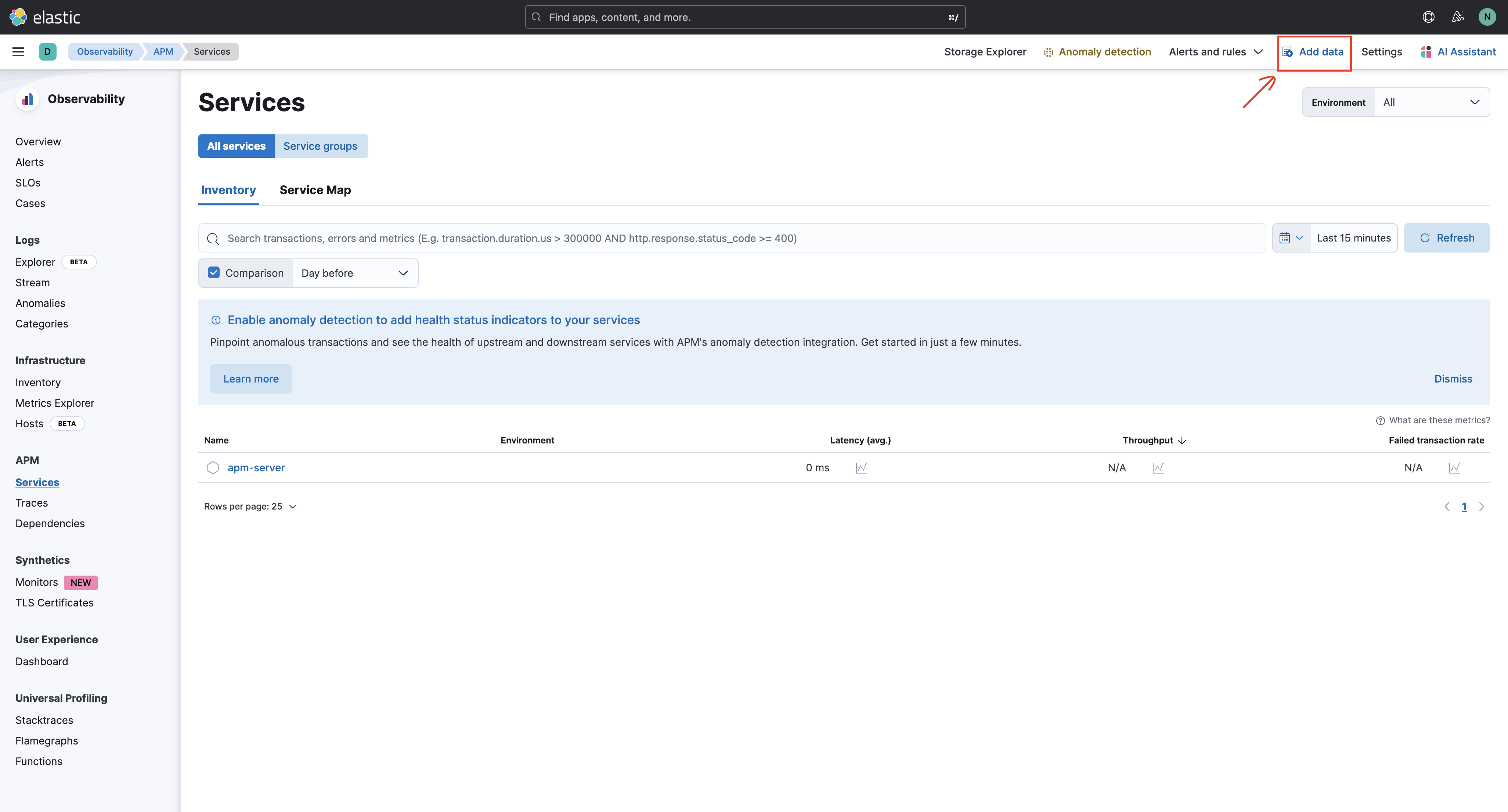
- Log in to the StackOps Elastic deployment Kibana. From the left navigation bar
 , select Observability > APM > Services.
 - Select the Add data option, located at the top right corner. This opens a new tab with APM options.
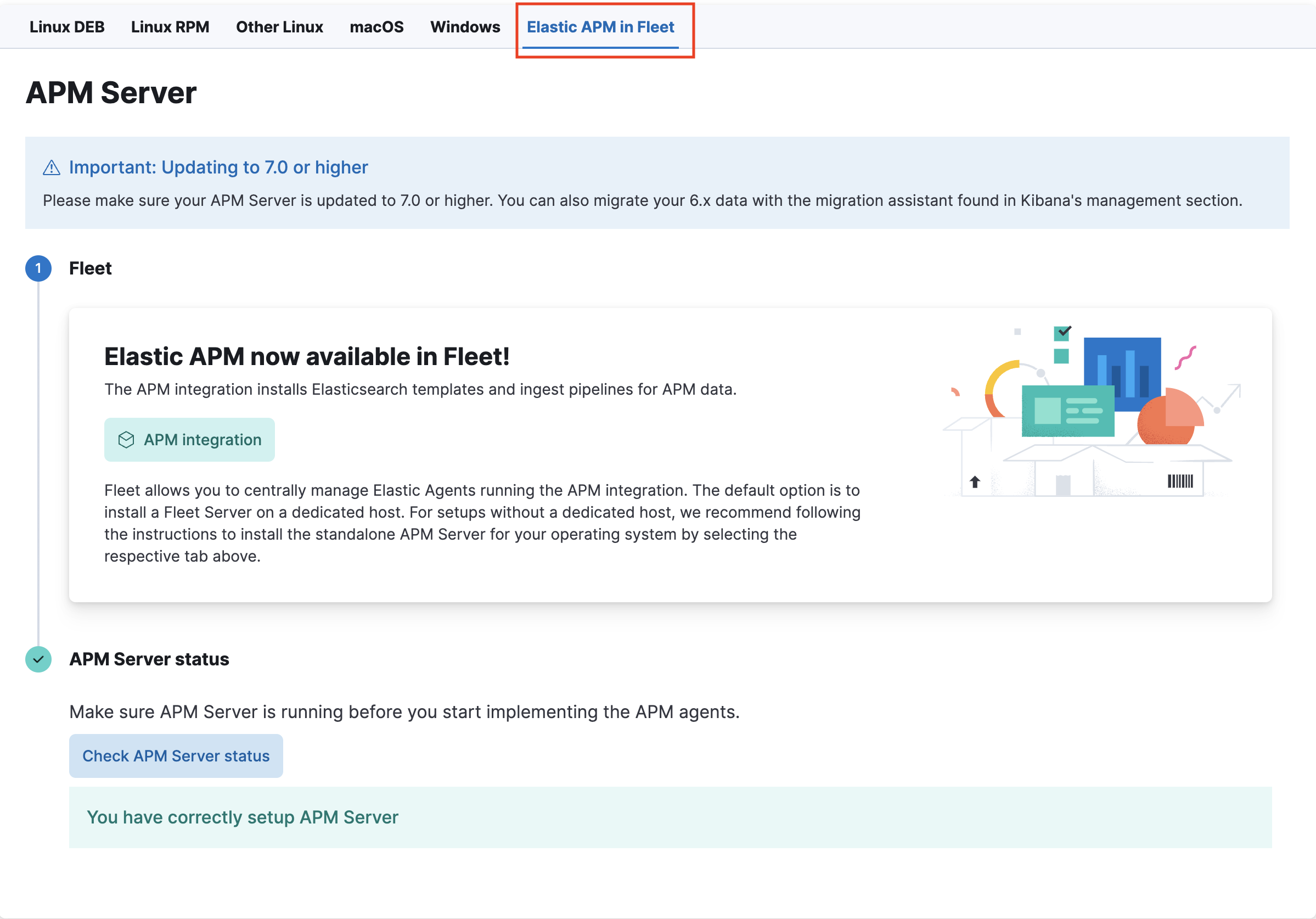
- Select the Elastic APM in Fleet option.
- Depending on your application language, select the corresponding Elastic APM agent. In this example, we are using the Java agent, which also provides a code sample with
secret_tokenandapm_server_url.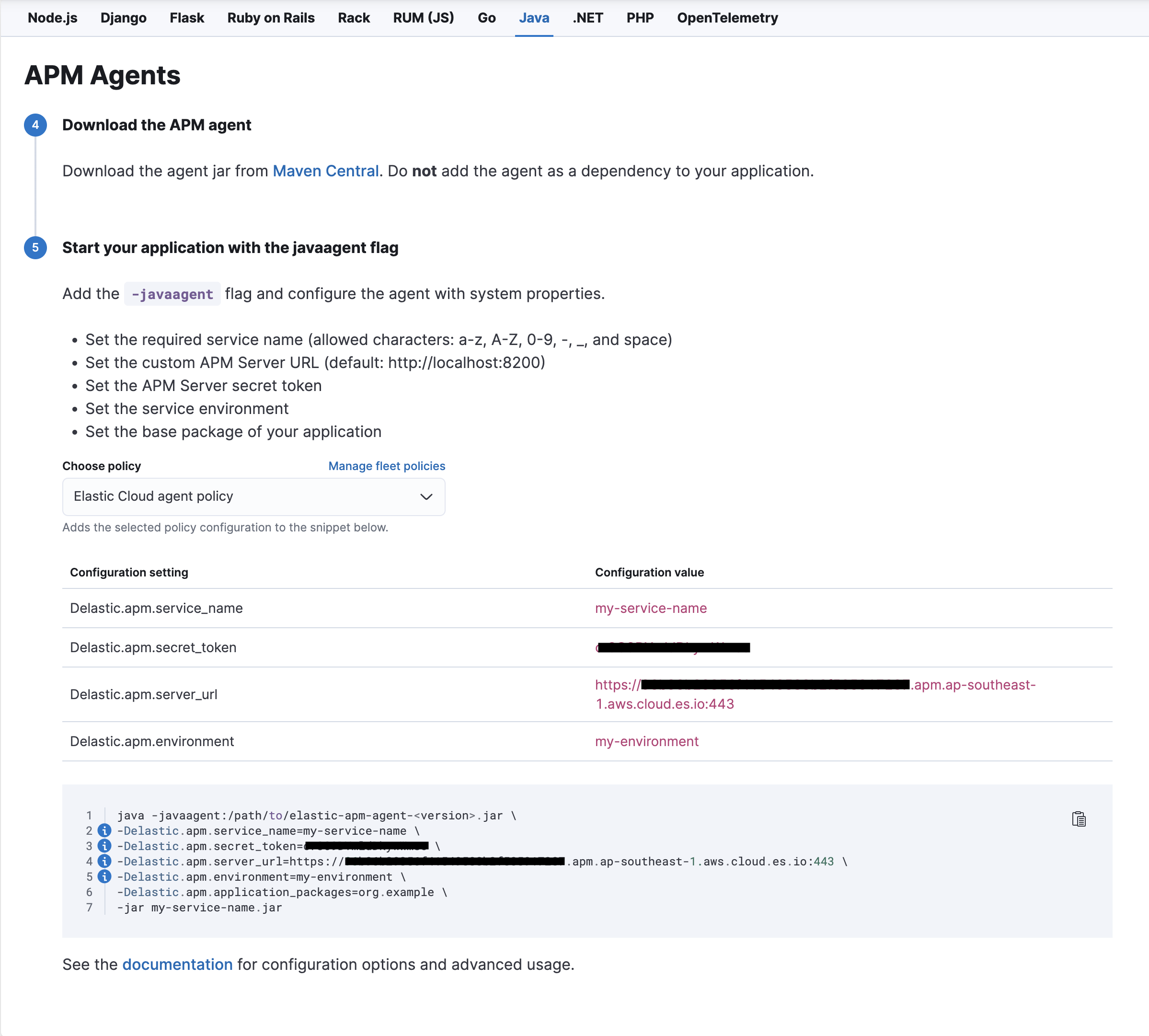
Note: You will need to update the
secret_tokenandapm_server_urlvariables accordingly. Theapm_server_urlshould be your VPCE endpoint, e.g.https://xxxxxxxxxxxxxxxxxx.apm.vpce.ap-southeast-1.aws.elastic-cloud.com:443.- Download the Elastic APM agent jar file from Maven central. Select the version accordingly.
- From a Terminal window, add the JVM
-javaagentflag when starting your application. Note that different application servers have different ways of setting the-javaagentflag and system properties.-javaagent:/path/to/elastic-apm-agent-<version>.jar - To configure the Elastic APM agent using system properties, use the -D prefix.
Note that the Elastic documentation illustrates the programmatical instrumentation of Java code.java -javaagent:/path/to/elastic-apm-agent-<version>.jar \ -Delastic.apm.service_name=my-service-name \ -Delastic.apm.secret_token=xxxxxxxxxxxxxxxxxx \ -Delastic.apm.server_url=https://xxxxxxxxxxxxxxxxxx.apm.ap-southeast-1.aws.cloud.es.io:443 \ -Delastic.apm.environment=my-environment \ -Delastic.apm.application_packages=org.example \ -jar my-service-name.jar - Once you have completed the configuration, the application performance data can be accessed in Kibana, under Observability > APM > Services.
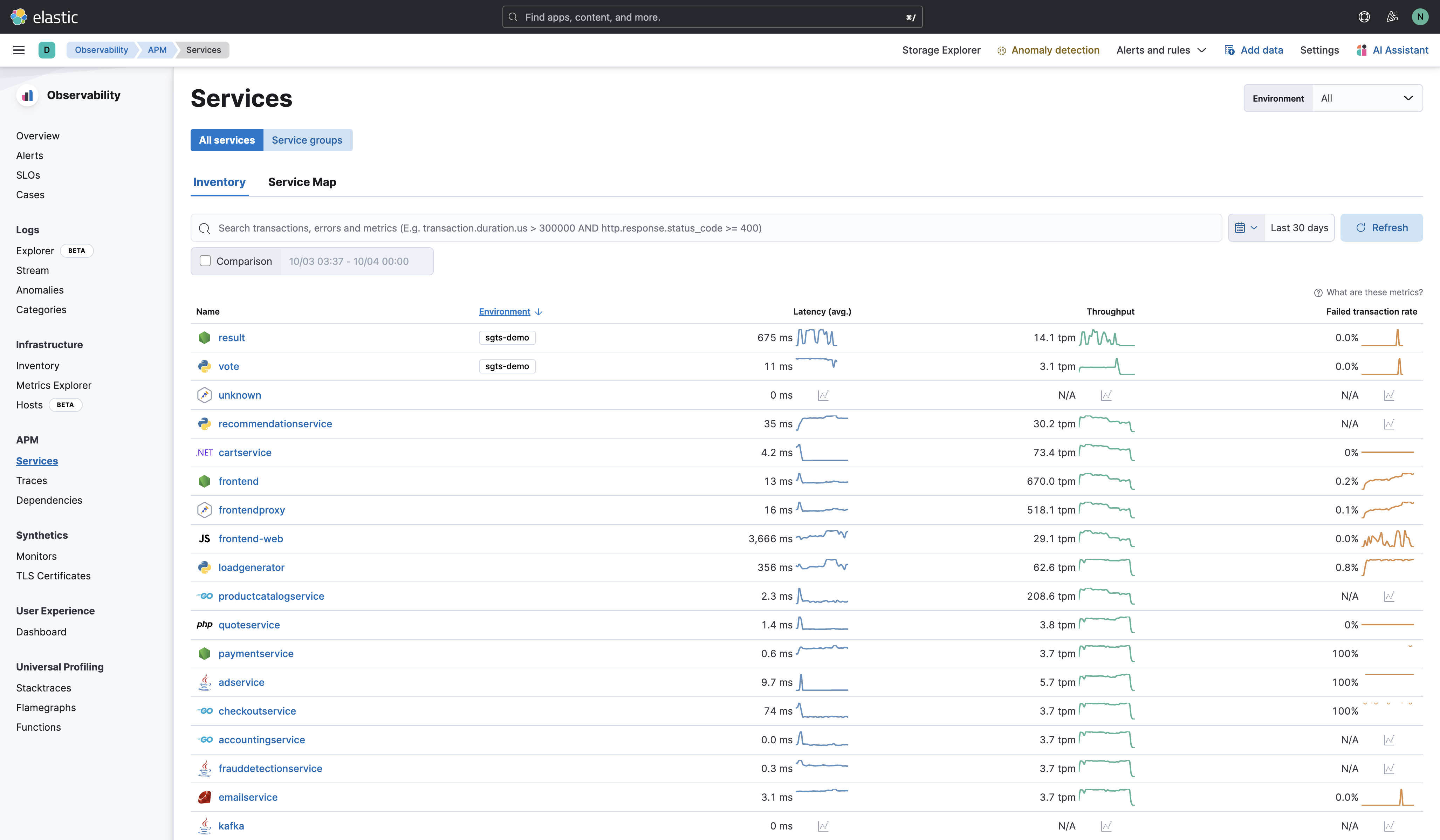
The Elastic APM agent provides extensive auto instrumentation for popular languages, frameworks, and libraries. The supported technologies are available here.
In situations where the auto instrumentation does not cover a specific part of your application or if you need more granular control over the monitoring of certain code paths, manual instrumentation is required.- Service name: The APM integration maps an instrumented service’s name (defined in each APM agent’s configuration) to the index that its data is stored in Elasticsearch. Service names are case-insensitive and must be unique. For example, you cannot have a service named
