OpenTelemetry (OTel) agent
OpenTelemetry’s mission is to enable effective observability by making high-quality, portable telemetry ubiquitous. Refer here for OpenTelemetry’s mission, vision, and values.
OpenTelemetry supports observability by following two key principles:
- You own the data that you generate. There’s no vendor lock-in.
- You only have to learn a single set of APIs and conventions.
OTel is an observability framework and toolkit designed to generate, collect, manage, and export telemetry data in a standardised manner. OTel uses OpenTelemetry protocol (OTLP), which is a set of rules, conventions, and standards that stipulate how telemetry data is exchanged, ensuring telemetry data is encrypted for transmission reliably with high throughput. Additionally, OTLP is natively supported by the Elastic Stack. This means that if you are using an OTel agent or collector, your application’s trace data or metrics can be sent directly to the Elastic Stack.
With OTel, you can instrument applications using a standard telemetry format, integrate various OTel libraries into your applications and infrastructure, as well as leverage its user experience monitoring tools to adapt your observability solution.
Refer to the OTel documentation for more information.
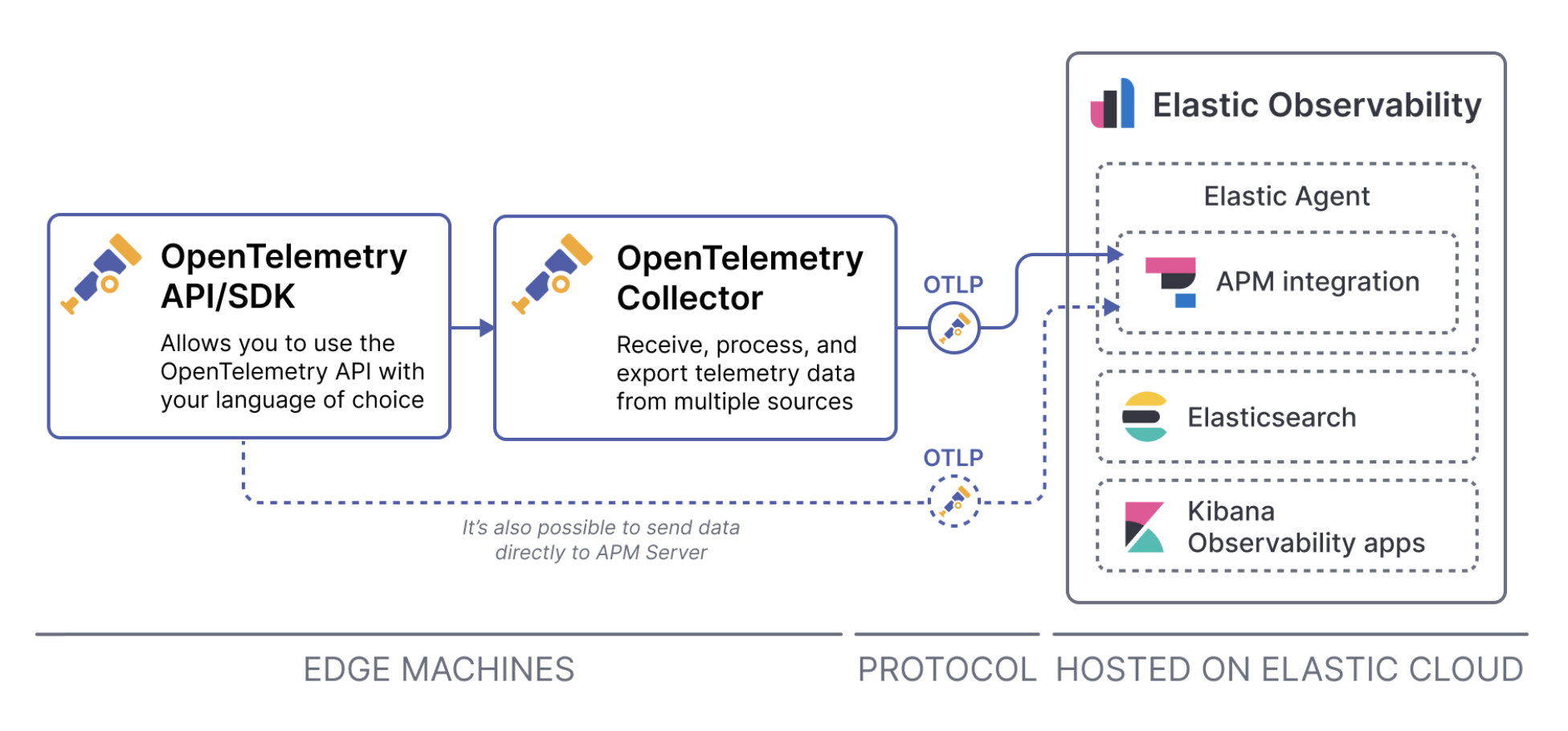
OTel components
OpenTelemetry consists of three components: agents, collectors, and exporters. Click on each tab to find out more.
The role of the agent is to ensure proper instrumentation of the target application. It literally sits in the application layer and in some cases, some programming languages offer automatic instrumentation using specialised agents, whereas other programming languages may need to include the instrumentation manually. Regardless, it is the layer that captures the telemetry data needed for observability which are logs, metrics, and traces.
The automatic OTel instrumentation comes with pre-defined out-of-the-box modules for frameworks and libraries, which simplifies the setup and maintenance of OTel within your application. If you prefer more control over how OTel is instrumented or require additional modules to your existing setup, you can opt for manual instrumentation.
To understand more about automatic (zero-code) or manual (code-based) instrumentation, read the OpenTelemetry documentation.
The collector, as the name implies, collects telemetry data from the instrumented apps and its unique responsibility is to decouple the agent from the destination (StackOps Elastic). The purpose of the collector is to relieve loading on the application by performing buffering/queuing of telemetry data before sending to the destination.
Collectors don’t need to be implemented manually. The OpenTelemetry project provides a ready to be used OTel collector that is fast, scalable, and customisable. You can further customise the collector to include different receivers, processors, extensions, and exporters.
To learn more about OTel collectors, refer to the OpenTelemetry documentation.
The communication between the collector and the backend/destination is implemented using the concept of exporters. As the name implies, exporters know how to export the collected data to a destination, and the collector allows multiple exporters to be used at the same time. This means that your collected data can be sent to both Elastic APM Server and any other tracing system.
The list of supported exporters are available here.
Instrumenting OTel for Java
OTel supports instrumentation for multiple languages and you can select the language API and SDK suitable for your application.
In this guide, we focus on instrumentating for Java.
From the opentelemetry-java-instrumentation repository, download the
opentelemetry-javaagent.jar, which contains the OTel agent and relevant instrumentation libraries. You can place the JAR file in your preferred directory.Open a Terminal window and run either one of these commands:
Include the OTel attributes directly in the startup command:
java -javaagent:/path/to/opentelemetry-javaagent.jar \ -Dotel.service.name=my-java-app \ -Dotel.traces.exporter=otlp \ -Dotel.exporter.otlp.endpoint=<ELASTIC_APM_SERVER_URL> \ -Dotel.exporter.otlp.headers="Authorization=Bearer <your-api-token>" \ -jar my-java-app.jarExport OTel settings as environment variables:
export OTEL_EXPORTER_OTLP_ENDPOINT=<ELASTIC_APM_SERVER_URL> export OTEL_EXPORTER_OTLP_HEADERS=Authorization=Bearer <your-api-token> export JAVA_TOOL_OPTIONS="-javaagent:path/to/opentelemetry-javaagent.jar" export OTEL_SERVICE_NAME="your-service-name" java -jar myapp.jarNote: Change
your-service-nameandmyapp.jaraccordingly.
The Elastic APM server URL and secret token can be obtained here:
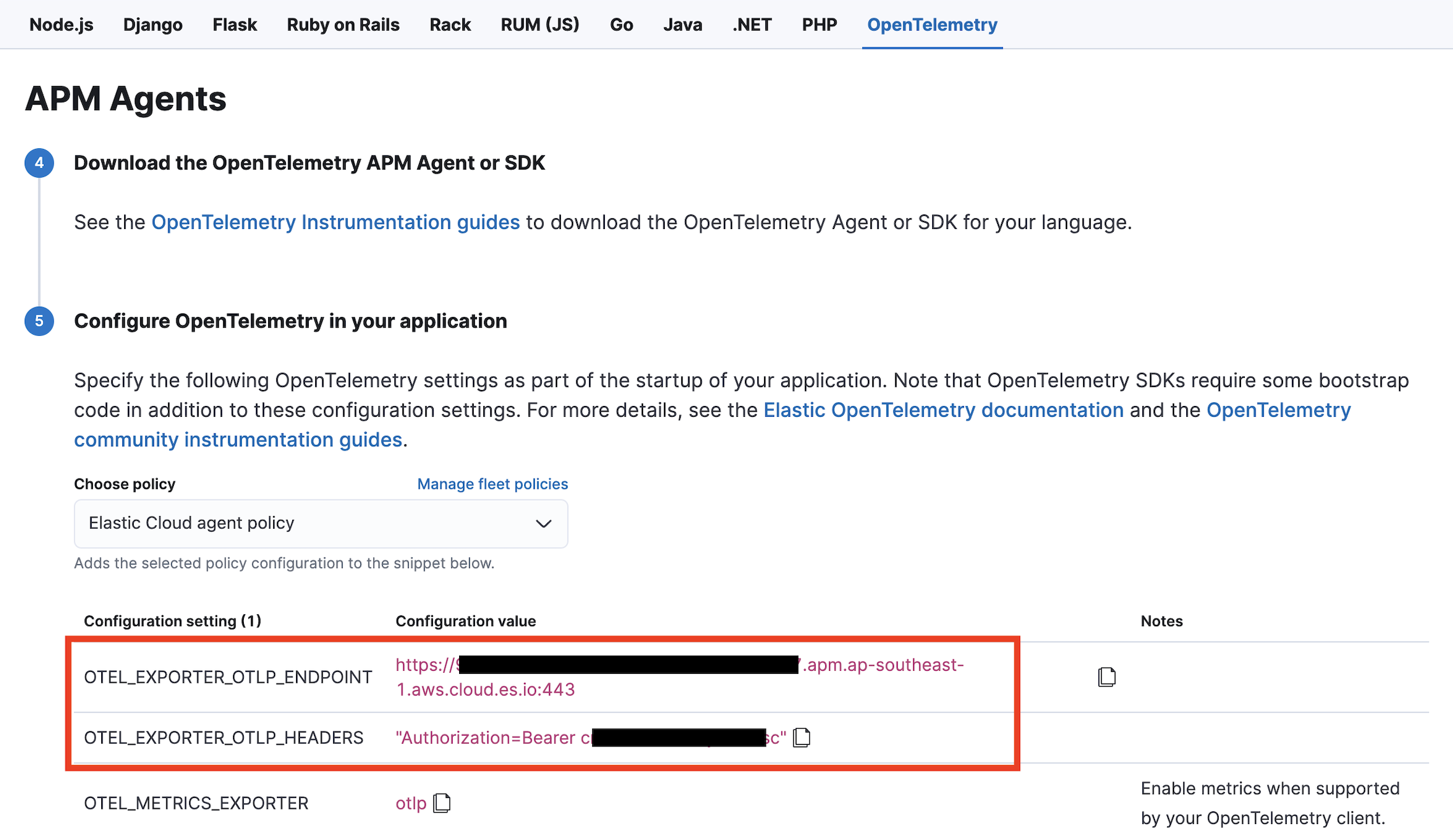
Note: You will need to update the your-api-token and ELASTIC_APM_SERVER_URL variables accordingly. The ELASTIC_APM_SERVER_URL should be your VPCE endpoint, e.g. https://xxxxxxxxxxxxxxxxxx.apm.vpce.ap-southeast-1.aws.elastic-cloud.com:443.
(Optional) Set up OTel collector
Install the OTel collector by referring to How to install collector.
For manual Linux installation, run these commands to download the file containing the binary and install it on your machine:
curl --proto '=https' --tlsv1.2 -fOL https://github.com/open-telemetry/opentelemetry-collector-releases/releases/download/v0.100.0/otelcol_0.100.0_linux_amd64.tar.gz tar -xvf otelcol_0.100.0_linux_amd64.tar.gzUpdate your project’s
collector.yamlfile with the following configurations to connect your OpenTelemetry collector instances to Elastic:receivers: otlp: protocols: http: endpoint: "localhost:4317" exporters: logging: loglevel: warn otlp/elastic: endpoint: "<ELASTIC_APM_SERVER_URL>" headers: Authorization: "Bearer <ELASTIC_APM_SECRET_TOKEN>" processors: memory_limiter: check_interval: 1s limit_mib: 2000 batch: service: pipelines: traces: receivers: [otlp] exporters: [logging, otlp/elastic] metrics: receivers: [otlp] exporters: [logging, otlp/elastic] logs: receivers: [otlp] exporters: [logging, otlp/elastic]In this option, by default the OTel Java agent uses OTLP exporter configured to send data to OTel collector at
http://localhost:4317.
You can start the application with one of these commands:- Include the OTel attributes directly in the startup command:
java -javaagent:path/to/opentelemetry-javaagent.jar \ -Dotel.resource.attributes=service.name=your-service-name \ -Dotel.traces.exporter=otlp \ -jar myapp.jar - Export OTel settings as environment variables:
export JAVA_TOOL_OPTIONS="-javaagent:path/to/opentelemetry-javaagent.jar" export OTEL_EXPORTER_OTLP_ENDPOINT=http://<otel-collector-url>:4317 export OTEL_SERVICE_NAME="your-service-name" export OTEL_TRACES_EXPORTER=otlp java -jar myapp.jar
- Include the OTel attributes directly in the startup command:
| Component | Description |
|---|---|
| Receivers | Receivers collect telemetry from one or more sources. They can be pull or push based and may support one or more data sources. Receivers are configured in the receivers section. |
| Exporters | Exporters send data to one or more backends or destinations. Exporters typically operate in a push model and support one or more data sources (destinations). |
| Processors | Processors take the data collected by receivers and modify or transform it before sending it to the exporters. Data processing happens according to rules or settings defined for each processor, which might include filtering, dropping, renaming, or recalculating telemetry, among other operations. |
| Service | The service section is used to configure what components are enabled in the collector based on the configuration found in the receivers, processors, exporters, and extensions sections. If a component is configured, but not defined within the service section, then it’s not enabled. The service section consists of three subsections:
|
