Cross-cluster capabilities
Cross-cluster search and cross-cluster replication are the cross-cluster capabilities used with distributed Elasticsearch clusters or deployments. These enable to achieve unified search capabilities and data replication across StackOps Elastic subscriptions within the same or different organizations.
Cross-cluster search (CCS): This feature allows authorized agency users (those with permission to read the data) to perform federated search across systems hosted on multiple Elasticsearch clusters or deployments across StackOps subscriptions within the same or different organizations.
Cross-cluster replication (CCR): This feature allows authorized agency users to replicate indices from one Elasticsearch cluster across StackOps subscriptions within the same or different organizations in near real-time. This feature is useful for various use cases, such as Dependency monitoring.
For other use cases related to cross-cluster capabilities, refer to our use cases section.
Benefits
| Benefits of CCS | Benefits of CCR |
|---|---|
| Aggregation of data: Performs federated search on various sources to create a centralized dashboard for monitoring purposes. | Ensure search continuity: Ensures that search requests can still be handled even if one cloud provider experiences an outage or becomes unreachable by replicating indices across clusters in other cloud provider. This improves system resilience and ensures uninterrupted access to data for users. |
| Manage resource efficiently: Offloads search-intensive operations to individual clusters while focusing on centralized aggregation to enhance overall performance. | Prevent search volume from impacting indexing throughput: Replication of indices across clusters helps to distribute search workload, preventing it from overwhelming indexing operations. This ensures that indexing throughput remains unaffected even during periods of high search volume, maintaining overall system performance and responsiveness. |
| Data Segregation and Access Flexibility: Promotes data segregation and maintains flexibility in access across different sources. | Data ownership: Allows you to replicate the required indices from multiple source clusters or deployments (leader cluster) and retain them on the destination clusters (follower cluster). This provides a way to have backups of data in your cluster and manipulate them locally even if the source cluster deletes the data. |
Use cases
Centralized dashboards
CCS allows you to create centralized dashboards that monitor multiple projects hosted on various Elastic deployments or clusters. You can aggregate and visualize data from different sources in a single dashboard.
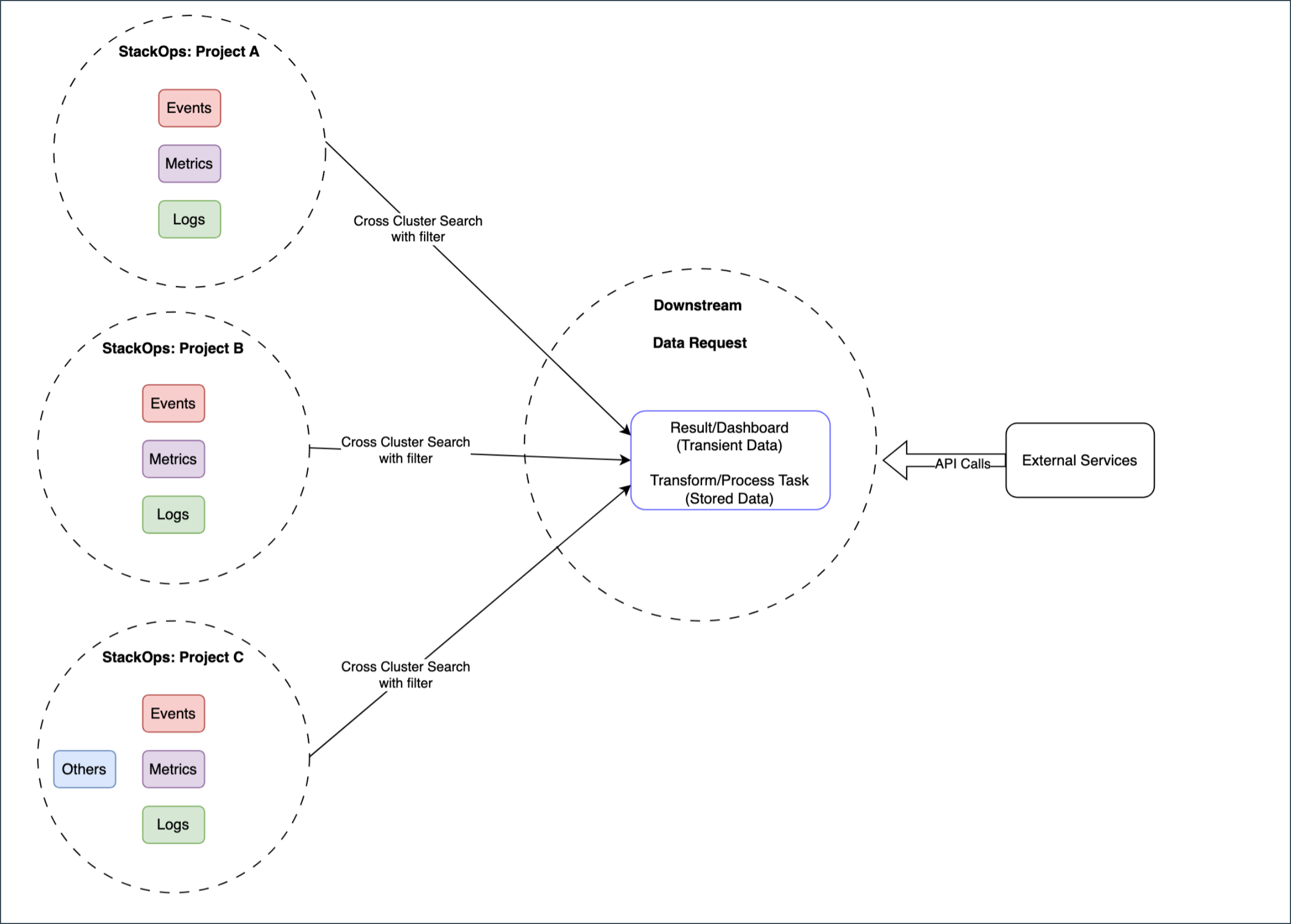
The diagram illustrates three distinct projects:
- StackOps: Project A
- StackOps: Project B
- StackOps: Project C
These projects are hosted on different Elastic clusters or deployments.
Each project hosts various types of data, including events, metrics, and logs. CCS acts as the bridge connecting these projects. By using CCS, authorized users can query data from these projects seamlessly.
Based on the filter conditions, CCS fetches the required data from these projects and aggregates them.
The projects must be up and running to query them.
In the Downstream process, the following key tasks occur:
Data Request: Real-time queries are made to the aggregated data. This results in the creation of a Result/Dashboard providing a centralized view of data across all projects. You can monitor events, metrics, and logs from a single interface.
Transform/Process Task: Processed data is stored for future reference.
The API Calls extending from the Downstream process, signifies that downstream cluster can integrate with External Services or platforms.
Dependency monitoring
By using cross-cluster search (CCS) and cross-cluster replication (CCR), you can track dependencies between projects and other applications. This helps ensure smooth operations and efficient troubleshooting.
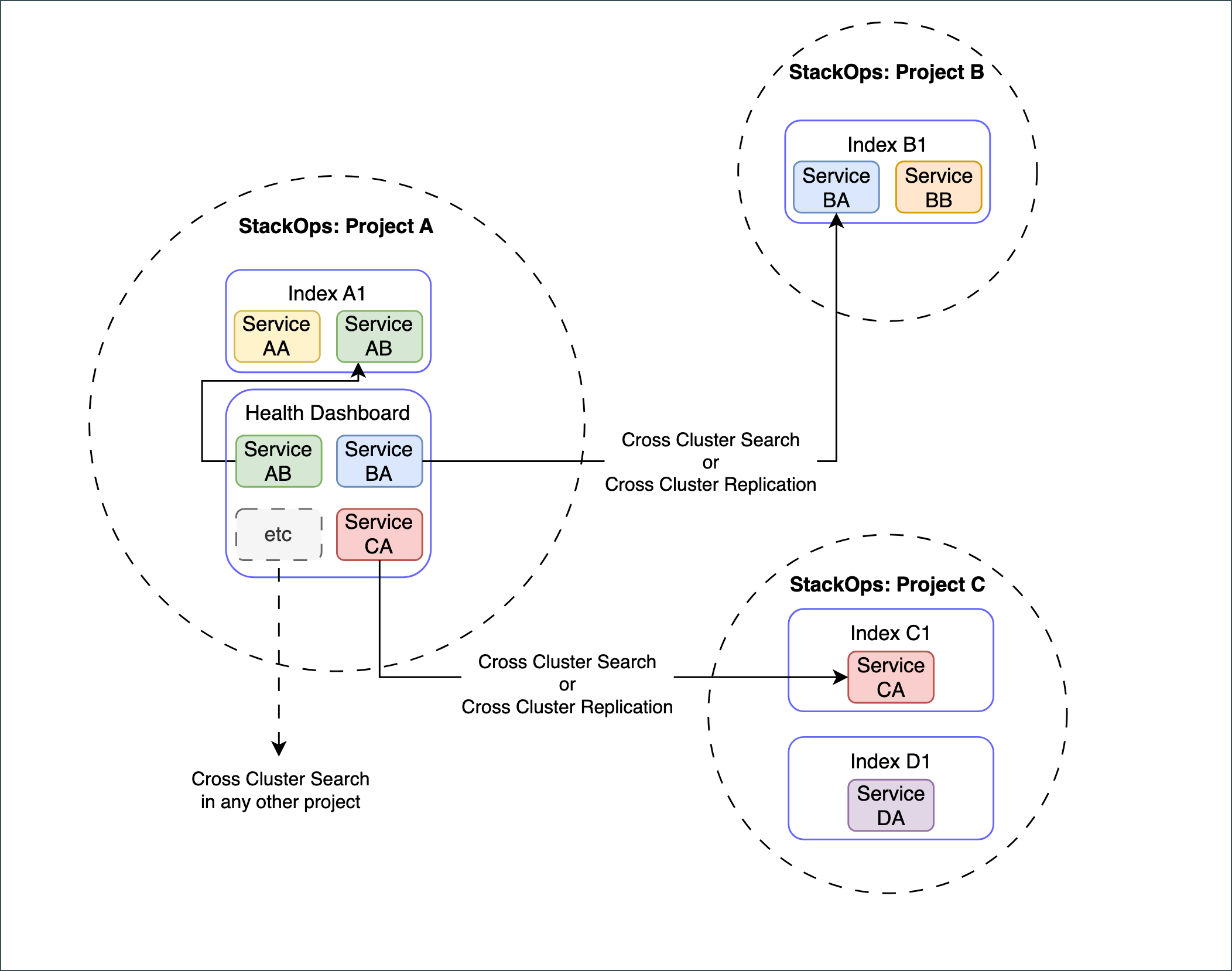
The diagram illustrates three distinct projects:
- StackOps: Project A
- StackOps: Project B
- StackOps: Project C
These projects are hosted on different Elastic clusters or deployments.
Each project hosts various types of data, including events, metrics, and logs. CCS acts as the bridge connecting these projects. By using CCS, you can query data from these projects and aggregate the data.
The projects must be up and running to query them.
In this use case, from the aggregated data you can see how Project A’s metrics impact Project B or how events in Project C relate to other applications. Understanding these dependencies enhances system reliability and troubleshooting.
Data ownership
By using cross-cluster replication (CCR), you can replicate the data and retain it as long as you require by managing your configurations such as data retention policy.
This helps ensure data availability, redundancy, and efficient access across clusters.
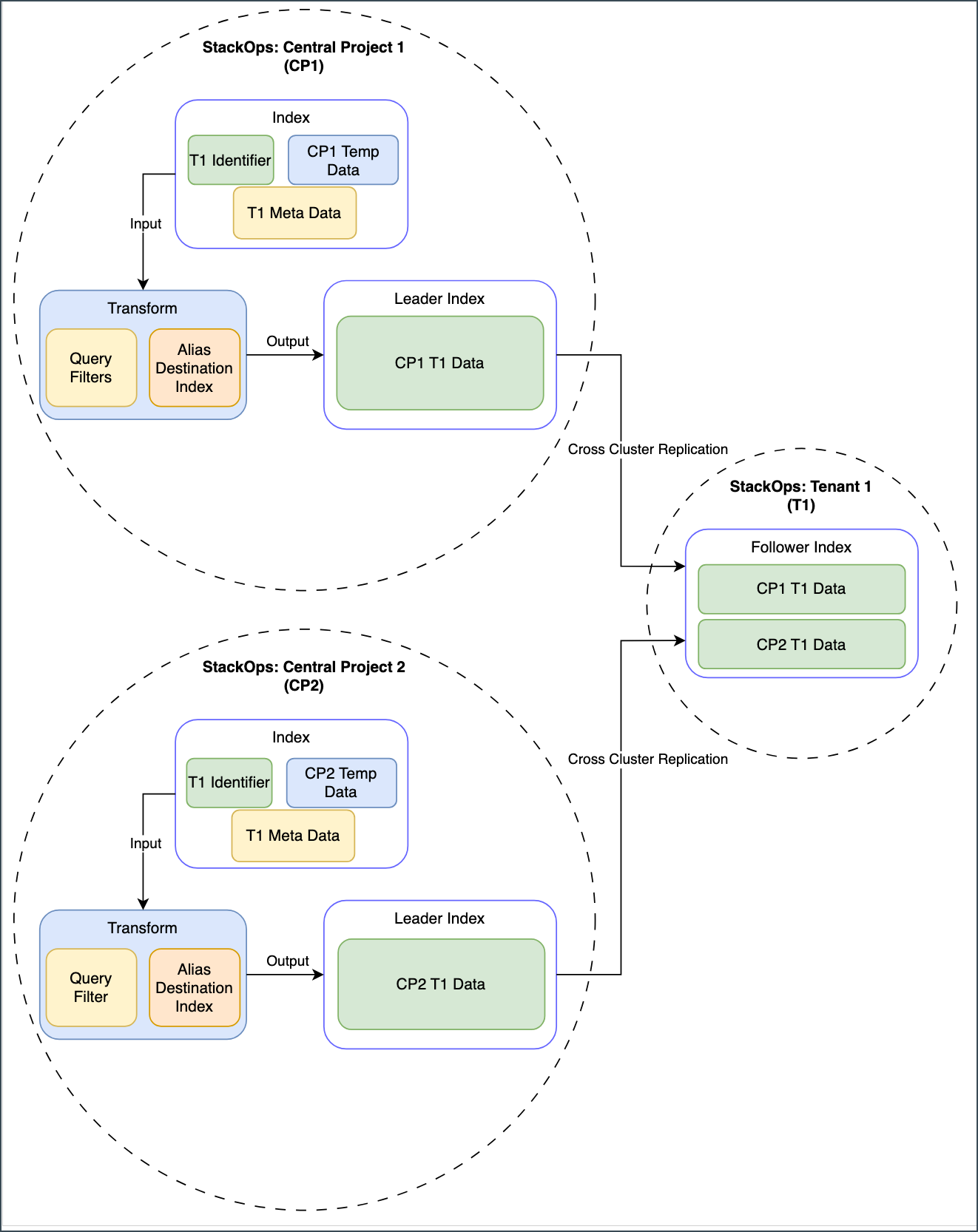
The diagram illustrates three distinct projects:
- StackOps: Central Project 1 (CP1)
- StackOps: Central Project 2 (CP2) and
- StackOps: Tenant 1 (T1)
The projects must be up and running to query them.
The first two projects produce the original data. Tenant 1 replicates a copy of the original data from the first two projects into their own cluster.
Each central project receives input data such as logs, events, or any other relevant information. The input data is specific to its context.
The input data is then indexed within the central project. While indexing, the data is transformed, enriched, and structured. The indexed data is stored within each central project.
As CCR configuration is setup, the indices are labeled as the leader based on a naming pattern allowing StackOps: Tenant 1 (T1) to replicate them from the central projects .
The replicated data is stored as indices in Tenant 1’s cluster with the follower label ensuring access for authorised StackOps Elastic users. Within this cluster, users have the flexibility to configure data retention policies, allowing them to retain data even after it’s been deleted from the central projects.
Configure cross-cluster search and cross-cluster replication
Users who are the system owners or who have the approval emails from the respective system owners to access (read and replicate) their data can submit a support request with the following details for CCS and CCR configuration.
| Details required for CCS | Details required for CCR |
|---|---|
| Which deployments are involved? 1. Which cluster will be the remote cluster that is hosting the data to be searched? 2. Which cluster will serve as the local cluster performing the search? |
What are the deployments involved? 1. Which clusters will be the leader cluster(s)? a. What data needs to be replicated to the follower cluster(s)? b. Is the data to be replicated available in a single index or a pattern of indices? c. Does the data need to be sanitized with transformation? (This may be necessary if follower cluster(s) need to replicate ONLY some data.) d. Is the data managed by an ILM policy with rollover? e. Base on (1c) & (1d): i. If data undergoes transformation, use alias rollover ii. If data undergoes any other process, use data stream rollover 2. Which clusters will be the follower cluster(s)? - a. Does the follower cluster(s) need to replicate ONLY specific data that is identified? i. Leader cluster should setup transformation to output only subset of data as specified in (1c) b. Base on (1b): i. If the data originates from a dataset with a different naming convention, use Add follower index method. - ii. If data comes from dataset with a common naming convention, use Add auto-follow pattern method. iii. For cases involving a combination of (i) and (ii), use a combination of both the methods. |
| Specify any restrictions you want on what are the Searchable Indices? For example: - Admin User can search “All data”. - Normal User can only search “Partial data”. |
NA |
Limitations
CCS limitations
CCS might take longer than expected for a few reasons:
Resources on the CCS cluster: If the cluster where you start the search doesn’t have enough resources, it might slow down the process.
Number of clusters: If you’re searching across multiple clusters, it could take more time to gather all the results.
Amount of data retrieved: The more documents (hits) you’re trying to find, the longer it might take to collect them.
Type of query: Some types of searches might take longer depending on what you’re looking for.
Version compatibility between the source and destination clusters: Ensure the deployment version of the source cluster is either the same or lower than that on the destination cluster.
CCR limitations
CCR might take longer than expected for a few reasons:
Resources in both clusters: Both the main cluster (the leader) and the cluster being copied to (the follower) need to have enough resources. If either one is lacking, it can slow things down.
Amount of data to be copied: The more data there is to copy, the more time it will take to replicate it.
Version compatibility between the source and destination clusters: Ensure the deployment version on the source cluster is either the same or lower than that on the destination cluster.
Data filtering: CCR replicates data on write and does not have filtering capabilities.
Additional resources
- The links to Elastic documentation may not match your Elastic deployment version. For accurate information, check and select the right documentation for your version.
- For other external documentation, always refer to the latest version provided to ensure up-to-date information.
For more information on CCS, refer to Elastic Documentation on CCS.
For more information on CCR, refer to Elastic Documentation on CCR.
For more information on CCR limitations, refer to Elastic documentation on CCR limitations.
For detailed information on the versions compatible with CCS and CCR configurations, refer to Elastic documentation:
