Upgrade your deployment or cluster
This document provides an overview of the Elasticsearch versions supported by StackOps and guidance on upgrading your existing deployments or clusters.
Audience
This guide is intended for StackOps Elastic users who want to upgrade their deployments or clusters.
Supported Elasticsearch versions
When creating a new deployment or cluster in the Console Portal, only supported Elasticsearch versions are available for selection. Currently, StackOps supports the following versions of Elasticsearch:
- 8.19.x (recommended version)
The supported versions are subject to change as we continue to test compatibility with newer versions for StackOps users.Check this page periodically for updates on supported Elasticsearch versions.
Version management
StackOps evaluates and provides baseline configurations on top of Elastic, requiring thorough testing to ensure security and compliance.
- Release cycle is targeted at twice per year, aligned with Elastic version releases.
- Future transition to Serverless will eliminate version management needs.
Note: Serverless is currently not StackOps-ready as its features are not on par with current Elastic Cloud Hosted capabilities.
Required updates for CVEs
To address potential CVEs that require a deployment version upgrade, we work closely with Elastic. We actively monitor and evaluate vulnerabilities, and for those applicable to our systems, we either apply a patch or plan a version upgrade in collaboration with tenants.
If an immediate upgrade isn’t possible, we seek and implement temporary workarounds to mitigate the risk. We also apply backfills when necessary to address any data integrity or security issues that arose before the fix. Our collaborative and systematic process ensures our deployments remain secure and stable against evolving threats.
Why should you upgrade?
Upgrade your deployments to the minimum supported version or recommended version of Elasticsearch to ensure optimal stability and performance.
Using an outdated version will negatively impact your StackOps Elastic experience. You will not be able to access features and capabilities like:
- Cross-cluster search (CCS): Old versions will lack Stack monitoring capabilities as it impacts data sharing in the StackOps central monitoring cluster.
- Cross-cluster replication (CCR): Metadata meant for data enhancement will fail to be pushed down from StackOps Elastic with CCR. - Additionally, the data pipeline used to enhance data for WoG data integration will fail if you do not upgrade your Elasticsearch version.
If you don’t upgrade to the minimum supported version, you will not be able to use the Stack Monitoring and Data Sharing features.
To know about the key features available when you upgrade to the recommended version, refer to StackOps Elastic versions key features.
Downtime during upgrades
- Elasticsearch upgrade will not incur downtime due to rolling updates.
- This applies to deployments with hot/warm/cold nodes in more than one availability zone.
- Deployments with nodes in only one zone may experience downtime during these operations.
- Kibana will incur downtime, due to data migration.
- Intermittent access to Kibana may be experienced.
Refer to Elastic documentation for more information.
Breaking changes after upgrades
- Major version upgrades will incur breaking changes.
- Minor version upgrades may potentially incur breaking changes.
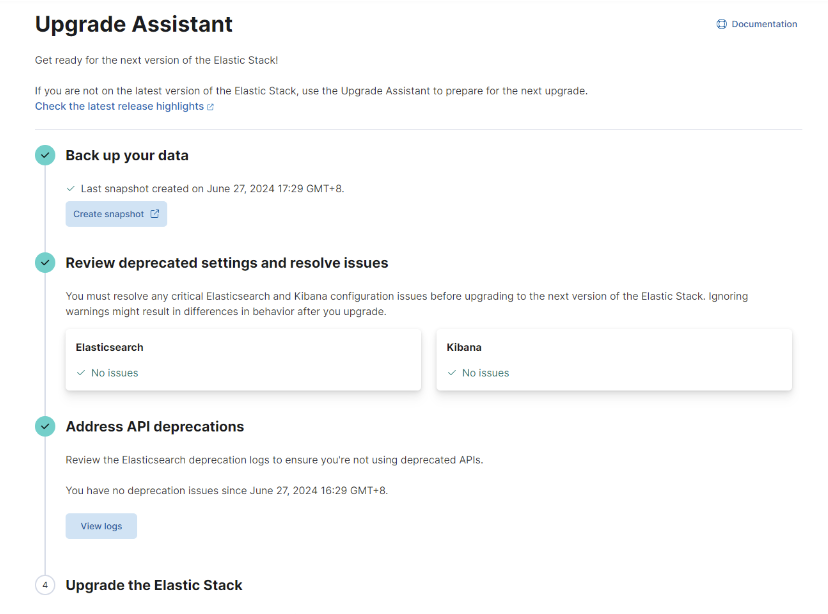
- The Upgrade Assistant must be run before the upgrade is performed.
Upgrade deployment/cluster to a supported version
Before upgrading your StackOps Elastic deployment, you must run the Upgrade Assistant and resolve any critical issues. StackOps team will remind you two days before your upgrade appointment.
Note that your upgrade can only proceed if you run the Upgrade Assistant successfully (with no errors).
Additional resources:
Option 1: Self-upgrade deployment via Console
If an upgrade is available for your deployment, you can perform a self-service upgrade directly in the Console portal.
Important: Self-service upgrade is supported only from v8.12 onwards. You can raise an SR to request for deployment upgrade if you are unable to perform the self-service upgrade.
Option 2: Request for deployment upgrade via SR
- Go to StackOps Service Desk and click Raise a SR. You should only raise 1 SR for 1 deployment.
- Fill in the following details:
Field Description Summary Briefly describe your upgrade request. Description Provide more details like Subscription Account Name or ID. Stackops SR category Select Elastic Search. StackOps SR Sub Category Select Upgrade Elastic Deployment. Account Short Name Note: You can locate your account short name by logging in to the Console portal, from the sidebar, click Subscription Accounts, Select the required account, Click ACCOUNT DETAILStab and the account short name would be indicated in the Account section.Resource Optional. Provide the resource name. Deployment Name/Kibana URL Specify your deployment name for the upgrade or share the Kibana URL. Current Elastic Version Specify the current Elastic version for your StackOps Elastic deployment. Upgrade Version Provide the specific Elastic version for this upgrade. Refer to Supported versions. Preferred date/time The SR must be raised at least 3 working days in advance and this upgrade can only be done during working hours (weekdays 10AM to 4PM). Reporting agency Specify the agency you belong to. Environment Select from the following options: Production, Staging, QA/UAT/DEV, Production and Staging, or ALL.
Important: You should request to upgrade non-prod deployment first. After successfully upgrading with no major issues in 1 week, you can raise the request for prod deployment upgrades.Attachments Optional. - Click Create. The StackOps support team will process your request and keep you updated on the status.
StackOps Elastic versions key features
Version 8.19
Elasticsearch version 8.19 is now available for provisioning. From 30 Sep 2025, you can raise an upgrade request to move to this version.
This table shows some of the key features that are available when you upgrade to Elasticsearch version 8.19:
| Feature | Description |
|---|---|
| Navigation updates | Updated left-menu navigation for a mores streamlined experience. |
| LogsDB index mode | Reduces log data storage by up to 65% with logsdb index mode and custom routing on sort fields. |
| Improved Kibana performance | Kibana performance boosted by up to 42%. |
| ZSTD compression type | By default, logsdb index mode applies ZSTD compression to stored fields. |
| OpenTelemetry (OTel) | - OOTB OTel with Kubernetes - Elastic Distribution of OTel - Tracing OpenAI apps |
| ES|QL | - Cross-Cluster Search - Lookup joins - Statistical analysis functions - Auto-complete |
| Discover | - Logs contextualisation - Contextual data presentation - Logs analysis with patterns |
| Host feature | Faster detection and remediation of host issues. |
| Inventory detection from logs | Identify inventory from logs and correlate with services. |
| Improved alert configs on Synthetics | Enhanced control over alert customisation for synthetic monitoring |
| MFA support for Synthetics journeys | Multifactor authentication (MFA) support to make secure testing of protected applications easier. |
| AI | - AI Assistant for Search - Custom knowledge source - AI observability and auditing |
| Import data from PDF | Upload data from PDF files and head to Search Playground with one click. |
| Wolfi Containers | Reduces CVEs in Elastic container images. |
| Customising default SIEM rules | Update built-in SIEM rules without overwriting custom changes. |
| Space-aware fleet configuration | Use Kibana spaces to manage Agent policies and integrations per space. Combined with granular user roles, this feature enables true role-based access control for Elastic Agent management. |
Version 8.15.x
- StackOps will be upgrading the central data Elastic to version 8.11.4.
- For a complete list of features that are available or deprecated for the supported versions, refer to corresponding Elastic Release notes.
This table shows some of the key features that are available when you upgrade your deployment/cluster to Elasticsearch version 8.15.x.
| Features | Description |
|---|---|
| ES|QL goes GA | ES|QL delivers advanced search using simple and familiar query syntax with concurrent processing, enhancing speed and efficiency regardless of the data source and structure. |
| Tech Preview | - OTel Collector for host, supported within Agent: (From 8.15) The Elastic Distribution for OpenTelemetry Collector is now in public technical preview offering a seamless solution for collecting logs and analysing host health. - Elastic Agent unpriviledge mode: This functionality is in technical preview and may be changed or removed in a future release. Elastic will work to fix any issues, but features in technical preview are not subject to the support SLA of official GA features. You can now run agents in an unprivileged mode that does not require root access on Linux or macOS, or admin access on Windows. |
| Kibana Dashboards and Discover enhancements | (From 8.15) Multiple improvements on Dashboards and Discover capabilities. |
| Links panel for dashboards | (From 8.14) You can now easily navigate from one dashboard to another using the links panel. Organise your dashboards better and make them more performant by chunking them in multiple dashboards with fewer visualisations and linking them together. |
| AI Assistant screen aware and AWS Bedrock support | (From 8.13) Enjoy enhanced features like: - AWS Bedrock support - Entry point contextual awareness |
| Google Vertex AI support - Gemini | (From 8.15) Google Vertex AI support with Gemini. |
| AIOps log pattern analysis | (From 8.14) Log pattern analysis enables faster and smarter investigation across thousands of log messages in order to analyse, troubleshoot, and identify the root cause of an incident. Combine it with anomaly detection and our other AIOps features to drastically reduce the MTTR. |
| Cross-cluster search improvements | (From 8.15) Multiple improvements available such as partial results reducing errors on central clusters. |
| Custom threshold alerting rule | (From 8.15) You can create and manage custom rules for threshold alerting, which addresses limitations with metrics and logs. |
| Enhanced features for SLO | - SLO management improvement: (From 8.13) Improved capabilites on SLO management like grouping and filtering SLOs and triaging burn rate alerts. - SLO burn rate alert dependency notification: (From 8.14) You can set up the SLO burn rate alerts to suspend the notification of burn rate alerts if there is a dependent service that is the root cause. - Cross cluster SLO management: (From 8.14) Centralise your SLOs visibility across multiple Elastic deployments. |
| Rules enhancements | - Rules management improvements: (From 8.13) Simpler to comprehend rule changes with the addition of a per-field comparison feature for Elastic prebuilt rules update. - Detection rules automation: (From 8.13) Teams can now configure additional native endpoint response actions via Elastic Defend integration to execute with their detection rules. These actions are automatically executed when a threat is detected. |
| New synthetics SLI configuration | (From 8.14) Convert your Elastic Synthetic monitors to availability SLOs with the same options that were used to set up the monitor. |
| Universal Profiling support for .NET | (From 8.14) Universal Profiling for .NET will now be supported alongside all major languages like PHP, Python, Java (or any JVM language), Go, Rust, C/C++, Node.js/V8, Ruby, Perl, and Zig. |
| Container views | New Container view is available under observability interface. |
| Agent global log level management | Simplifies configurations of agents log levels with Fleet policies instead of individual agent. |
