StackOps Elastic architecture
StackOps Elastic enables agencies to monitor their systems regardless of where they reside, Government on Commercial Cloud (GCC) or on-premise. Learn more about the connectivity patterns, monitoring components, storage layers, and other key architectural elements for both cloud and on-premise setups.
Reference architecture diagrams
The following reference diagrams outline how data is collected from the tenant’s environment, securely transmitted, and processed within the StackOps Elastic platform for monitoring and analysis.
The cloud architecture diagram illustrates two distinct environments: the tenant’s workload in GCC (AWS or Azure) and the StackOps Elastic Cloud deployment.
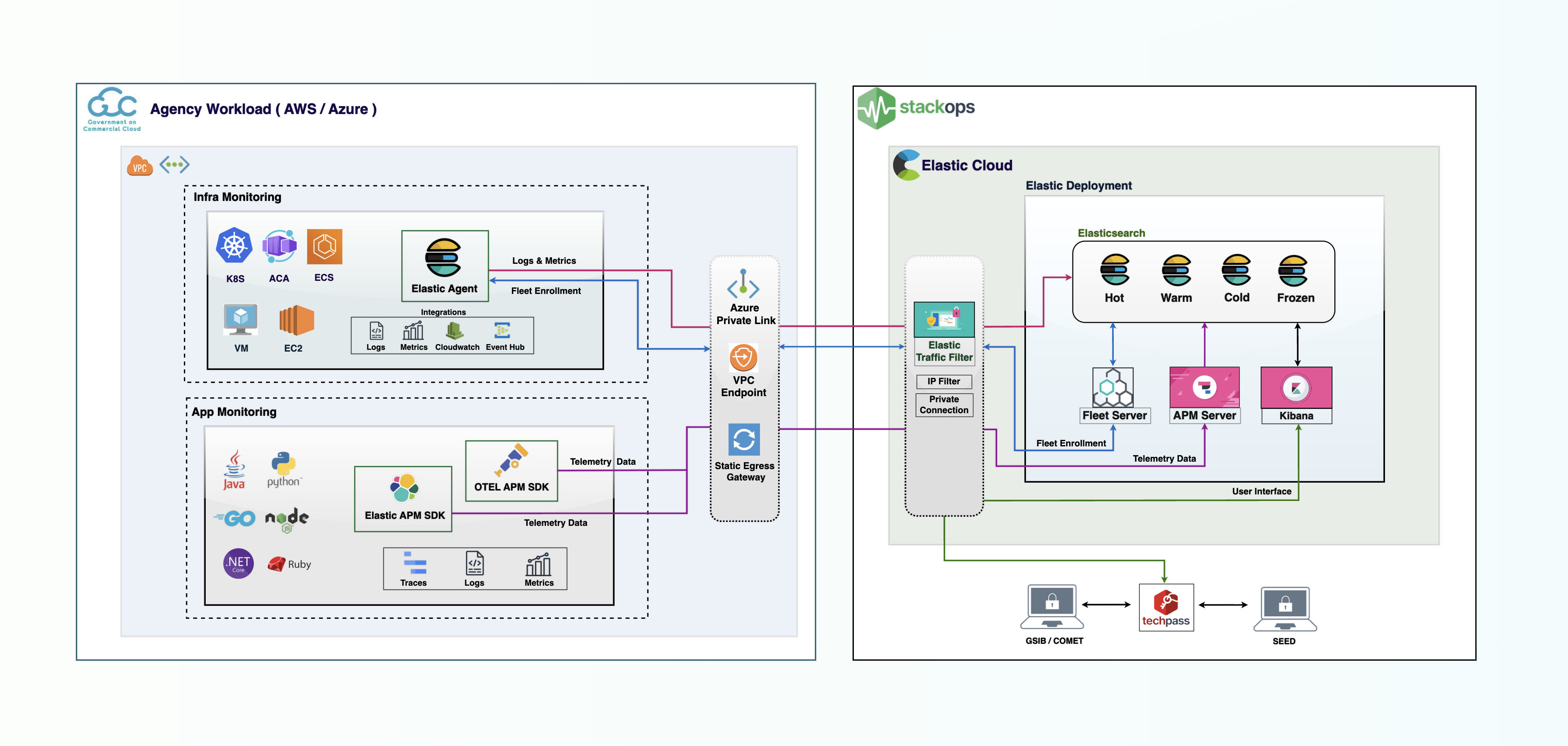
Cloud connectivity pattern
The monitoring data (logs, metrics, and traces) is securely routed to the StackOps Elastic deployment via private endpoints (AWS VPC Endpoint, Azure Private Link) or a Static Egress Gateway. On the receiving end, Elastic Traffic Filters enforce strict access control, ensuring that data is accepted only from whitelisted sources.
Cloud monitoring components
To facilitate data collection, the following components are integrated into the tenant’s environment:
- Elastic Agent—Facilitates logs and metrics collection for infrastructure monitoring, providing out-of-the-box integrations to simplify data collection from multiple sources (e.g., Kubernetes, Azure Container Apps, Elastic Container Service).
- Elastic APM Agent SDK or OTel SDK—Measures application performance and tracks errors by collecting telemetry data like transactions, spans, errors, and metrics. These SDKs are instrumentation libraries written in the same language as your service (e.g., Java, Python, Node.js).
The on-premise architecture diagram illustrates two distinct environments: the tenant’s on-premise workload and the StackOps Elastic Cloud deployment. It showcases three separate approaches that agencies can utilise to connect to their Elastic Cloud deployment.
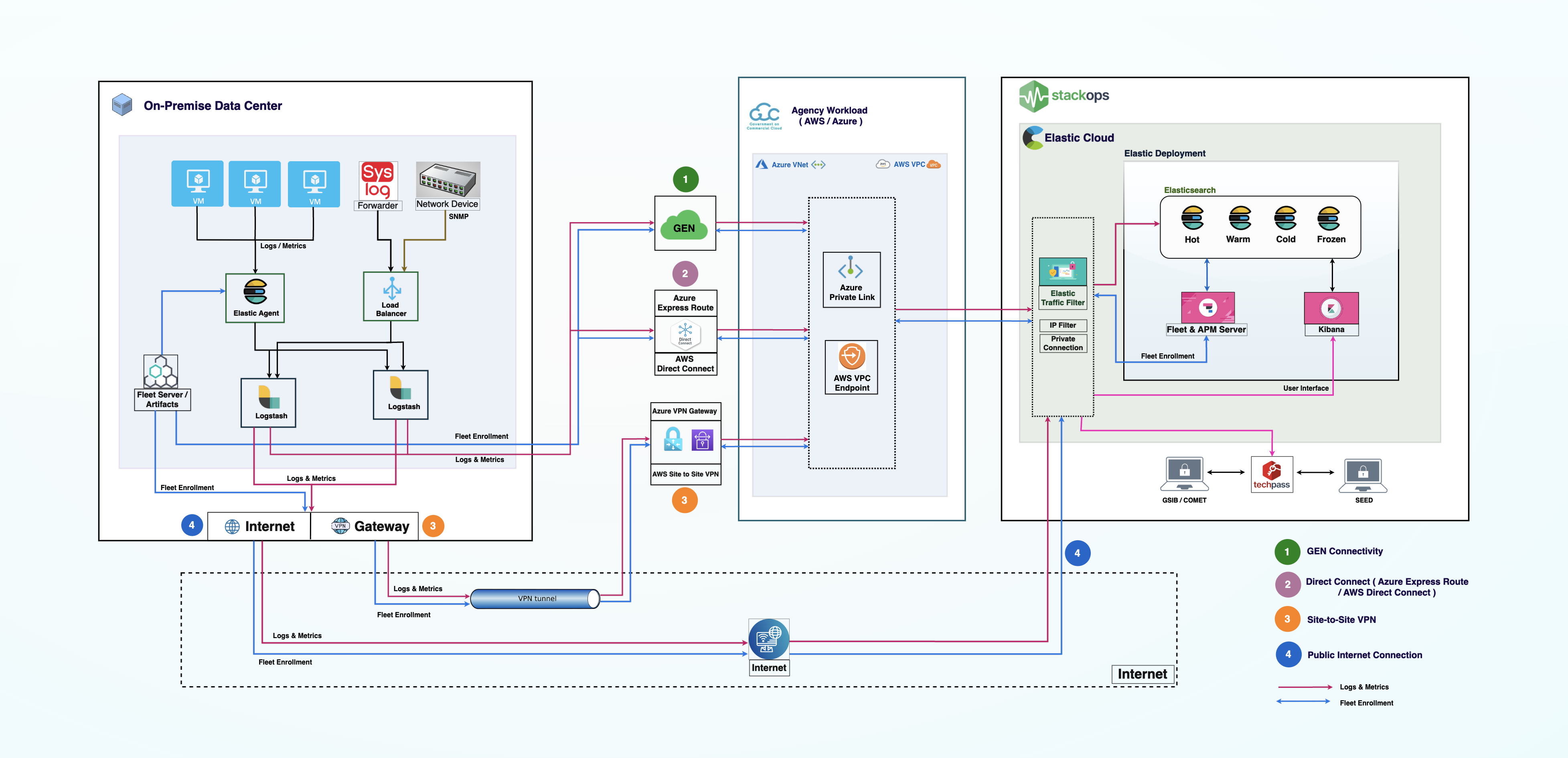
On-premise connectivity patterns
To monitor on-premise workloads, agencies must establish a network path from their local data center to the GCC compartment, and subsequently to the Elastic deployment. Here are the architectural patterns for ingesting logs and metrics from on-premise data centers into StackOps Elastic Cloud:
- GEN Connectivity
- Direct Connect
- Site-to-Site VPN (data routed through the public Internet)
- Public Internet Connection (data routed through the public Internet)
Option 1: GEN Connectivity
GEN (Government Enterprise Network) provides a dedicated, government-controlled network infrastructure with multiple layers of security controls, reducing exposure to public internet threats and offering better protection for your data. Agencies that have workloads in data centers with connectivity to GEN (such as GDC1, GDC2) can use this approach to send logs/metrics without needing to implement Direct Connect or any other setup.
Option 2: Direct Connect
The Direct Connect approach represents the gold standard for high-security, mission-critical government workloads. It relies on a dedicated physical network connection between the agency’s on-premise data center and the cloud service provider.
In the reference diagram above, traffic does not traverse the public internet at any point. The agency establishes a physical link (AWS Direct Connect or Azure ExpressRoute) to extend their private network into the cloud VPC/VNet. Once the traffic reaches the agency’s cloud network, it is routed securely to the StackOps Elastic deployment using Private Link (AWS VPC Endpoint or Azure Private Link). This ensures that the Elastic Cloud endpoints resolve to private IP addresses within the agency’s own cloud network address space, effectively making the deployment appear as if it is a local resource on the agency’s private network.
The Direct Connect approach offers the following benefits:
- Consistent perfomance—Provides guaranteed bandwidth with consistent latency. Crucial for high-volume logging where bursty traffic can overwhelm smaller pipes.
- Strict security—Maximises data protection by keeping traffic on private infrastructure, meeting the strictest compliance requirements.
Option 3: Site-to-Site VPN
The Site-to-Site VPN approach suits agencies that require private connectivity but do not have the volume to justify a dedicated physical line. This architecture uses the public internet as the underlying transport medium but encapsulates the data within an encrypted IPsec tunnel.
Traffic travels from the on-premise firewall, through the encrypted tunnel, and lands on a Virtual Private Gateway (AWS) or VPN Gateway (Azure) within the agency’s cloud environment. From there, the traffic is routed internally to the StackOps Elastic deployment via Private Link. This setup maintains the security posture of using private IP addresses for ingestion without the heavy infrastructure investment of a dedicated line.
The Site-to-Site VPN approach offers the following benefits:
- Balanced security and cost—Cost-effective solution that satisfies most security policies for Restricted data, by encrypting data in transit using industry-standard protocols (IPsec/IKEv2).
- Rapid deployment—Significantly faster to implemented compared to a Direct Connect approach.
The Site-to-Site VPN approach may come with MTU (Maximum Transmission Unit) issues. The VPN overhead adds headers to packets; if the payload (your logs) plus the headers exceed 1500 bytes, packets may fragment or drop.
Option 4: Public Internet Connection
The Public Internet Connection approach involves connecting on-premise agents directly to StackOps Elastic deployment by whitelisting your on-premise egress in Elastic traffic filters. Traffic travels from the agency’s on-premise network, through the agency’s internet gateway, across the public Internet, and hits the Elastic Cloud deployment.
While this is the simplest method, it is generally treated as an exception rather than the rule for WOG workloads, given the following concerns:
- Public exposure—The endpoint is discoverable on the public Internet, increasing the potential attack surface.
- Data sensitivity restrictions—This method is generally not recommended for Confidential/Sensitive data without explicit risk acceptance.
- Reliability risk—By relying on public Internet reliability, data ingestion is susceptible to routing issues, latency spikes, and temporary connectivity failures outside your control.
On-premise monitoring components
To facilitate data collection, the following components are integrated into the tenant’s environment:
- Data collectors—Essential tools for gathering, processing, and forwarding logs and metrics from on-premises workloads to StackOps Elastic. Three example components are shown in the reference diagram above:
- Elastic Agent is used to collect logs, metrics, and data from on premise workload and ship them to the StackOps Elastic.
- Syslog forwarders are tools or services that capture system and application logs in the standard syslog format.
- Fluentd is an open-source data collector designed for unifying log collection and processing.
- Other components can be used, as long as they support ingestion into Logstash through the supported input plugins.
- Logstash—Acts as a persistence and processing layer by temporarily storing logs and metrics on disk using persistent queues, helping to prevent data loss during connectivity disruptions between on-premises and cloud workloads. It also supports data enrichment and transformation through pipeline filters, enabling ETL operations before forwarding data to StackOps Elastic.
- Load balancer— Required for data collected from non-Elastic components (such as syslog forwarders or Fluentd), which must be routed through the load balancer to multiple Logstash instances. For Elastic components like Elastic Agent or Filebeat, an external load balancer is not required, as they handle load balancing internally.
- On-premise Fleet Server—Used to minimize external traffic from Elastic Agents. The Elastic Agents report their status to the Fleet Server at regular intervals (e.g., every 5 seconds). Without an on-premises Fleet Server, all Elastic Agents would have to send their status directly to the Elastic Cloud–hosted Fleet Server, resulting in multiple network requests instead of a single consolidated connection.
Storage layers
The StackOps Elastic deployment consists of Elasticsearch nodes responsible for storing data and managing the data lifecycle. To balance performance and cost, the storage is structured into the following data tiers:
- Hot nodes—Handle data ingestion and store recent, frequently accessed data.
- Warm nodes—Store slightly older data that is still queried regularly.
- Cold nodes—Store historical data that is accessed less often.
- Frozen nodes—Store archival data, queried only when necessary.
Core platform and management services
The following components are part of the core StackOps Elastic offering, providing a ready-to-use architecture:
- Kibana—The user interface (UI) for the StackOps Elastic deployment, acting as a real-time window to visualise, analyse, manage, and monitor data stored in Elasticsearch. You can transform raw data into interactive dashboards, charts, and maps. Through core features like Discover and Alerting, you can also actively explore data trends and set up automated monitoring for various use cases. To ensure security, access to the StackOps Kibana UI is strictly restricted to SEED and GSIB/COMET devices.
- APM Server—The central bridge for Application Performance Monitoring. It receives detailed performance telemetry data from your application (instrumented either using Elastic APM SDKs or Otel APM SDKs), processes and enriches the data, then stores it as structured documents in Elasticsearch for analysis and visualisation through Kibana UI.
- Elastic Cloud-hosted Fleet Server—The control plane for managing Elastic Agents. Controlled through Kibana UI, it facilitates scalable data collection by handling Elastic Agent policy distribution for integration as well as real-time status monitoring of Elastic Agents across your infrastructure. Furthermore, it simplifies operations by allowing users to trigger agent upgrades directly via the Kibana Fleet UI, removing the need to manually access and update the agents running on the tenant’s workloads.
Note: In StackOps, a dedicated Elastic deployment can be provisioned for each project or system based on your use case.
