FormSG (Trigger)
The FormSG Node enables your workflow to receive secure form submissions from FormSG, Singapore’s trusted form builder for government agencies. When a citizen or staff member submits a form, the configured webhook triggers your workflow and provides the form data to start automated processing.
Note: FormSG is a secure form building platform for government agencies. For an overview of all trigger nodes, see Configure Workflow Input.
FormSG Support: For any enquiries or issues related to FormSG, please reach out to the FormSG team via go.gov.sg/formsg-support.
How Does It Work?
The FormSG Node acts as a trigger that receives webhook POST requests whenever a form is submitted. It authenticates incoming webhooks using a secret key to ensure data integrity and security.
Prerequisites: You need a FormSG Secret Key from your FormSG form configuration to verify webhook authenticity. This key is used to validate that incoming requests are genuinely from FormSG.
Setup Steps:
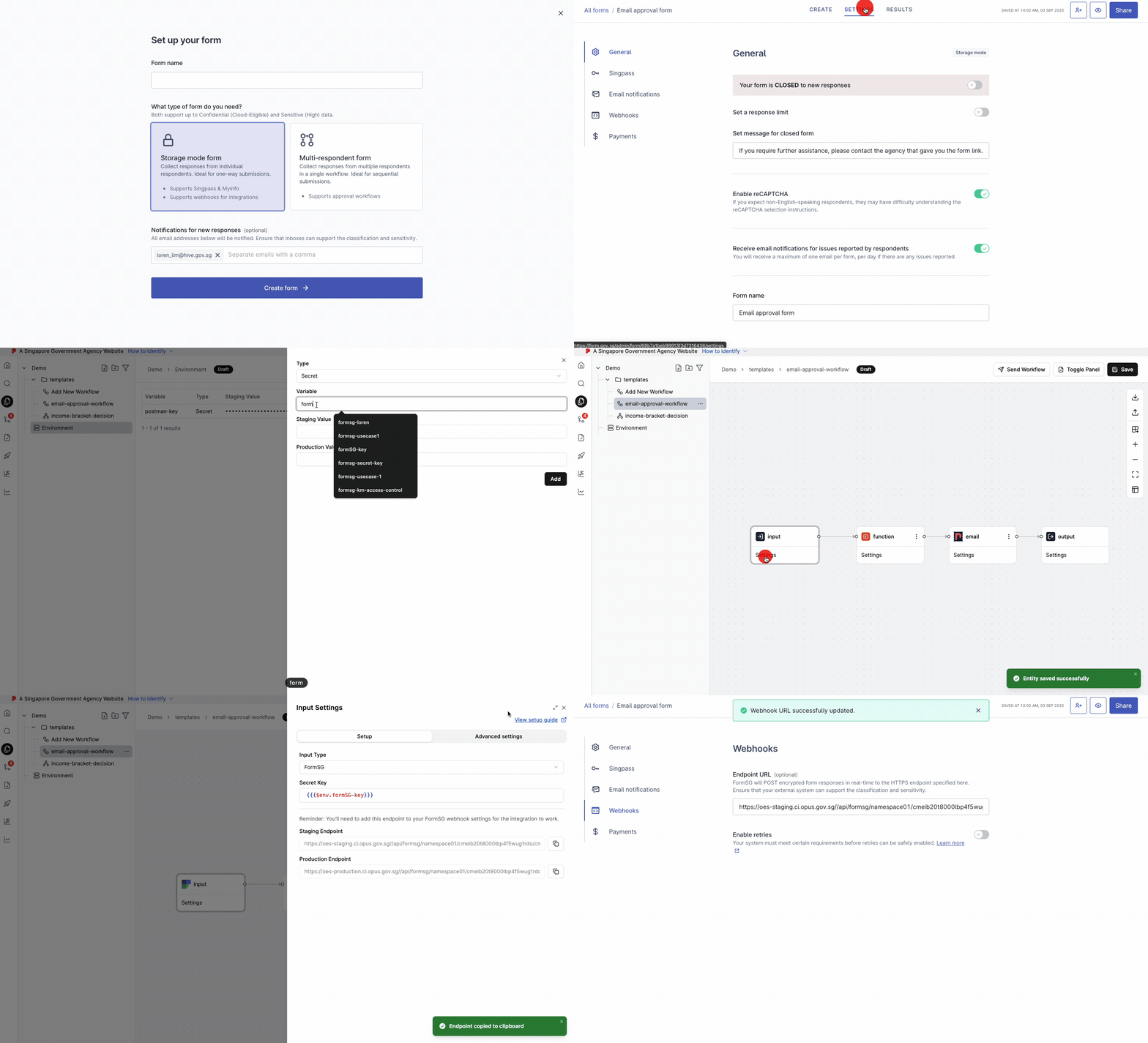
- Click on Select Input
- Choose FormSG as the trigger node
- Open the trigger node Settings to configure the FormSG connection
- Enter the FormSG form link to connect to your form
- Check the connection to ensure it is a valid FormSG form link
- Provide the FormSG Secret Key to verify webhook authenticity and ensure secure data transmission
- Copy the webhook endpoint URL provided by the trigger node
- Navigate to FormSG and go to Settings > Webhook
- Paste the webhook endpoint URL in FormSG
- Publish your workflow in OPUS to activate the webhook connection
- Each form submission will now send a webhook POST request to trigger the workflow automatically
Runtime URL
The trigger node provides runtime URLs for invoking your workflow in different environments:
- Staging URL: Used for testing in the staging environment
- Production URL: Used for live production workflows
The URL format indicates the specific branch or release version:
mainbranch for development- Release versions (e.g.,
release/1.0.0) for production deployments
Note: The endpoints below are for Lite tier reference only. Always refer to the endpoint URL shown in your node settings.
| Environment | Endpoint URL |
|---|---|
| Staging | https://lite.staging.oes.opus.gov.sg/api/formsg/<namespace-id>/<project-id>/<entity-id>?branch=main |
| Production | https://lite.production.oes.opus.gov.sg/api/formsg/<namespace-id>/<project-id>/<entity-id>?branch=main |
Query Parameters:
| Parameter | Description |
|---|---|
branch |
The branch or release version (e.g., main, release/1.0.0) |
identifier |
Optional. Custom identifier that appears in the monitoring page for easier tracking |
Example:
https://lite.staging.oes.opus.gov.sg/api/formsg/namespace01/project01/cmj889fap00ysa401rpsjr98f?branch=mainOutput
When a form is submitted, the FormSG Trigger node outputs the decrypted form field responses along with a _meta object containing submission metadata.
Output Structure:
{
"_meta": {
"formId": "67d27ca5d1e48166ca6faeb7",
"submissionId": "682ef8213ea3ba1b2c109a8e",
"created": "2026-03-08T10:10:41.253Z"
},
"What is your name?": "John Doe",
"What is your email?": "john@example.com"
}Metadata Fields:
| Field | Description |
|---|---|
_meta.formId |
The unique identifier of the FormSG form |
_meta.submissionId |
The unique identifier of this specific submission |
_meta.created |
ISO 8601 timestamp of when the form was submitted |
The form field responses are included alongside _meta at the root level, keyed by their field labels. These can be accessed by downstream nodes using template expressions (e.g., {{{ data._meta.submissionId }}}).
When to Use It?
Use FormSG Node when:
- You need to automate processing of government form submissions.
- You are collecting data through FormSG and want to trigger automated workflows.
- You want to integrate form submissions with backend systems, databases, or APIs.
- You need real-time processing of form data (e.g., sending notifications, creating records, triggering approvals).
- You want to reduce manual data entry and processing time.
Tip: Combine with Decision Nodes or Expression Nodes to validate and route form submissions based on specific criteria. Use Function Nodes or API Nodes to integrate with external systems for data storage or further processing.
