Execution
Prerequisites:
- Published Workflow/Decision: Your workflow or decision must be published before execution. Draft versions cannot be executed via API. See Publishing Changes for instructions.
- Access Token: All API requests require a valid Access Token for authentication. See the Access Token Management guide to generate staging and production access tokens. Only administrators can generate access tokens.
Once you have built and published your workflows or decisions, you can execute them via API endpoints. The platform provides separate API endpoints for staging and production environments to support testing and live operations.
Note: Draft versions cannot be executed via API. Workflows and decisions must be published before they can be executed. Ensure you configure the correct endpoint URL in your external systems based on the released version and environment.
API Specification
Endpoint Configuration
The platform provides different endpoints for staging and production environments:
Note: The endpoints below are for Lite tier reference only. Always refer to the endpoint URL shown in your node settings.
Workflow Endpoints:
| Environment | Endpoint URL |
|---|---|
| Staging | https://lite.staging.oes.opus.gov.sg/api/workflow/<namespace-id>/<project-id>/<entity-id>?branch=main |
| Production | https://lite.production.oes.opus.gov.sg/api/workflow/<namespace-id>/<project-id>/<entity-id>?branch=main |
Decision Endpoints:
| Environment | Endpoint URL |
|---|---|
| Staging | https://lite.staging.oes.opus.gov.sg/api/decision/<namespace-id>/<project-id>/<entity-id>?branch=main |
| Production | https://lite.production.oes.opus.gov.sg/api/decision/<namespace-id>/<project-id>/<entity-id>?branch=main |
How to Get Endpoints from the Portal
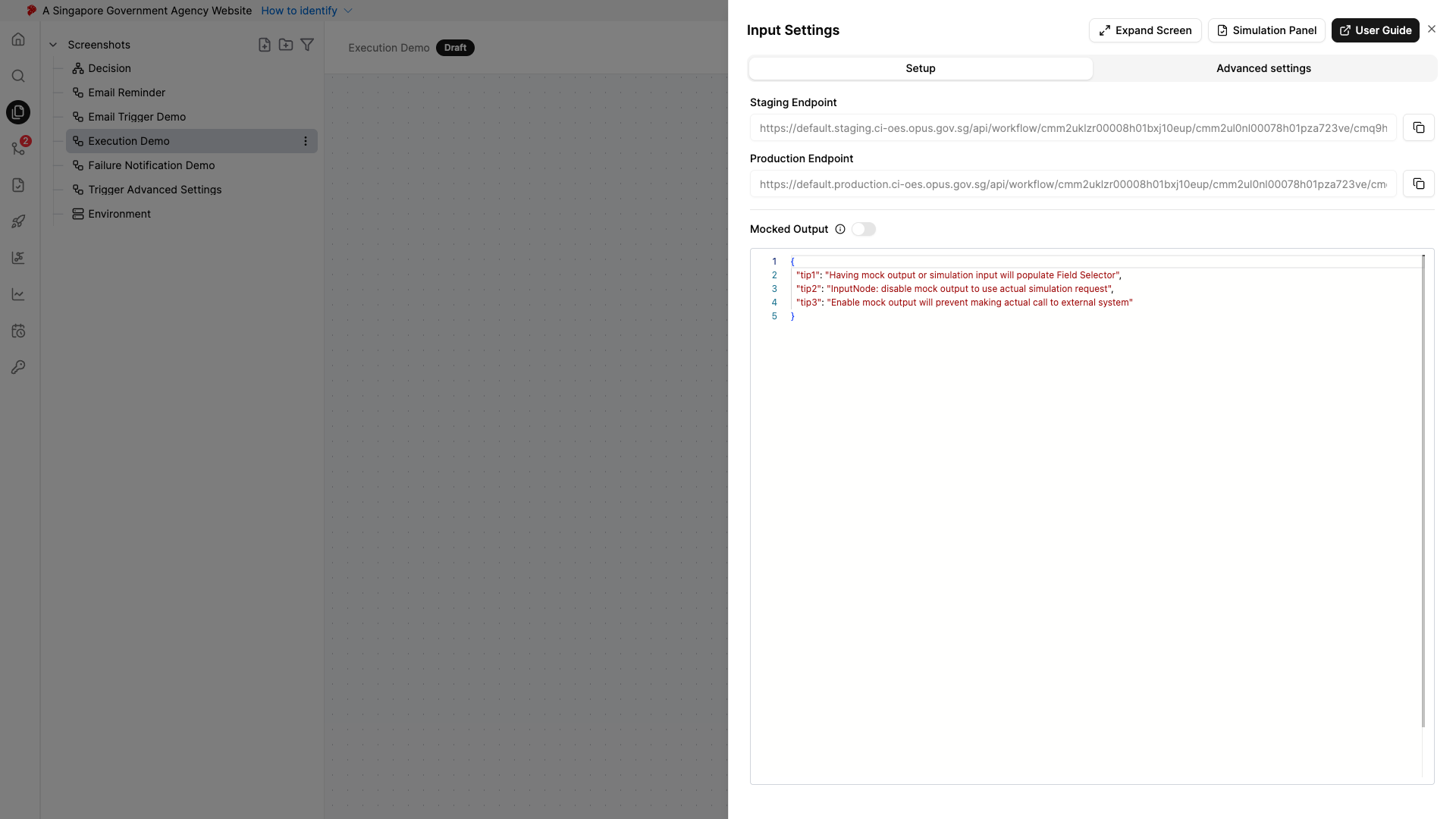
The endpoint URL for your workflow or decision can be retrieved directly from the trigger node settings. Open the trigger node (e.g., Input node) and the staging and production endpoint URLs are displayed at the top of the settings panel.
- Navigate to your workflow or decision in the project editor
- Click on the trigger node (e.g., Input, FormSG, Ownself Gather, Email, etc.) and open its settings
- Copy the relevant endpoint URL (staging or production) using the copy button
- Configure this endpoint in your external system
Note: The endpoint URL path varies depending on the trigger node type used in your workflow:
Trigger Node Endpoint Path Input /api/workflow/<namespace-id>/<project-id>/<entity-id>FormSG /api/formsg/<namespace-id>/<project-id>/<entity-id>Ownself Gather /api/gathersg/<namespace-id>/<project-id>/<entity-id>/api/email/<namespace-id>/<project-id>/<entity-id>GovRewards /api/govrewards/<namespace-id>/<project-id>/<entity-id>ApplySG /api/applysg/<namespace-id>/<project-id>/<entity-id>Each trigger node’s settings panel will show the correct endpoint URL specific to that trigger type. Always refer to the trigger node settings for the exact URL to use.
Request Format
HTTP Method: POST
Headers:
Authorization: Bearer <your-access-token>
Content-Type: application/jsonURL Parameters:
| Parameter | Type | Required | Description |
|---|---|---|---|
namespaceId |
string | ✅ | Unique ID of the namespace |
projectId |
string | ✅ | Unique ID of the project |
entityId |
string | ✅ | Unique ID of the workflow or decision to execute |
Query Parameters:
| Parameter | Type | Required | Description | Valid Values |
|---|---|---|---|---|
branch |
string | ✅ | Branch name to execute | main, release/<version> |
Request Body:
The request body should contain the input data required by your workflow or decision in JSON format.
{
"inputField1": "value1",
"inputField2": "value2",
"inputField3": 12345
}Response
The response differs between decision and workflow executions due to their different execution characteristics:
Decision Response
Decision nodes return the output directly since they are designed for synchronous, immediate processing:
{
"result": "approved",
"score": 85,
"recommendation": "Process application"
}Workflow Response
Workflow nodes return the execution status rather than the final output. This is because workflows may contain nodes that take days or weeks to complete (e.g., human approval tasks, external system integrations with extended processing times).
{
"executionId": "8259f852-1eac-4a1d-842f-bdb1ac9077ec",
"result": {
"status": "SUCCESSFUL"
}
}The executionId can be used to track the workflow execution. To receive the final workflow output, you will need to add an API node in your workflow to call back to your system with the results once the workflow completes.
Example Requests
Execute API in Staging Environment
POST https://lite.staging.oes.opus.gov.sg/api/workflow/my-namespace/my-project/my-workflow?branch=main&version=committed
Authorization: Bearer <your-staging-token>
Content-Type: application/json
{
"applicantName": "John Doe",
"applicationId": "APP-12345",
"amount": 5000
}Execute API in Production Environment
POST https://lite.production.oes.opus.gov.sg/api/workflow/my-namespace/my-project/my-workflow?branch=release/1.0.0&version=committed
Authorization: Bearer <your-production-token>
Content-Type: application/json
{
"applicantName": "John Doe",
"applicationId": "APP-12345",
"amount": 5000
}Troubleshooting
Common Issues
401 Unauthorized:
- Check that your access token is valid and not expired
- Ensure the token is correctly included in the Authorization header
- Verify you are using the correct token for the environment (staging/production)
404 Not Found:
- Verify the namespace, project, and entity IDs are correct
- Check that the branch exists (releases must be created first for production)
- Ensure the workflow/decision is published
400 Bad Request:
- Validate the request body matches the expected input schema
- Check that branch and version parameters are valid
- Ensure Content-Type header is set to
application/json
Network Connection Errors:
- Verify the URL is whitelisted (see Network Requirements)
- Check network connectivity to our platform endpoints
- Ensure your firewall allows outbound HTTPS connections
