System Overview
Architecture
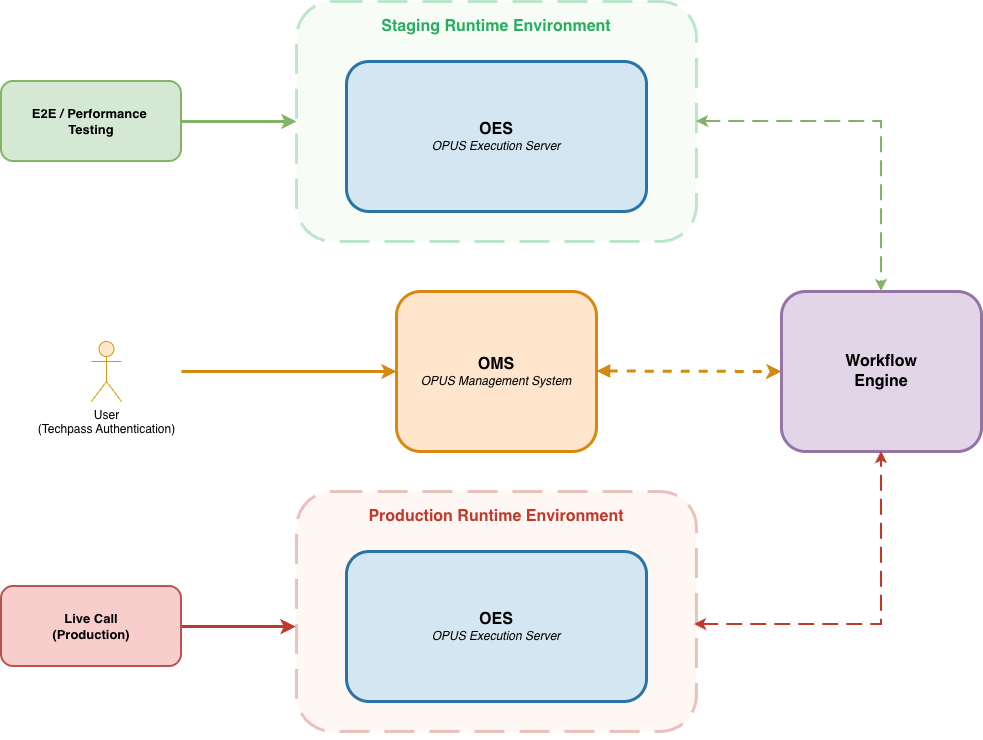
OPUS is centrally hosted on the Government Commercial Cloud (GCC) and provides a secure platform where authorized users can authenticate via TechPass to build, test, and manage both workflows and decisions.
OPUS Management System (OMS)
The OPUS Management System is the web-based interface where users build, test, and manage both workflows and decisions.
User Authentication
All users must authenticate via TechPass to access OPUS. Once authenticated, users can access OMS to author, test, and manage workflows and decisions based on their assigned permissions.
Key Capabilities
Authoring and Development:
- User Interface - Drag-and-drop editor for building workflows and decisions
- Versioning - Git-like version control with branching
- Collaboration - Multi-user environment with locking mechanisms to prevent conflicts
Testing and Validation:
- Simulation - Test workflows and decisions locally with mock data before deployment
- Test Management - Create and manage test suites for regression testing
- Debugging - Inspect execution traces and troubleshoot issues
Deployment and Release:
- Publishing - Commit changes to make them available for testing
- Release Management - Create versioned releases for production deployment
- Access Control - Manage user permissions and access tokens
Data Storage:
- Stores workflow and decision artifacts (models, configurations)
- Maintains version history and audit trails
- Manages authentication tokens and user permissions
OPUS Execution Server (OES)
The OPUS Execution Server provides API endpoints for executing workflows and decisions in both staging and production environments.
Purpose and Usage
OES is used after workflows and decisions have been:
- Authored in OMS
- Tested through simulation and validation
- Published to create committed versions
- Released to create production-ready versions
Key Features
API Execution:
- REST API endpoints for workflow and decision invocation
- Supports both synchronous and asynchronous execution patterns
- Returns execution results and status information
Execution Tracking:
- Records execution traces for monitoring and debugging
- Maintains execution history for audit purposes
- Provides real-time execution status
Resource Management:
- Opt-in dedicated compute resources per environment (for paying agencies)
- Separate database instances for staging and production
- Performance monitoring and optimization
Rule Engine:
- OES operates as a standalone Rule Engine runtime when executing decisions
- During this mode, no communication occurs with the Workflow Engine and all processing is fully self-contained within OES
Staging and Production Environments
OPUS provides two isolated environments for each tenant to ensure proper separation between testing activities and live execution.
Environment Isolation
The dual-environment architecture provides critical guardrails:
- Resource Isolation - Separate compute, database, and network resources prevent cross-environment interference
- Data Separation - Staging and production data are completely isolated
- Performance Protection - Heavy test loads in staging cannot impact production
- Release Control - Changes are tested in staging before production release
This architecture ensures that regression testing, performance testing, and other validation activities can be conducted safely without risking production system availability or performance.
Staging Environment
The staging environment is designed for development, testing, and validation:
- Functional Testing - Test workflows and decisions with real integrations before production deployment
- Regression Testing - Run comprehensive test suites to validate changes without impacting production
- Performance Testing - Conduct load testing and performance validation in isolation
- API Endpoint - Dedicated staging execution endpoint with separate compute resources
Key Benefits:
- Test activities do not affect production performance
- Safe environment for experimentation and validation
- Allows realistic testing with actual system integrations
Production Environment
The production environment is dedicated to live business operations:
- Live Execution - Execute published workflows and decisions for real business processes
- Isolated Resources - Separate compute and database infrastructure from staging
- API Endpoint - Production execution endpoint with performance monitoring
Key Benefits:
- Protection from test load impacts
- Optimized for business-critical operations
Development to Production Workflow
The typical workflow from development to production involves both OMS and OES:
1. Development Phase (OMS)
- Author workflows and decisions in the OMS web interface
- Simulate with mock data to validate logic
- Save as draft versions
2. Testing Phase (OMS + Staging OES)
- Publish changes in OMS to create committed versions
- Deploy to staging environment
- Execute E2E and performance tests via Staging OES API
- Monitor execution traces and debug issues in OMS
3. Production Phase (OMS + Production OES)
- Create release version in OMS
- Release to production environment
- Execute live business operations via Production OES API
- Monitor production execution in OMS
This clear separation ensures that all testing and validation occur in staging before any changes reach production.
