Introduction
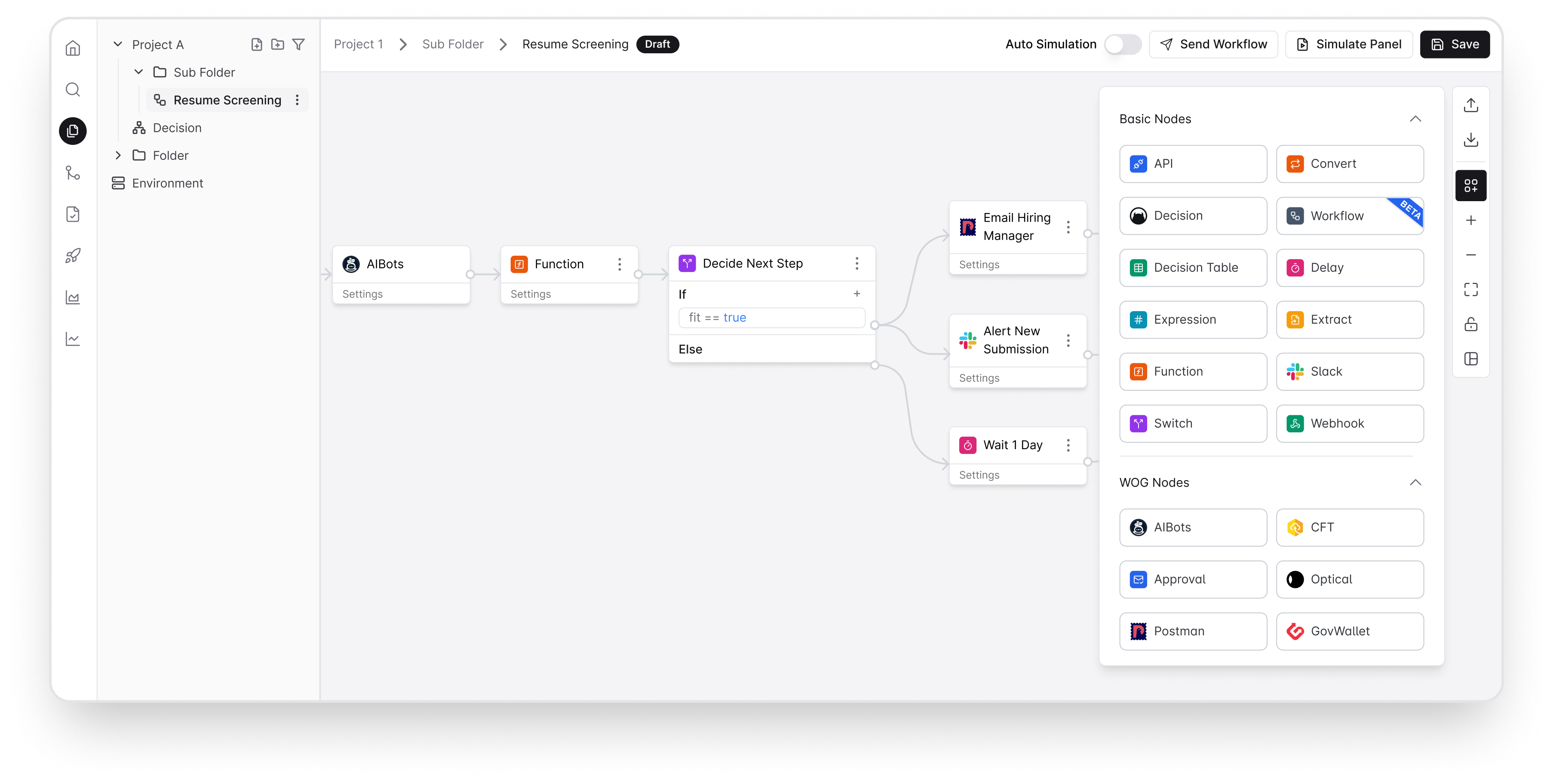
Opus helps government agencies automate agentic workflows, build business rules with a drag-and-drop visual editor, orchestrate agents while integrated with whole-of-government tools, so public officers can ship faster without waiting for developers or building integrations from scratch.
Unlike generic automation tools that require extensive custom work to meet government requirements, Opus delivers security and compliance by design. Built on enterprise-grade infrastructure, it handles failures and timeouts automatically with retries, letting teams focus on solving problems rather than managing infrastructure.
Users build and test automations visually. Start from pre-built templates for common government processes or build from scratch. Developers extend when needed. Every workflow is self-documenting. And because Opus integrates with shared government tools, agencies avoid duplicating work that’s already been done elsewhere.
See intro deck.
Sign up for Opus via opus.gov.sg. Opus will soon be available for subscription via the TechBiz Portal. Opus is hosted on the Government Commercial Cloud (GCC) and classified for Restricted, Sensitive Normal.
Get Started
Prerequisites: You need a TechPass account to access Opus. Public officers can self-sign up. Vendors and contractors should coordinate with their respective agencies. Opus is accessible on non-SE GSIB, SEED, and COMET machines (some agencies may have additional network constraints).
- Try Opus — Start exploring by signing up for an Opus workspace at opus.gov.sg. No approvals needed.
- Read the docs — Access tutorials, use cases, and FAQs at go.gov.sg/opus-docs.
- Join the community — Connect with other government developers on Teams or Slack.
- Invite your team — Use the user management features to add colleagues to your workspace.
System Architecture
The platform is centrally hosted on the Government Commercial Cloud (GCC) and consists of two main components: the OPUS Management System (OMS) for authoring and managing both workflows and decisions, and the OPUS Execution Server (OES) for running workflows and decisions via API endpoints. The platform provides isolated staging and production environments to ensure safe testing before live deployment.
For a detailed explanation of the architecture, components, and environment separation, see the System Overview.
Workflows and Decisions
OPUS Platform provides two main building blocks for Workflow and Decision automations:
Workflows
Workflows automate processes across systems. Using a drag-and-drop interface, you connect nodes (i.e. Trigger inputs, AI, API, Decision, Slack, Notification) to define how data flows through your automation. The Workflow engine manages execution, retries, and state tracking to ensure reliable completion.
Use Workflows when you need to:
- Automate manual, repetitive tasks
- Automate sequences of tasks across multiple systems
- Execute processes (API integrations, file transfers, notifications)
- Track and monitor execution of every step in a process
Decisions
Decisions define business rules and logic to evaluate input data and return an outcome. Using Decision Tables and others, you can codify policies that can be applied consistently across systems. Decisions separate business logic from your code, allowing decisions to be updated independently.
Note: Workflows and Decisions are designed to work together. Decisions can be embedded within Workflows to apply business rules and logic as part of the broader process automation.
Use Decisions when you need to:
- Apply rules or policies consistently (i.e. eligibility checks, validations, computations)
- Evaluate conditions and return results
- Separate business logic so rules can be updated independently
Glossary
Key terms and definitions used throughout OPUS:
| Term | Meaning |
|---|---|
| Decision | Business rules and logic to evaluate the input request and return a response. Use Decisions for eligibility checks, validations, and computations where rules can be updated independently. |
| Decision Service | Decision Service endpoint or call (REST endpoint) that returns a set of outputs with a given set of inputs. A Decision comprises all the components authored in the UI in a single page. |
| Entity | Each Decision or Workflow file is referred as an entity. |
| Folder | Similar to file folder. Used for organising a Project. Folders can be nested. |
| Namespace | Refers to Tenant / Account. Each Tenant/ Namespace is an account on its own. For TechBiz subscriber, this is associated with your TechBiz billing. |
| Node | An object/component/connector, such as API, CFT, Extract, Webhook, etc. Nodes are connected together into a graph. |
| OES | OPUS Execution Server – API service for executing workflows and decisions via REST endpoints. |
| OMS | OPUS Management System – Web-based interface for authoring, versioning, and managing workflows and decisions. |
| OGRE | Name of our product – a rule engine for everyone. |
| OPUS | Name of our product – a low code platform to automate what matters. It is also being referred as the main platform for both OGRE Decisions and OPUS Workflow Automations. |
| Project | A collection of Decisions and Workflows. Each Namespace can contain any number of Projects. Each Project comprises Folders with Decisions and Workflows. |
| Publish | Process of committing a new version of a Workflow or Decision that will be used when creating a Release. |
| Rule Nodes | A collection of nodes specially for Decision, such as Decision Table, Switch, Function, or Expression. Rule Nodes can be connected together into a Decision Graph. |
| Regression | Process of running all Test Suites for all Decision Services and Workflows for a Project. |
| Release | Latest published version of all Decision Service, Workflow and Test Suite artifacts for an entire Project. Creates versioned releases. |
| Staging Environment | Testing environment for executing published workflows and decisions with real integrations. Used for E2E and performance testing. |
| Production Environment | Live environment for executing released workflows and decisions in business operations. |
| Test Suite | A collection of test cases containing one or more test scenarios. Each Decision Service and Workflow can have one or more Test Suites. |
| User | Platform user authenticated via TechPass. |
| Workflow | Process automation that connects multiple steps across systems. Use Workflows for API integrations, file transfers, and notifications with execution tracking. |
Next Steps
Now that you understand what OPUS is and how it works:
For Administrators:
Quick Start for Administrators - Get onboarded, create projects, invite users, and generate access tokens.
For Developers:
Quick Start for Developers - Get access and start building workflows and decisions with step-by-step guides.
