Configure Decision Trigger
Prerequisites:
- Create Decision: You must create a decision before configuring the input node. The decision must exist in the editor before you can set up its starting point.
An Input Node defines the starting point of your decision — it’s where the inputs are passed into the Decision Service to start execution. For decisions, the Input Node uses the Default configuration for standard API usage.
Default (API Usage):
Decisions use the Default Input Type, which provides a standard webhook endpoint without requiring external system setup. Any application or service can send HTTP POST requests with JSON payload and a valid access token to trigger the decision evaluation.
Access Token Required: Triggering decisions via API requires an access token for authentication. See Access Token Management for details on generating and using access tokens.
Note: Unlike Workflow, Decision do not have any integrated Trigger Nodes. Decisions are designed to be called from external systems via direct API calls using the Default Input Type or from Workflows.
Setup
The setup process for decision input is straightforward:
- Open the Input node Settings
- Copy the webhook endpoint URL provided by the Input node
Runtime URL
The Input node provides runtime URLs for invoking your decision in different environments:
- Staging URL: Used for testing in the staging environment
- Production URL: Used for live production decisions
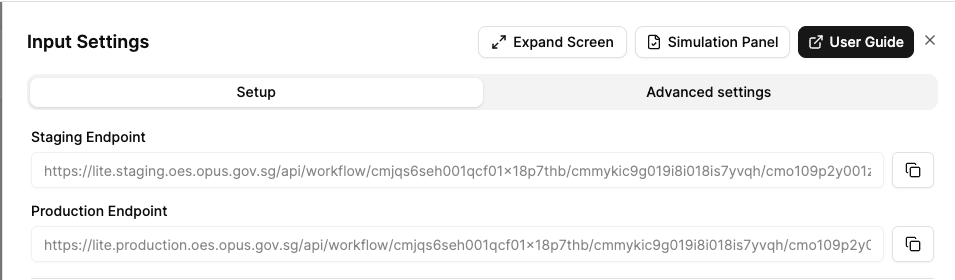
The URL format indicates the specific branch or release version:
mainbranch for development- Release versions (e.g.,
release/1.0.0) for production deployments
Tip: Enable trace=true during development and testing to debug decision logic. Disable it in production for better performance if rule traces are not needed.
Advanced Settings
In Decisions, the Input Node supports the following advanced setting:
- Schema Validation: Define a JSON schema to validate the incoming decision input data.
For more details on advanced settings.
Next Steps
Once you’ve configured your Input Node:
Configure Nodes - Set up the Decision by adding and configuring nodes such as Decision Tables, Expression, Function, Switch nodes to build your Decision Service.
