Decision
The Decision Node lets you reference an existing Decision flow within your project. Instead of rewriting the same logic across multiple workflows, you simply point to the source, ensuring consistency, reusability, and a single source of truth. This promotes easier maintenance, reduces duplication, and allows users to confidently reuse complex rules across different processes.
How Does It Work?
Setup Steps:
- Build your workflow using Graph Edit Mode (minimum setup: input node → decision node → output node, but you can add more nodes as needed)
- Click on the decision node settings to open its configuration
- Configure the following data:
- Select a Decision Table: Choose from existing decision flows (e.g., “Eligibility Check”) created elsewhere in your project
- View or Edit Source: You can preview the referenced decision or open it in a new tab for full access and updates
Output:
The Decision Node evaluates the logic of the selected decision and returns the output in the format defined by that decision. For example, when referencing the Income Tax Computation Decision Table with an input of income: 10000.
The decision node returns:
{
"results": {
"tax": 200
}
}This output from the selected decision can be used by subsequent nodes in the workflow.
Note: A decision can contain multiple nodes with complex logic. The output format and structure varies depending on the nodes and logic configured within the referenced decision. See Decision Base Nodes for more information on available decision nodes.
Important: Decisions have a maximum nesting depth of 5 levels. When using Decision Nodes to reference other decisions, ensure the total chain of referenced decisions does not exceed 5 levels to prevent circular dependencies and ensure optimal performance.
Examples
Referencing a Decision (Funding Amount)
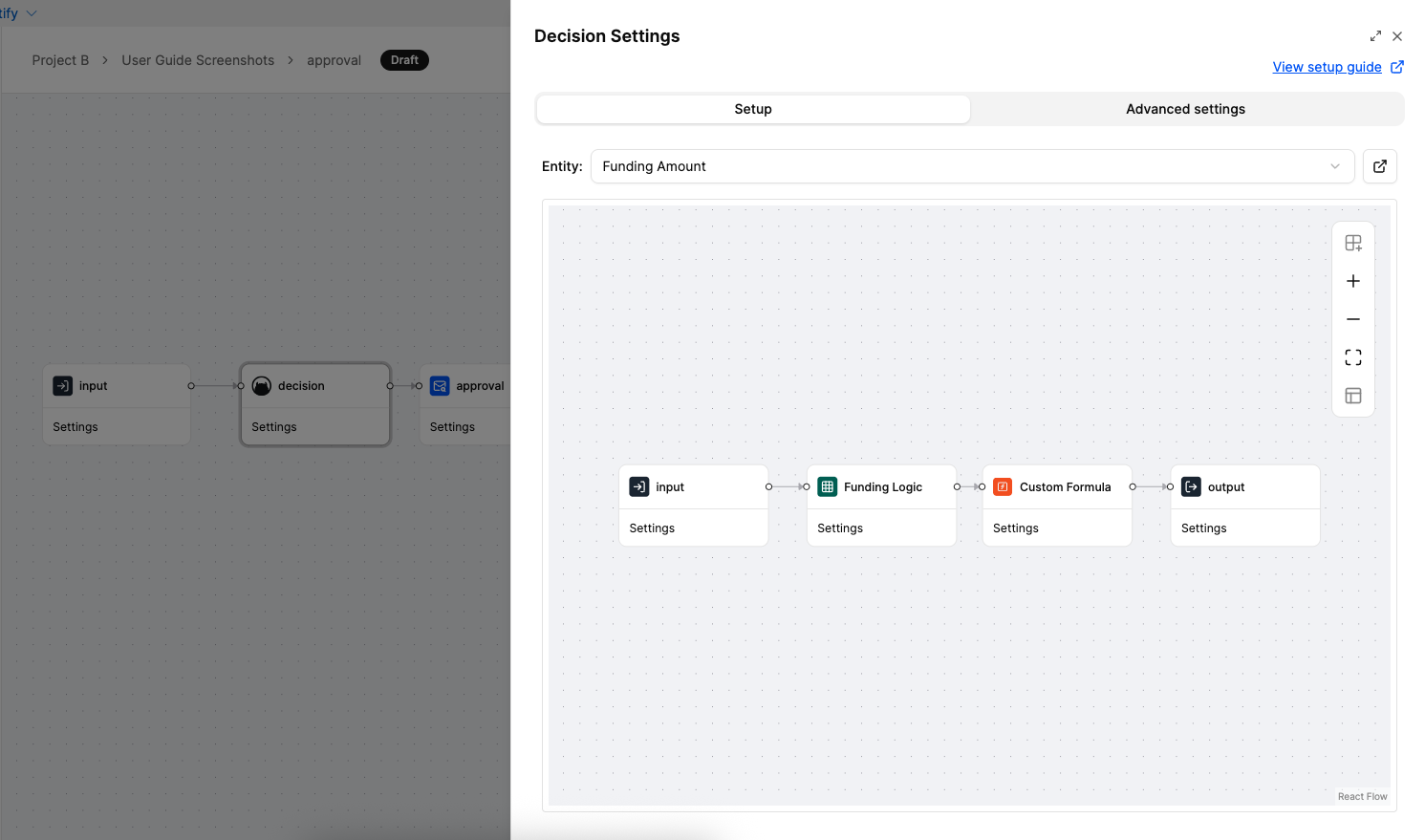
This example demonstrates how to use a Decision Node in a workflow to reference an existing decision. The “Funding Amount” decision is selected and configured in the node settings, allowing the workflow to reuse the decision logic without duplicating it. When the workflow executes, the Decision Node calls the “Funding Amount” decision, evaluates it with the input data, and returns the result, which can then be used by subsequent nodes in the workflow.
When to Use It?
Use a Decision Node when:
- You want to create modular, reusable Decisions.
- You want to reuse existing Decision across multiple Decisions or Workflows.
- You need to ensure consistency by maintaining a single source of truth.
- You want to make future updates easier by centralising decision management.
- You need to separate business rules from code and workflow logic for better governance.
- You need to process multiple items through the same decision logic using loop mode.
