Session service
Overview
The Console session service allows products to retrieve or extend a user session when the user is accessing the Console portal.
This service is used by products that integrate their web applications within the Console portal. When a user logs in to Console, a session is automatically created and stored in the dev.con.sid.local cookie. This cookie is forwarded to the product backend when pages are accessed within Console. The session ID can then be used to retrieve or extend the user session.
Session details
This example shows a typical response from the session service:
{
"acctType": "account:public_officer",
"attrs": { "view": "tenant"},
"email": "chun_teck_goh@hive.gov.sg",
"firstName": "Chun Teck",
"lastName": "Goh",
"name": "Chun Teck Goh",
"userPrincipalName": "chun_teck_goh_hive.gov.sg#EXT#@gdstechpassstg.onmicrosoft.com",
... more fields here ...
"productRoles": [ // Product roles that are pre-configured in your product
{
"productIds": ["shiphats", "shiphatsdev"],
"role": "product_admin"
},
{
"productIds": ["devconsole"],
"role": "product_ops"
}
],
"roles": [ // App roles that you can configure in your product
"product_admin",
"shiphats_portal_user",
"shiphats_portal_ops"
],
"tenantRoles": [ // Tenant roles retrieved from TechBiz
{
"accounts": [
{ "id": "<UUID1>", "name": "CT-Techbiz-Demo-Sub1" },
{ "id": "<UUID2>", "name": "CT-Techbiz-Demo-Sub2" },
{ "id": "<UUID3>", "name": "CT-Techbiz-Demo-Sub3" },
],
"role": "tenant_manager"
},
{
"accounts": [
{ "id": "<UUID2>", "name": "CT-Techbiz-Demo-Sub2" },
{ "id": "<UUID4>", "name": "CT-Techbiz-Demo-Sub4" },
],
"role": "tenant_billing"
}
]
}Session roles
You may want to fetch session details to check what roles a user has. The following types of roles are available:
- App roles
- Product roles
- Tenant roles
App roles
App roles are configured by your team in the TechPass application associated with your product. If you assign a user to these roles, they will appear in the session details.
Product roles
Product roles are predefined in Console. They are created as app roles in the TechPass application linked to your product.
product_admin: Full access to your product’s configuration pagesproduct_ops: Read-only access
If assigned, these roles will appear in the user’s session.
Tenant roles
Tenant roles are assigned through TechBiz. If a user holds a role such as subscription admin, technical admin, or billing admin in TechBiz, they will receive a corresponding tenant role in Console.
| TechBiz role | Console role |
|---|---|
| Subscription admin | tenant_manager |
| Technical admin | tenant_admin |
| Billing admin | tenant_billing |
Single session per user
Console supports only one active session per user at any time.
If a user logs in on a new browser while an existing session is active, a new session is created and the previous session is automatically revoked. The user’s previous browser session will no longer be valid.
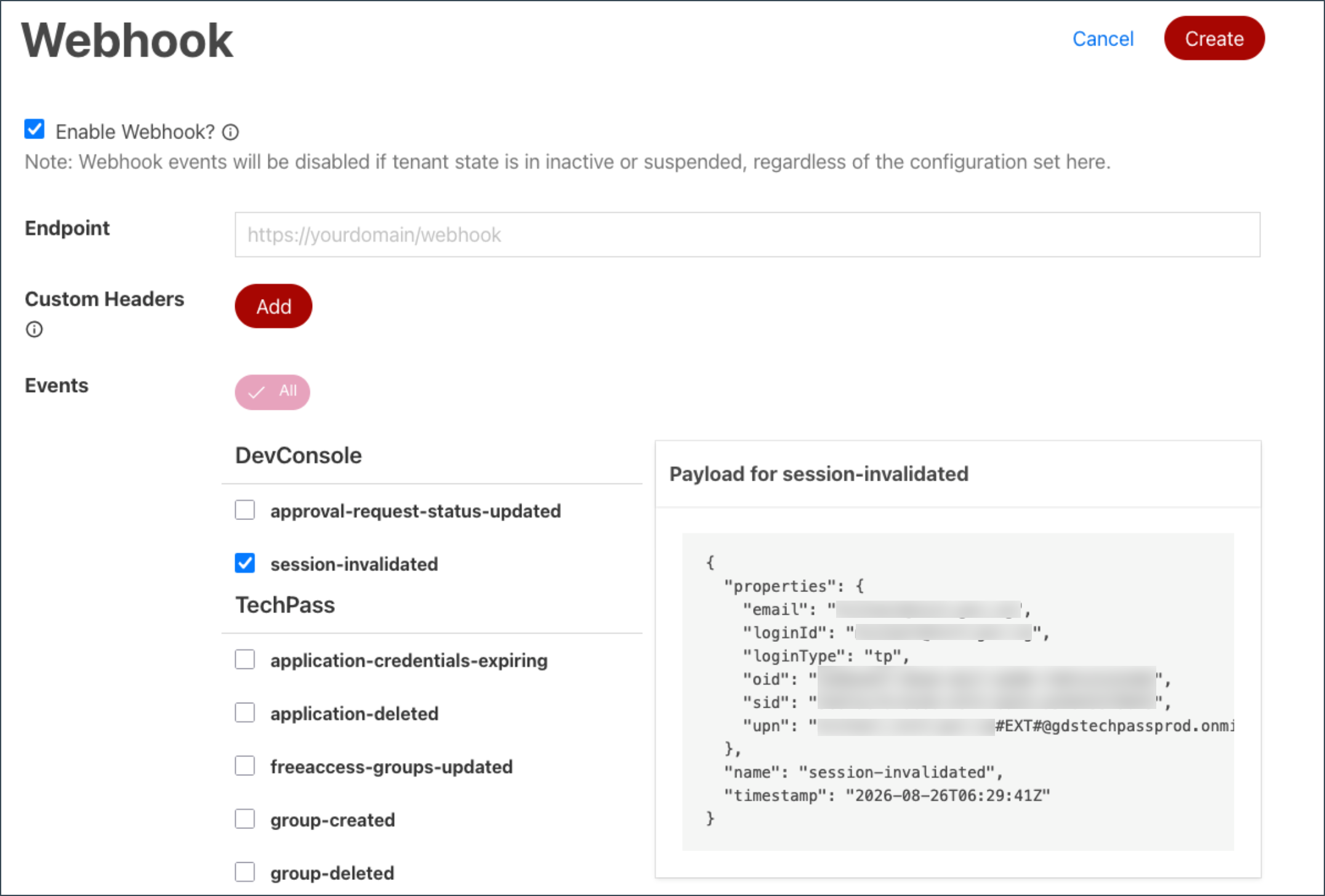
Session invalidation webhook
A session-invalidated webhook is triggered in the following cases:
The user logs out of Console in the browser.
The user logs in to Console while an existing session is active. The new session is created, and the webhook is sent for the old revoked session.
To subscribe to this webhook, follow the TechPass webhook guide. The webhook name in TechPass is session-invalidated.
Session verification and extension
When a user navigates to product pages within Console, the dev.con.sid.local cookie is included in the request.
The Get session info with roles API may be called to verify the session and retrieve the user identity.
By default, the session service automatically extends the user session when the API is called. The service assumes that API calls are triggered by user activity, such as navigation between pages.
Session timeout and lifetime
- Idle timeout (no activity across products within the Console portal): 20 minutes
- Maximum lifetime (when the session continues to be extended): 2 hours
Security and performance considerations
The application should verify the session:
- When backend APIs are invoked
- When navigation occurs between pages
Since frontend applications may make multiple API calls to backend services or microservices, session information may be cached to reduce calls to the session service and improve overall performance.
If caching is implemented, follow these guidelines:
- Always read the session ID from the
dev.con.sid.localcookie. If the session ID is empty or the cookie is missing, treat the request as unauthenticated. - Cache session information for up to 2 minutes, using the session ID as the cache key.
- Read operations: Cached session information may be used.
- Write operations or access to sensitive information: Always call the session service to verify the session.
API specifications
- Staging: Session service (staging)
- Production: Session service (production)
