Pre-onboarding
Cloud File Transfer (CFT) subscriptions are managed through TechBiz, the central Whole-of-Government (WOG) platform for Public Officers to subscribe to Singapore Government Tech Stack (SGTS) products.
Complete the following steps before subscribing to CFT in the TechBiz portal:
- Understand CFT pricing and billing — to plan your cost centre and billing setup
- Plan your subscription structure — to determine how to organise your projects in TechBiz
- Gather subscription requirements — roles, contacts, and billing details required for subscription
Step 1: Understand CFT pricing and billing
CFT uses a usage-based billing model — there are no fixed subscription fees or plans to select. Charges are based on actual usage and billed quarterly.
For full pricing details, refer to CFT Pricing (TechPass login required).
How billing works:
Usage is counted at upload.
A file is counted as a transfer once CFT receives it from the Sender Application. If a transfer error originates from the sender, the transfer is still counted and charged. If the error is attributable to CFT, it is not charged.
Re-uploads are counted as new transfers.
Each submission by the Sender Application is counted independently. If CFT encounters an internal error, its built-in retry mechanisms handle reprocessing — no re-upload is required and no additional charge applies. If a file appears stuck, raise a support request rather than re-uploading.
Billing is quarterly, based on actual usage.
A monthly preliminary invoice is available via email and in the TechBiz Portal for early visibility.
The quarterly invoice goes to your agency’s finance department, who forwards it to the Billing Admin you specify in TechBiz.
Usage is tracked per CFT project.
All transfers across all workflows within a project are aggregated before tiered pricing is applied — grouping more workflows under one project can help you unlock better rates.
GST applies to all invoices.
Step 2: Plan your subscription structure
TechBiz organises your CFT subscription into three levels: Subscription Account → System → Resource (CFT Project).

| Level | What it is |
|---|---|
| Subscription Account | Your agency’s billing account in TechBiz, linked to one Cost Centre. |
| System | A grouping that represents your application or service. Linked to a Digital Governance Platform (DGP) subsystem ID — if one is not yet available, this field can be skipped and updated later. |
| Resource | A CFT project within a System — for example, UAT, Staging, or Production. |
Your subscription structure determines how your projects and billing are organised. Choose the structure that fits your agency’s setup.
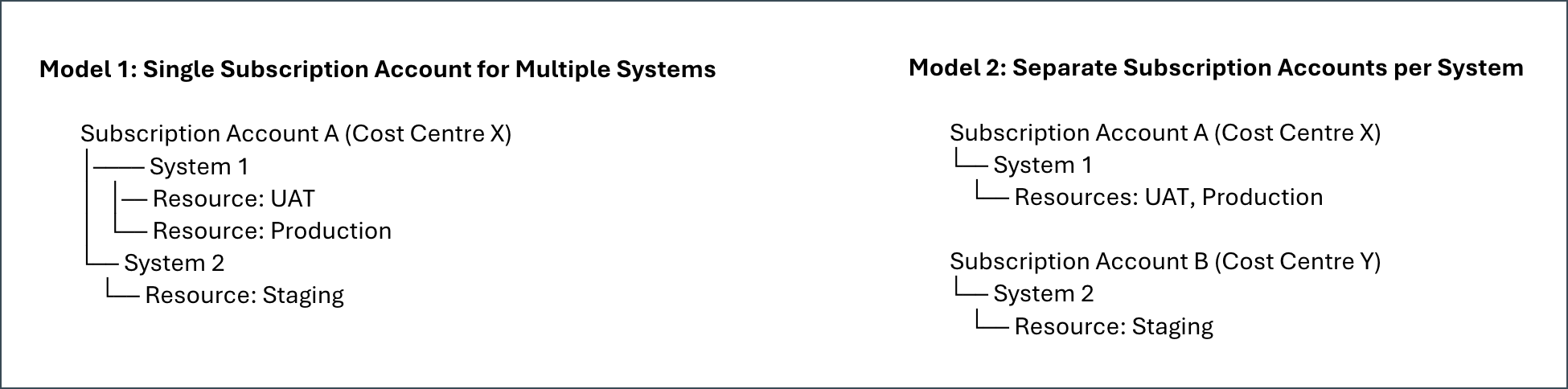
If your project involves multiple agencies or external partners:
- Each Subscription Account is linked to a single Cost Centre — split billing is not supported.
- Only one agency can own the CFT subscription and be responsible for billing.
- Any cost-sharing or inter-agency payments must be handled outside of TechBiz and CFT.
- Align billing arrangements with partner agencies before subscribing.
Step 3: Gather subscription requirements
Before subscribing in the TechBiz Portal, ensure the following are prepared.
1. Assign key roles
Assign the following roles before subscribing. Note that confirming the Tenant Approver may require additional lead time.
| Role | Who | What they do | Required details |
|---|---|---|---|
| Subscription Admin (Primary & Secondary) | Public Officers | Manages the TechBiz Subscription Account — billing, invoices, and user access. At least one Primary and one Secondary required. | Full name, work email, mobile number |
| Billing Admin | Public Officer | Receives and manages billing invoices from your agency’s finance department. | Full name, work email, mobile number |
| Tenant Approver | CIO or CIO delegate | Approves your CFT subscription request in TechBiz. | Full name, work email, designation |
Note: The Tenant Approver approves your subscription in TechBiz. The Tenant Manager — a separate role — is the person who manages your CFT project after setup. The Subscription Admin automatically becomes the initial Project Tenant Manager.
2. Prepare billing information
- Sub Business Unit (SBU)
- Agency Department
- Cost Centre
- Fund Centre (GovTech only)
3. Confirm TechBiz access
To access the TechBiz Portal, the following are required:
- A non-SE GSIB or Government Managed Device (GMD)
- An active TechPass account or TechPass OTP
Next steps
After going through the steps in the previous sections, you can now proceed to subscribe to CFT via TechBiz.
Need assistance?
- Book a CFT engagement session for subscription or pricing support
- Raise a support request for technical queries
Subscription requirements
Before you can subscribe to CFT in the TechBiz Portal, ensure the following roles are assigned and required information is prepared.
1. Assign key roles and prepare contact details
| Role | Who Can Be Assigned | Required Details |
|---|---|---|
| Subscription Admins (Primary & Secondary) | Public Officers | Full name, work email, mobile number |
| Billing Admin | Public Officers | Full name, work email, mobile number |
| Tenant Approver | CIOs or CIO delegates | Full name, work email, designation |
2. Have the following billing info ready
- Sub Business Unit (SBU)
- Agency Department
- Cost Centre
- Fund Centre (GovTech only)
3. Ensure access to TechBiz
To access the TechBiz Portal, you’ll need:
- A non-SE GSIB or Government Managed Device (GMD)
- An active TechPass account or TechPass OTP
Next steps
You can now proceed to subscribe to CFT via TechBiz.
Need more help?
- Book a CFT engagement session for subscription or pricing support
- Raise a support request for technical queries
