Configure webhook notifications
In the Webhooks section of the admin portal, you can create and modify your webhook notifications. To know more about how to use webhook notifications, refer to the Webhook notifications section.
Create webhooks
To create a webhook notification, follow these steps:
- On the sidebar, click Webhooks.
- From the Project Selection drop down, select a project from the dropdown list.
- Click Create Webhooks.
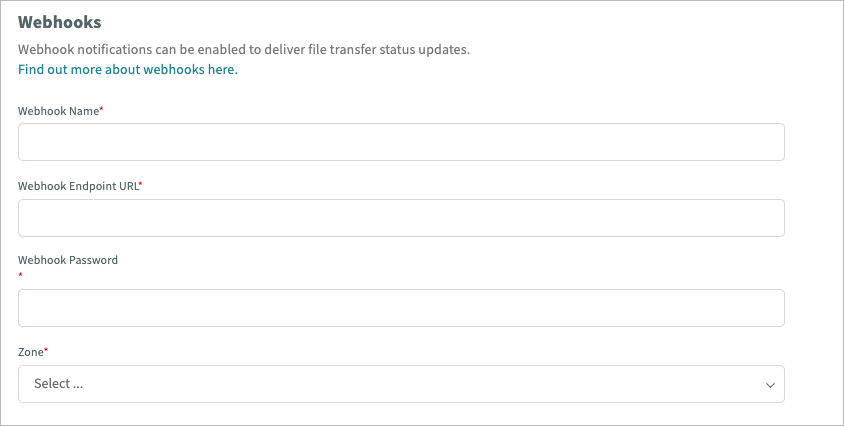
- Configure the webhook details.
- Click Submit.
Configure webhook details
| Field | Description | Required |
|---|---|---|
| Webhook Name | The webhook name. | Yes |
| Webhook Endpoint URL | The endpoint URL of the webhook. Only HTTPS endpoint URLs are supported. Important: CFT does not support webhook endpoints that use the default AWS API Gateway endpoint, which follows the URL format .execute-api.ap-southeast-1.amazonaws.com. If you are using AWS API Gateway for a webhook endpoint, we recommend setting up a custom domain for your API Gateway. Your custom domain must also use Route 53 to route to API Gateway with an A Alias record. |
Yes |
| Webhook Password | The secret string that is hashed to generate a signature, verifying that webhook notifications are genuine and sent by CFT. The string should not exceed 50 characters. | Yes |
| Zone | Locates the zone where the webhook is set up, either Internet or Intranet. | Yes |
View webhooks
To view webhook details, follow these steps:
- From the sidebar, click Webhooks.
- Select a project from the dropdown list. A list of the webhooks in the project is displayed.
- Select a webhook from the list. To search for a specific webhook, enter the webhook name in the Search box.
Modify webhooks
To modify a webhook, follow these steps:
View the list of webhook notifications in your project.
Click the Actions menu icon of the application you want to modify.
Choose one of the following actions:
- View Details - View webhook details.
- Edit - Make changes to the webhook.
- Deactivate - Deactivate an active webhook.
- Activate - Activate an inactive webhook.
- Delete - Delete a webhook. The webhook should be inactive before it can be deleted.
