Manage SonarQube token
Subscription Admins (SAs) and Project Admins (PAs) can view, copy, and refresh the token used for authenticating SonarQube scans and integrations.
SHIP-HATS sends notification emails to Project Admins when tokens are nearing expiry.
Prerequisites
Ensure the following:
- You are a Subscription Admin (SA) for the subscription, or a Project Admin (PA) for a SHIP-HATS project within the subscription.
Steps
In Console, go to Products > SHIP-HATS, and select the required subscription to open the Workspace.
For detailed steps, see Access Workspace.
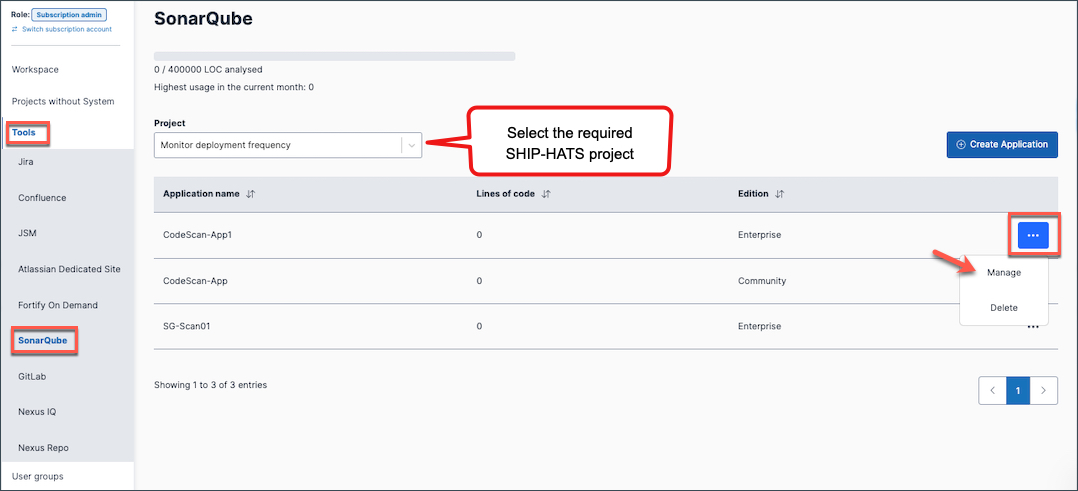
Click Tools > SonarQube.
Select the required SHIP-HATS project.
Select the ellipsis (…) next to the Application name and then select Manage.
In the Token tab, you can:
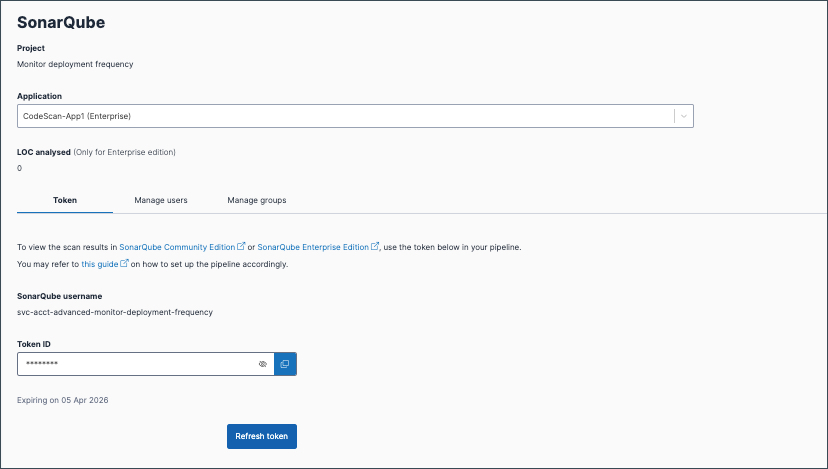
View the token — Select the eye icon next to the token.
Copy (retrieve) the token — Select the copy icon next to the token.
Refresh (renew) the token — Select Refresh token. The refreshed token is immediately active and replaces the previous token.
Things to note
- If you have refreshed the token, the previous token will become invalid immediately. Update any CI/CD pipelines or integrations that use the previous token.
