Sensitive-High (SH) data transfers
CFT supports the secure transfer of Sensitive-High (SH) data using the Sensitive-High Transfers feature.
When transferring Sensitive High (SH) files through CFT, agencies can choose one of these options:
Option 1: Sensitive-High transfers with scanning:
- Malware scanning by default
- Optional CDR (Content Disarm and Reconstruction)
- Files are decrypted for scanning, then re-encrypted for delivery
- See guidelines and steps
Option 2: Sensitive-High transfers without scanning (Scan bypass)
- Pure file transfer service without malware scanning and CDR
- Full encryption maintained throughout transfer
- Agency accepts complete security responsibility
- See guidelines and steps
Option 1: Sensitive High Transfers with Scanning
Important considerations
You may send Sensitive High files via CFT under the following conditions:
- The incoming encrypted files must be decryptable by CFT (PGP or SLIFT) for scanning (CDR is possible but optional).
- CFT will re-encrypt files before making them available to receivers
- CDR scanning is available as an optional security measure
Prerequisites
Before proceeding:
Agency should risk accept on the data exposure risk brought about by:
- Decrypting of files for CDR scans.
- Time that the SH file remained in CFT bucket folder for the receiver to pick up the file due to the minimal retention period is day for S3 bucket (Since pushing of file to receiver is not possible)
Agency should risk accept on possible malware entry to their system even after CDR scan (as CFT cannot guarantee the effectiveness of CDR COTS product)
Agencies must agree to the outlined responsibilities in the CFT SH File Transfer Acknowledgement below.
SH File Transfer Acknowledgement [Click to view]By choosing to send “Sensitive-High” data via CFT’s workflows, you acknowledge and accept the following:
User Responsibility for Security
• I understand that CFT facilitates secure transfer but does not assume responsibility for any unintended data exposure or exfiltration.
Risk Assessment
• I have conducted an appropriate risk assessment in consultation with my Agency Security Officer/Representative and/or IDSC, and have addressed all concerns related to SH data transfer risks.
Encryption Requirements
• I will ensure that all Sensitive-High data (SH) is encrypted using CFT supported security technologies (i.e. PGP and/or SLIFT) prior to initiating any transfer through CFT.
Data Handling during Processing
• I acknowledge that CFT will temporarily decrypt all files, including SH files, in this workflow during scanning and CDR processing, before re-encrypting them using the designated receiver’s key.
No Data Storage by CFT
• I acknowledge that CFT does not retain or store any agency files and only handles file transmission. Receiver Application’s Obligations
• I will ensure that the receiving application retrieves the SH file from the CFT clean folder as soon as possible after it becomes available.
Limitations of Malware Scanner and CDR
• I understand and accept that the Malware Scanner and Content Disarm and Reconstruction (CDR) reduce but does not eliminate malware risk totally. No Malware Scanner and CDR solution guarantees complete protection.
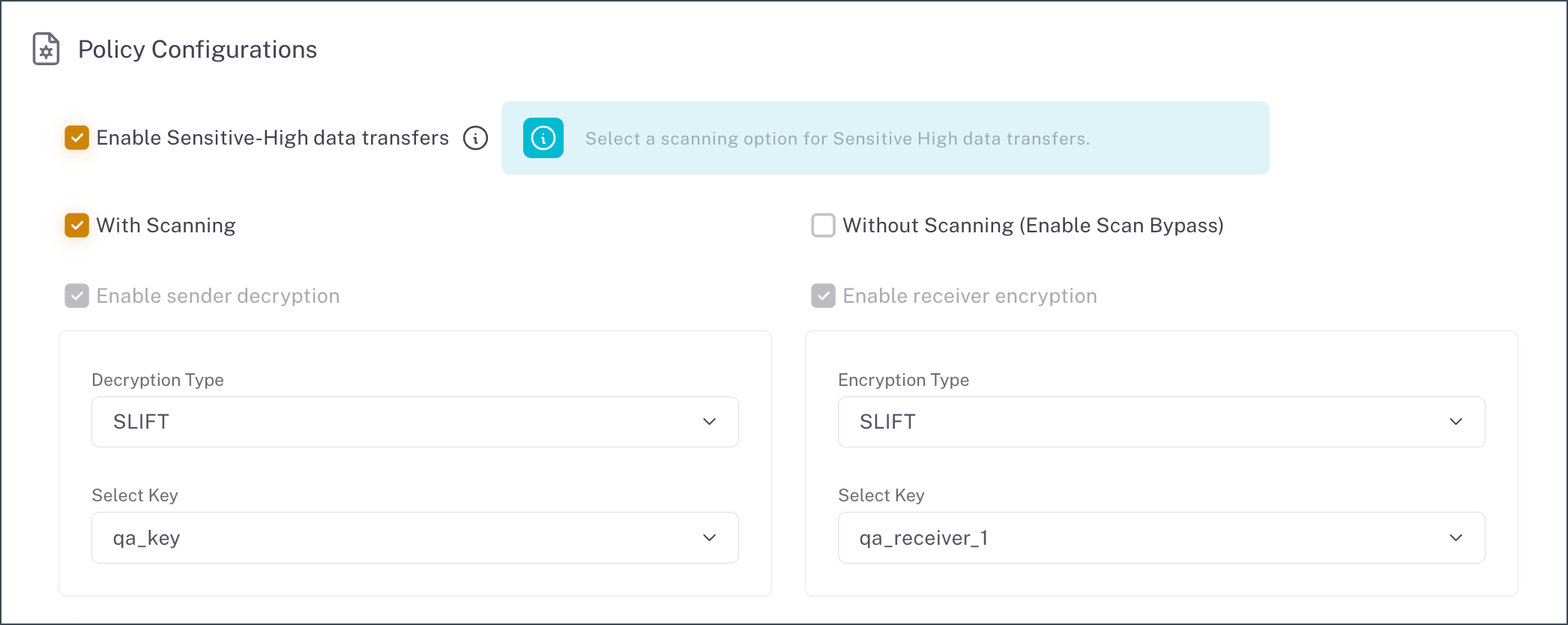
Set up Sensitive-High transfers with Scanning
| Step | Task | Environment |
|---|---|---|
| 1 | Ensure that you have reviewed the Prerequisites. | Tenant system |
| 2 | Enable Sensitive-High transfers in your workflow. | CFT Admin Portal |
| Select With Scanning and agree to the terms and conditions. | ||
| Configure decryption and encryption, as required for With Scanning option. | ||
| Optional | Enable Scan Bypass webhook notifications in a workflow. - File Bypass Failed: Triggered if the file was found to not be encrypted, which is required for Scan Bypass and Sensitive-High transfers. Note: If the scan bypass is successful, the FileReadyForDownload webhook event is triggered. |
CFT Admin Portal |
Option 2: Sensitive High transfers without scanning
Choose this option when you require complete end-to-end encryption and are prepared to manage all security risks internally.
Important considerations
Users must acknowledge that:
- CFT will not decrypt or scan data transferred through this workflow
- CFT bears no responsibility for data exposure or exfiltration during the transfer process
- Users must implement appropriate encryption using approved security technologies before initiating transfers
- A thorough risk assessment addressing potential data exposure concerns must be completed
Prerequisites
Before proceeding:
- Complete a thorough risk assessment addressing potential data exposure concerns.
- Ensure files are pre-encrypted using approved standards. View supported encrypted file types.
- Ensure that files are not password-protected.
- Review and understand all important considerations.
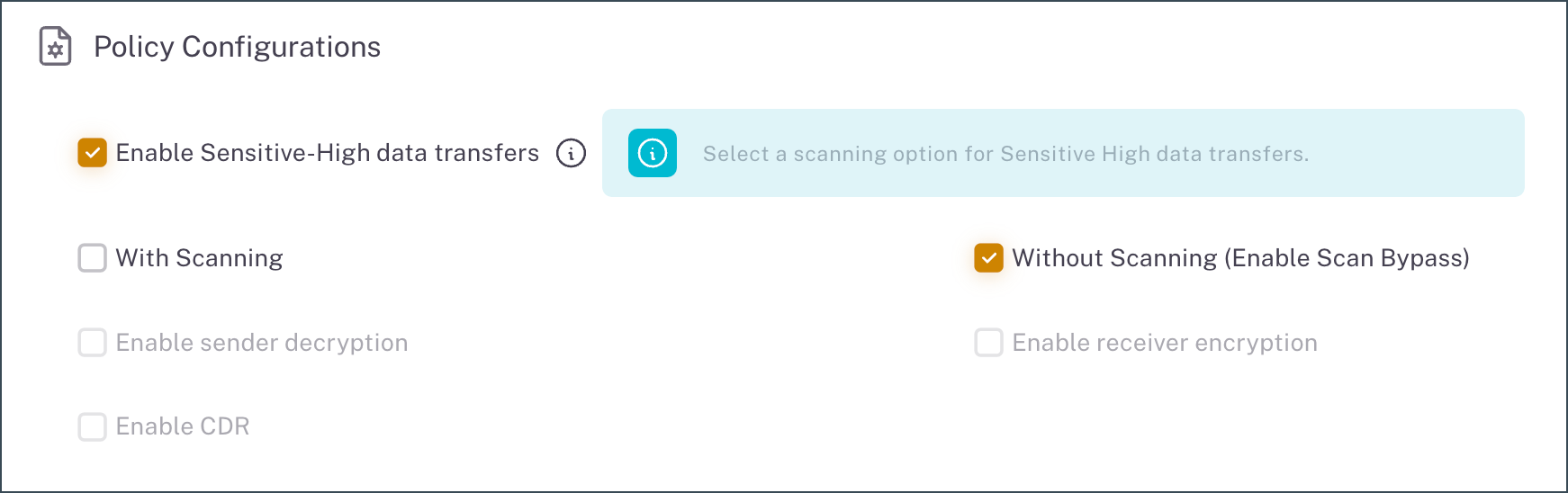
Set up Sensitive-High transfers without scanning (Scanner bypass)
| Step | Task | Environment |
|---|---|---|
| 1 | Ensure that you have reviewed the Prerequisites. | Tenant system |
| 2 | Enable Sensitive-High transfers in your workflow. | CFT Admin Portal |
| Select Without Scanning and agree to the terms and conditions. | ||
| Optional | Enable Scan Bypass webhook notifications in a workflow. - File Bypass Failed: Triggered if the file was found to not be encrypted, which is required for Scan Bypass and Sensitive-High transfers. Note: If the scan bypass is successful, the FileReadyForDownload webhook event is triggered. |
CFT Admin Portal |
