Interrupt
Beta Feature: This node is currently in beta. Features and functionality may be subject to changes.
The Interrupt Node cancels a running Delay Node, allowing a workflow that is waiting on a delay to resume immediately. This is useful for time-sensitive scenarios where you need to bypass a scheduled wait — for example, cancelling a reminder delay when an approval has already been received.
Important: Simulation and testing are not supported for the Interrupt Node. Use Run Workflow to test workflows containing Interrupt Nodes.
How Does It Work?
Setup Steps:
- Your workflow must contain at least one Delay Node
- Add an Interrupt Node to your workflow graph
- Click on the Interrupt Node settings to open its configuration
- Select the Target Delay Node — the specific Delay Node that this Interrupt will cancel when executed
Configuration:
| Field | Description |
|---|---|
| Target Delay Node | Required. Select the Delay Node in the current workflow that should be interrupted. Only Delay Nodes in the same workflow are available for selection. |
Behaviour:
When the Interrupt Node is executed during a workflow run:
- If the target Delay Node is currently waiting (sleeping), it is immediately cancelled and the workflow continues from that point
- If the target Delay Node has not started yet, it will be skipped entirely when reached — no delay will occur
The Interrupt Node passes through its input data unchanged. It does not modify the workflow payload.
Example
Email Reminder with Interrupt
This example shows a workflow that sends an approval email and a follow-up reminder, using the Interrupt Node to cancel the reminder delay if the approval is received in time.
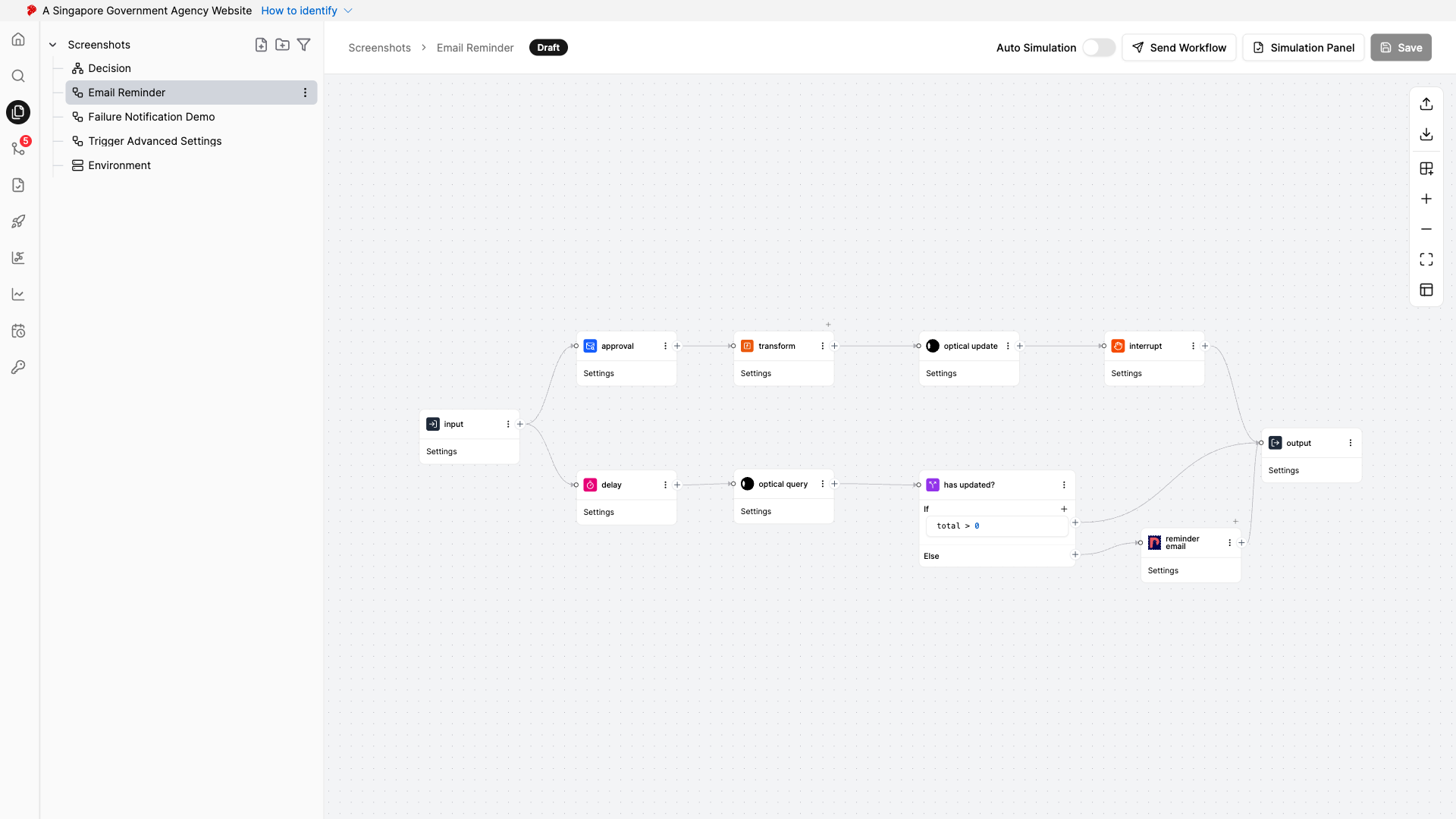
How it works:
The workflow splits into two parallel branches after the input:
- Upper branch (Approval path): Sends an approval email, transforms the response, updates an external system (WebSG Custom), then executes the Interrupt Node to cancel the delay in the lower branch
- Lower branch (Reminder path): Waits on a Delay Node, then checks the external system to see if the approval has already been processed. If not, it sends a reminder email
If the approval comes in before the delay expires, the Interrupt Node cancels the delay — skipping the reminder entirely. If the delay completes without interruption, the workflow checks whether a reminder is still needed and sends one if appropriate.
When to Use It?
Use Interrupt Node when:
- You want to cancel a pending reminder if an action has already been taken
- You need to skip a waiting period based on an external event
- You want to implement timeout patterns with early exit (e.g., cancel a delay when a response is received)
- You have parallel workflow branches where one branch should abort a delay in another
