Delay
The Delay Node pauses workflow execution for a set period of time before continuing to the next step. It is useful when you need to hold or stagger actions, such as sending reminders, waiting for external processes to complete, or pacing automated tasks.
How Does It Work?
Setup Steps:
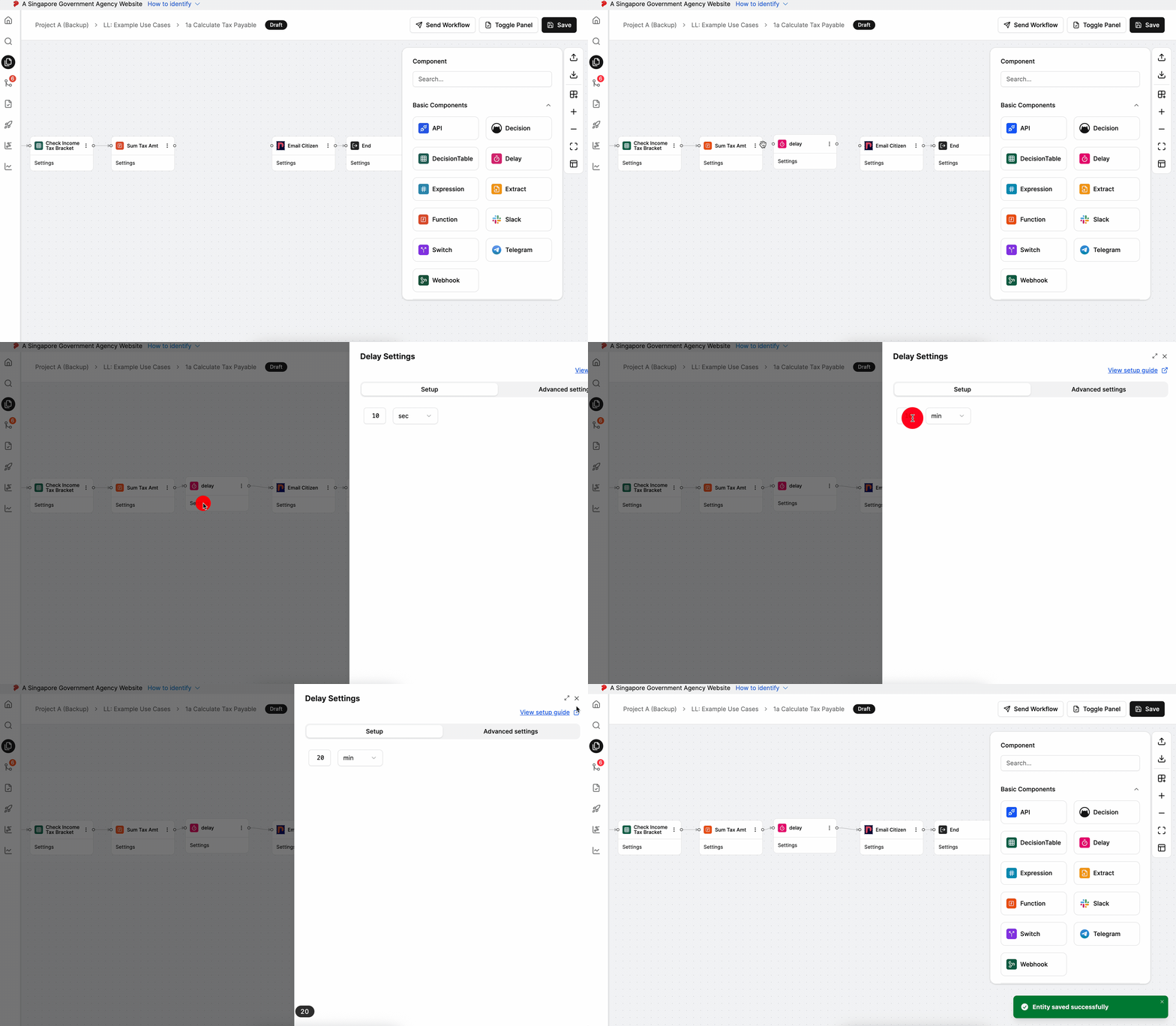
- Build your workflow using Graph Edit Mode (minimum setup: input node → delay node → output node, but you can add more nodes as needed)
- Click on the delay node settings to open its configuration
- Configure the following data:
- Select the delay duration using one of the time units:
- Seconds
- Minutes
- Hours
- Days
- When the workflow reaches this node, execution pauses for the specified time period
- Select the delay duration using one of the time units:
Output:
The Delay Node passes through the input data unchanged after the specified delay period completes. All data from previous nodes remains accessible to subsequent nodes in the workflow.
When to Use It?
Use Delay Node when:
- You want to space out notifications (e.g., send a reminder 1 hour later).
- You need to wait before retrying an action (e.g., recheck system status after 10 minutes).
- You want to pace tasks to avoid overloading systems or APIs.
- You need to hold execution until a suitable time window (e.g., resume next day).
