Frequently Asked Questions (FAQ)
If you are not finding the answer to your question in this documentation, these frequently asked questions might help you. If you are still unsure, do not hesitate to let our team know.
Getting Started
What is Workflow?
Workflow helps government agencies automate processes and build business rules with a drag-and-drop visual editor, pre-connected to whole-of-government tools, with compliance built in. It provides two main building blocks:
- Workflow: Automate flow through the use of nodes (i.e. Triggers, AiBots, API, Decision, Slack, Email Approval).
- Decision: Build business rules and logics to evaluate input data and return an outcome, that can be applied consistently across technology systems for (e.g. eligibility checks, validations or computations).
Workflow operates as a Software-as-a-Service (SaaS) platform hosted on the Government Commercial Cloud (GCC) and supports systems up to Restricted Sensitive Normal (RSN) classification.
How do I get access to the platform?
To access the platform:
- You need a valid TechPass account and non-SE GSIB, COMET, or SEED machine
- Sign up from workflow.tech.gov.sg
- Refer to the email details
The platform will also be available for subscription soon via the TechBiz Portal.
What are the different user roles in the platform?
The platform has three user roles with different permissions:
- Administrator: Full access to create projects, manage users, generate access tokens, and manage project assignments
- Editor: Can create, read, update, and delete workflow, decisions, test suites, environment variables within assigned projects
- Viewer: Read-only access to view projects and its entities.
When to use Workflow?
| Workflow | Plumber | Power Automate | |
|---|---|---|---|
| Workflow style | Directed acyclic graph based with branching, loops, parallel, multiple paths | Linear, step-by-step | Flow-based with conditions, branching |
| Complex logic support | Advanced (IFs, loops, custom Javascript, child workflows) | Basic | Moderate–High (conditions, approvals, expressions) |
| Learning curve | Medium | Low | Medium |
| Durability | Auto resume from state, long-running workflows, exactly-once semantics | Limited | Limited (timeouts/retries) |
| Built-in rule engine | Yes | No | No |
| Integrations & ecosystem | >20 nodes WOG-focused ecosystem | ~15 actions OGP products integration | Large ecosystem with Microsoft apps |
| Best For | Complex logic, mission-critical workflows with WOG approved tools | Singapore Government workflows with OGP tools | Microsoft-centric workflows |
How much does Workflow cost?
Workflow: Early adopters can enjoy the service for free while pricing is being finalised. There is no indicative or estimated timeline for pricing at this moment.
WOG / Third-party integrations: Although Workflow has native integrations with some WOG products, we do not have influence over their product subscription costs. Some products may have started cost-recovery (i.e. AISAY requires a subscription to obtain an authentication key), while others like Ownself Gather remain free to use at this time. Please check with the respective product teams for their latest pricing.
Workflows and Decisions
When should I use Workflows vs Decisions?
Use Workflows when you need to:
- Automate processes across systems
- Connect nodes (i.e. Trigger inputs, AI, API, Decision, Slack, Notification) to define the workflow automation.
- Track and monitor execution, retries, long-lasting workflows using a durable system
Use Decisions when you need to:
- Apply rules or policies consistently across systems (eligibility checks, validations, computation)
- Evaluate conditions and return results
- Separate business logic so rules can be updated independently
Note: Workflow and Decision are designed to work together. Decision can be embedded within Workflow to apply business rules as part of broader process automation.
Can Decisions make external API calls?
No, Decision nodes cannot make external API calls. For security and performance reasons, API calls are disabled when using Function node.
If you need to fetch external data, you could:
- Fetch the data using the Workflow API node
- Pass the fetched data as input to Decision node for processing
This separation keeps rule evaluation isolated, efficient, and independent of external dependencies during runtime.
Can the platform handle complex business rules?
The platform supports varied decision modeling with:
- Data Types: String, Number, Boolean, Date and Time, Array, and Objects, each with its own set of operators and built-in functions
- Decision Nodes: Decision Tables, Functions, Expressions, and Switch nodes can be combined in Decision graphs
- Decision Tables: Spreadsheet-like interface with different hit policies (First for single result, Collect for all matching rules)
What if I accidentally create duplicate or overlapping rules?
The platform will return the output response of the last successful decision node executed, based on the hit policy configured in Decision Table and Switch nodes.
To avoid issues with overlapping rules:
- Use simulation and testing to validate your implementation
- Run regression tests to ensure accuracy
- Follow best practices to avoid writing overlapping decisions intentionally
- Use decision nodes to set checkpoints on outcomes when overlap is intended
Why do we use triple braces ({{{ }}}) instead of double braces ({{ }}) in Workflow templating language?
Triple braces render the value exactly as-is without escaping. Double braces automatically escape special characters for safe HTML display, which can unintentionally modify API keys or tokens. Using triple braces preserves the original value, ensuring authentication works correctly with external systems.
Environments and Deployment
What is the difference between Staging and Production environments?
The platform provides two isolated environments for each tenant by default. Below is a recommended approach, but tenants are free to use production environment only. If you need a custom setup, please reach out to the team.
Staging Environment:
- Used for development, testing, and validation
- Functional testing with real integrations
- Regression and performance testing
- Dedicated staging API endpoint with separate compute resources
- Test activities do not affect production performance
Production Environment:
- Dedicated to live business operations
- Execute published workflows and decisions for real business processes
- Separate compute and database infrastructure from staging
- Production API endpoint with performance monitoring
- Protected from test load impacts
Each environment has its own API endpoints and requires separate access tokens.
What is the difference between Draft, Published, and Released versions?
Draft: Work in progress that is not published. Locked by the last user who saved it. Used for authoring and local simulation.
Published: Published version available for testing in the staging environment or use direcly in production environment. It is a snapshot that can be tested with actual integrations.
Released: Versioned production-ready release (e.g., release/1.0.0) made available for live business operations.
Typical workflow: Draft → Publish → Test in Staging → Release → Execute in Production
How do I release my workflow or decision to Production?
- Develop: Author your workflow/decision in OMS using the drag-and-drop editor
- Simulate: Test with mock data locally to validate logic
- Save: Save as draft version
- Publish: Publish your changes to create a published version
- Test in Staging: Execute via staging API endpoints with real integrations
- Monitor: Check execution traces and debug any issues
- Regression Test: Run all test suites to ensure no breaking changes
- Release: Create a versioned release for production
- Execute in Production: Use production API endpoints for live operations
Is there a standard process or approval workflow to promote releases from Staging to Production?
Workflow provides two runtime environments (Staging and Production) but does not enforce a built-in approval gate between them. Agency teams are free to define their own promotion process and governance mechanisms based on their internal policies.
The platform supports this flexibility by:
- Keeping environments fully isolated (separate compute, databases, and access tokens)
- Allowing teams to test in Staging before creating a production Release
- Providing role-based access control (only Administrators can manage tokens and releases)
Refer to Releases for the available release workflow.
What is the recommended approach for versioning and managing multiple Workflow endpoints concurrently?
Use Releases. Each release creates a versioned endpoint (e.g., release/1.0.0, release/2.0.0) that can be called independently. Multiple release versions can coexist and be executed concurrently via the branch parameter in your API call, allowing consumers to migrate at their own pace.
How do I route requests to updated Workflow endpoints when business rules change?
When business rules change:
- Publish the updated workflow or decision
- Create a new release (e.g.,
release/5.0.0) - Update your calling system to reference the new release version in the
branchquery parameter
Example endpoint with release version:
https://lite.production.oes.opus.gov.sg/api/workflow/namespace-id/project-id/entity-id?branch=release%2F5.0.0
Always update the release number in your API call to point to the specific release you want to execute. Previous releases remain available until you are ready to migrate.
Can Workflow releases be integrated into SHIP/HATS for automated build and deployment?
No. Workflow operates as a SaaS platform with its own release and deployment lifecycle managed through the OMS interface (Draft → Publish → Release). It does not integrate into SHIP/HATS CI/CD pipelines.
Refer to our documentation on Publishing and Releases for what’s available and the suggested flow.
Testing and Monitoring
What is the difference between Simulation and Testing?
- Simulation: Local testing within the OMS editor using mock data. Useful for rapid validation of logic during development. Available for both workflows and decisions.
- Testing: Execution in the staging environment using real integrations and actual API endpoints. Provides realistic testing before production deployment.
Both are important. Suggested Approach: Simulation for quick iterations during development, and Testing for validation with real systems before going live.
How do I run regression tests?
Regression testing in the platform allows you to re-run all test cases to ensure no breaking changes were introduced. Refer to Regression Testing.
- Create Test Suites for your workflows and decisions
- Define test scenarios with input data and expected outputs
- Import test data from Excel/CSV files if needed
- Run the regression test before publishing changes
- Review results - errors are displayed first for quick identification
Best practice: Run regression tests before every release to catch issues early.
How do I monitor workflow executions?
The platform provides comprehensive monitoring capabilities. Refer to Monitor Workflow.
- Real-time tracking: View step-by-step progress of workflow execution
- Execution traces: See detailed logs and traces for each step
- Node inspection: Click on nodes to view configuration and execution details
- Simulation insights:
- Decision Tables show visual highlighting of triggered rules
- Function Nodes display console.log output
- Switch Nodes show which branch was taken
- Request/Response panels: Review input data and output results
Monitoring is available in both staging and production environments through the OMS interface.
API Execution and Access Tokens
How do I execute a workflow or decision via API?
To execute via API. Refer to Execution
- Generate Access Token: Administrator generates a token for your environment (staging or production)
- Get API Endpoint: Find your endpoint URL in OMS (includes namespace-id, project-id, entity-id)
- Make API Call:
- Method: POST
- Headers:
Authorization: Bearer <token>andContent-Type: application/json - Body: JSON payload with input data and branch parameter (main or release/)
Example endpoints:
- Staging Workflow:
https://lite.staging.oes.opus.gov.sg/api/workflow/... - Production Workflow:
https://lite.production.oes.opus.gov.sg/api/workflow/...
How long are access tokens valid?
Access tokens are valid for 1 year from creation.
Important notes:
- Separate tokens are required for staging and production environments
- Only administrators can generate and manage tokens
- Tokens are required for all API executions
- Plan ahead to regenerate tokens before they expire to avoid service interruption
What are the common API execution errors?
Refer to Common Issues.
What is the timeout limit for the API node?
The API node has a fixed timeout of 1 minute (60 seconds). If the external API does not respond within this duration, the request will automatically time out and the step will fail.
Security and Network Requirements
What data classification does Workflow support?
The platform supports systems and data up to Restricted Sensitive Normal (RSN) classification.
The platform is hosted on the Government Commercial Cloud (GCC) and adheres to key government security standards, including (but not limited to):
- TechPass authentication for all users
- CAM and IM8 compliance
- Automatic account deactivation after 90 days of inactivity
- Comprehensive audit trails for all activities
- Environment isolation between staging and production
How does user deactivation work?
The platform adheres to CAM (Corporate Access Management) and IM8 (Instruction Manual 8) compliance. The below are in placed:
- Automatic deactivation: Accounts are automatically deactivated after 90 days of inactivity
- TechPass-triggered deactivation: When users leave their organization, TechPass triggers deactivation in the platform
- Audit trails: All activities are logged and maintained for compliance
Does Workflow have rate limits or request size limits?
Yes. The platform enforces limits at two levels:
Rate Limits (Inbound Requests)
The platform rate limits inbound API requests at approximately 33 requests per second per source IP address (10,000 requests per 5-minute window). If your system exceeds this rate, additional requests will be temporarily blocked until the request rate drops back below the threshold.
For OES API endpoints (workflow and decision execution), rate limiting is applied per API path rather than per IP — each endpoint path has its own independent budget of approximately 33 requests per second.
Request Size Limits
Each inbound request body is capped at 10 MB. For details on how payload sizes work within workflows, refer to Workflow Limits & Constraints.
What this means for different integration patterns:
| Pattern | Example | Consideration |
|---|---|---|
| High frequency, small payload | FormSG submissions, GovEntry events | Monitor request rate — sustained bursts above ~33 RPS from a single IP will be throttled |
| Low frequency, large payload | Databricks batch results, file processing | Monitor payload size — keep request bodies under 10 MB; split large datasets across multiple requests if needed |
Note: If you anticipate sustained high request volumes, contact us to discuss your integration pattern and ensure the platform limits work for your use case.
Decision-Specific Questions
What hit policies are available for Decision Tables?
Decision Tables support two hit policies:
First (F):
- Returns the output of the first matching rule
- Evaluation stops after the first match
- Use when you want a single, definitive result
Collect (C):
- Returns outputs from all matching rules
- Evaluates all rules even after finding matches
- Results are collected in an array
- Use when you need to apply multiple rules
Rules are evaluated top to bottom, and the conditions within a rule are evaluated from left to right with an (AND logic).
Can I import/export Decision Tables from Excel?
Yes, the platform supports Excel import/export for Decision Tables:
- Import: Upload Excel file to populate Decision Table rules quickly
- Export: Download Decision Table rules to Excel for review or bulk editing
This feature is particularly useful for:
- Migrating existing rule sets
- Collaborating with business users who might prefer spreadsheets
- Bulk editing of rules outside the UI
What is the ZEN Expression Language?
ZEN is the expression language used in the platform for evaluating conditions and expressions:
Supported operations:
- Mathematical calculations: +, -, *, /, %
- String manipulation: len(), upper(), lower(), contains(), matches()
- Boolean logic: and, or, not, comparisons (==, !=, <, >, <=, >=)
- Date/time operations
- Array functions: sum(), max(), min(), filter(), map()
- Context access to input variables
Example use cases:
- Expression nodes for calculations
- Switch nodes for conditional branching
- Decision Table conditions
- Function node expressions
Nodes and Integrations
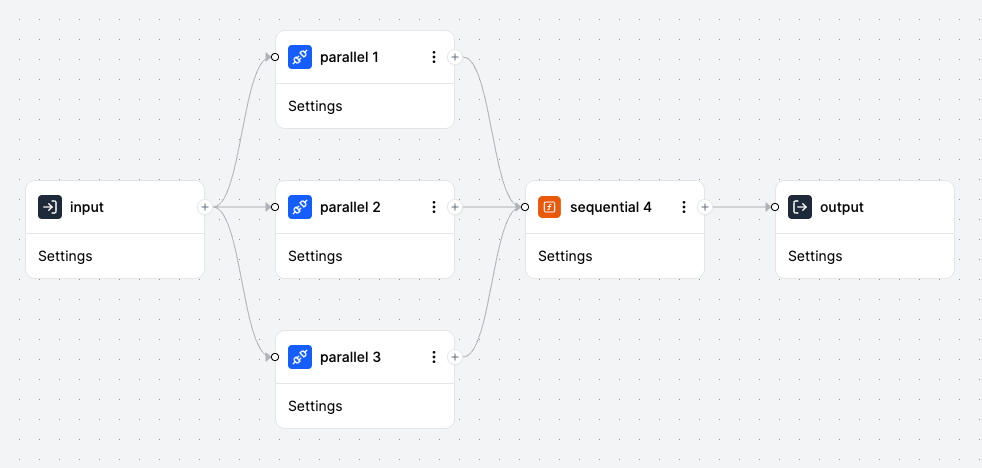
Are workflow nodes executed sequentially or in parallel?
Workflow nodes are executed sequentially in a single-threaded manner. This design ensures:
- Each node is processed in the intended order
- Deterministic behavior for consistent results
- Clear execution flow for debugging and monitoring
- State is properly maintained between nodes
For parallel processing, you can design your workflow to call multiple nodes independently then connect to subsequent step(s).
Can Decision process multiple records or only single records?
Decision can process both individual records and sets of records.
Single Record: Pass a single object as input for straightforward processing
Multiple Records:
- Pass an array of records as input
- Use loop mode in Rule nodes (i.e. Decision Table) to iterate through arrays
- Each iteration processes one record through the flow
- Results are collected from all iterations
This flexibility allows you to handle both batch and real-time processing scenarios.
What are the pre-connected Whole-of-Government tools?
Refer to the full list of available nodes for all supported integrations.
Can Workflow interact with Workday?
Workflow does not have a native integration with Workday. However, you can use the API node to call Workday APIs if you have obtained the respective API access from your agency.
Can I create my own custom nodes?
Custom node creation is not entirely self-service. If you have a use case that requires a new node, reach out to the Workflow team.
What AI capabilities does the platform provide?
The platform provides AI integration through specialised nodes:
PlatformAI’s Models, AISAY, AIBots
Note: Function Nodes cannot make external API calls, so use dedicated AI nodes for AI integrations. There are more AI capabilities currently under experimentation.
Important: According to the circular, for all AI use, agencies are responsible to take care of the data sensitivity and the use cases clearance and approvals.
Troubleshooting
My workflow is failing. How do I debug it?
- Check Execution Trace: View logs in the OMS monitoring section
- Review Node Details: Click on failed nodes to see error messages and configuration
- Verify Input Data: Ensure input format matches expected schema
- Test in Simulation: Run simulation with the same input to isolate issues
- Check Network Access: Verify external URLs are whitelisted
- Validate Access Token: Ensure token is valid and matches environment
- Review API Responses: Check response codes and error messages from external APIs
Common issues:
- Invalid input schema
- URLs not whitelisted
- Access token expired or wrong environment
- Function Node timeout (5-second limit)
Why can’t I save my workflow or decision?
Common reasons:
Version Lock: Another user may have the draft locked. Check who last modified the draft and coordinate with them.
Validation Errors:
- Ensure all required fields are filled
- Check that connections between nodes are valid
- Verify that all referenced entities exist
Permissions: Ensure you have Editor role permissions for the project.
Solution: Check for error messages in the UI, resolve validation issues, and ensure you have the latest draft version.
My approval emails are not working. What is wrong?
Check these common issues:
Email Requirements:
- Approver and requester must be different people
- Only government emails (i.e. Techpass AAD and WOG AAD) are allowed. Personal emails,
hive.gov.sgare not allowed.
Response Format:
- First line: Must contain “Approve”/“Approved”/“Yes” or “Reject”/“Rejected”/“No”
- Second line: Optional comments (max 255 characters)
- Must reply directly to the approval email (don’t forward)
Network Issues:
- Ensure email service URLs are whitelisted
- Check that workflow has network access configured
The platform hangs or becomes unresponsive on COMET/GSIB devices when accessing the Monitoring page or running Simulation with Debug. What should I do?
This issue has been resolved. The platform should no longer hang or become unresponsive on COMET or GSIB devices when accessing the Monitoring page or running Simulation with Debug. No workaround is required.
If you continue to experience any issues, please reach out to the support team.
Support and Feedback
How can I provide feedback or request features?
We welcome your feedback and feature requests:
- Feedback & Request: Workflow Service Desk
Your feedback helps us improve Workflow to better serve government automation needs.
How do I get help if I am stuck? Is there a community or support channel?
For updates, announcements, and community support:
- Join the slack channel #workflow-broadcast
- Submit feedback and questions via the Workflow Service Desk
- Refer to our documentation regularly for updates and new features
- Contact the Workflow team directly for urgent issues. If all else fails, reach out to ang_hock_kay@tech.gov.sg
The team is continuously improving the platform based on user feedback and government needs.
