Troubleshooting SFTP issues
Follow these troubleshooting tips to address common SFTP-related issues. If you require further assistance, please reach out to our team for support.
SFTP Client application
Troubleshoot errors when you have an SFTP Client application (agency or vendor side).
| Error | Cause | Solution | |
|---|---|---|---|
| 1 | The SSH Key is invalid because it is in a SSH2 format | CFT only accepts SSH Keys in OpenSSH format | Option 1: 1. In your terminal, run the command below. ssh-keygen -i -f {path-to-ssh2-public-key-file} > {path-to-openssh-public-key-file} Ensure that you enter the correct path or file name values for the SSH2 public key and the new OpenSSH public key in the command. 2. Repeat this command for your private key. Option 2: Alternatively, you may manually edit your keys. 1. Remove the highlighted parts shown below: 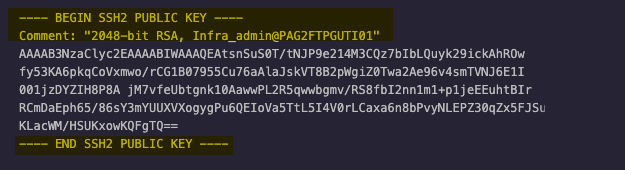 2. Add the prefix ssh-{algorithm type} to the key (e.g., ssh-rsa for RSA type). Ensure that the main content are in a single line instead of multi-line.  |
| 2 | (US-ASCII):SETSTAT unsupported This error is displayed in the WinSCP application. |
This error appears in WinSCP when manual changes are made to the file folder or filename, which are not supported. | To prevent this error from occurring, follow the workaround steps outlined in this article. |
SFTP Server application
Troubleshoot errors when you have an SFTP Server application (agency or vendor side).
| Error | Cause | Solution | |
|---|---|---|---|
| 1 | Connection failed. (invalid credentials). This error is displayed in the Admin Portal after clicking Test Connectivity. |
The credentials provided might be invalid or the SSH keys were not added to the agency SFTP Server. | Option 1: Ensure that the provided credentials are valid on your SFTP Server: SFTP Username and SFTP Password Option 2: Ensure that the generated SSH key is already added to the agency SFTP Server. For more information, refer to AWS documentation. |
| 2 | Unexpected error occurred. Could not test connection. This error is displayed in the Admin Portal after clicking Test Connectivity. |
The SFTP Server host name might be invalid. | For an SFTP Server in the intranet zone, ensure that the SFTP Server Hostname:Port has a gov.sg hostname. CFT does not allow IP address format for the intranet zone. For an SFTP Server in the internet zone, IP address format is allowed, but ensure that the IP address is whitelisted. |
| 3 | SSH handshake succeeded, but read/write access was denied. Please check user permissions and server settings. This error is displayed in the Admin Portal after clicking Test Connectivity. |
There might be issues with user permissions on the SFTP server. | Ask your administrator to double-check user permissions and server settings. |
| 4 | Error Creating Job This error is displayed in the Admin Portal when creating a scheduled job. |
The cron expression syntax submitted might be invalid. or The limit for jobs per project has been exceeded. |
For invalid cron expression syntax, ensure that the cron expression syntax follows AWS EventBridge standards. If you have exceeded the limit for the number of jobs, please contact the CFT team to request an exception. Requests will be reviewed on a case-by-case basis. |
