Passwordless FAQ
This article provides additional information about passwordless sign-in.
Audience
Users with @techpass.gov.sg accounts (all TechPass enviroments, including @stg.techpass.gov.sg).
Questions
- Who is affected?
- What do I need to do?
- What is the timeline?
- I am using Microsoft Authenticator with number matching push notification. Do I need to do anything?
- I am using OATH software tokens like Authy and Google Authenticator apps. Can I continue using them?
- I am using SMS OTP. Can I continue using it?
- I change, lose, or damage my phone. How do I setup passwordless in my new phone?
- How does passwordless sign-in look like?
- How do I verify that I have set up passwordless sign-in properly?
- I have set up passwordless sign-in, but I am still being prompted for a password
- When do I need to transition from Authy or Google Authenticator apps to use Microsoft Authenticator passwordless sign-in?
- What are the supported authenticators?
Who is affected?
- Included: All users with @techpass.gov.sg accounts.
- Excluded/not affected:
- Users with WoG/MOE identities.
- Project product identities used for synthetic monitoring.
- Test and training product identities.
What do I need to do?
Existing @techpass.gov.sg users that have setup multifactor authentication (MFA), follow the steps in Setup Passwordless.
New @techpass.gov.sg users onboarding to TechPass, follow the steps in Get invited and onboard to TechPass. The steps have been updated to include passwordless sign-in setup.
What is the timeline?
Production Environment
Passwordless has been enabled.
- Affected users can start the transition to use passwordless.
- Affected users can continue to use their existing authentication methods.
Passwordless will be enforced in 4 June 2026. What will happen?
- Affected users will not be able to sign-in using Software OATH (e.g. Google Authenticator, Authy) or SMS-OTP.
I am using Microsoft Authenticator with number matching push notification. Do I need to do anything?
Great! You are only one step away from using passwordless. You may follow the step in Enable Passwordless sign-in in mobile app. This step only requires you to enable passwordless sign-in in your mobile app.
I am using OATH software tokens like Authy and Google Authenticator apps. Can I continue using them?
No, you need to use the Microsoft Authenticator app. Passwordless is configured only using Microsoft Authenticator. Follow the steps in Setup Passwordless to transition to Microsoft Authenticator.
Authy and Google Authenticator will not be supported in the future. Raise a ticket with us if there are special circumstances where you cannot bring your mobile device into your work premises.
I am using SMS OTP. Can I continue using it?
No, you need to use the Microsoft Authenticator app. Passwordless is configured only using Microsoft Authenticator. Follow the steps in Setup Passwordless to transition to Microsoft Authenticator.
SMS OTP will not be supported in the future. Raise a ticket with us if there are special circumstances where you cannot bring your mobile device into your work premises.
I change, lose, or damage my phone. How do I setup passwordless in my new phone?
Scenario 1: You still have access to your old phone and can sign in with Microsoft Authenticator
If you can still use Microsoft Authenticator on your old phone to sign in:
- Install Microsoft Authenticator on your new phone.
- Follow the steps in Set up Passwordless Sign-In starting from Step 1 to add your new phone and enable passwordless sign-in.
- After you have verified that you can use passwordless sign-in on your new phone, you can remove the Microsoft Authenticator linked to your old phone by following the steps in Delete an unused sign-in method.
Scenario 2: You no longer have access to your old phone and cannot sign in (for @techpass.gov.sg accounts)
If you have an @techpass.gov.sg account and cannot access Microsoft Authenticator on your old phone and cannot sign in to your account, you need a Temporary Access Pass (TAP) to regain access:
- Raise a ticket with us and specify Reset Multi Factor Authenticator (MFA).
- Our team will reach out to you to verify your identity and provide the Temporary Access Pass.
- Use the Temporary Access Pass to sign in, then follow the steps in Set up Passwordless Sign-In to set up passwordless sign-in on your new phone.
- After you have verified that you can use passwordless sign-in on your new phone, you can remove the Microsoft Authenticator linked to your old phone by following the steps in Delete an unused sign-in method.
Scenario 3: You no longer have access to your old phone and cannot sign in (for WOG/MOE accounts)
If you have a WOG or MOE account and cannot access Microsoft Authenticator on your old phone and cannot sign in to your account:
- Contact your Agency Facility Management (AFM) or IT Service Management (ITSM) team for assistance.
- They will help you reset your MFA and regain access to your account.
How does passwordless sign-in look like?
With passwordless sign-in, after you enter or select your @techpass.gov.sg account, you will not be prompted for a password. Instead, the Microsoft Authenticator app on your mobile phone will receive a sign-in notification for you to approve the sign-in. You may also refer to log in to TechPass using passwordless.
How do I verify that I have set up passwordless sign-in properly?
To verify, follow the steps in Verify passwordless setup.
I have set up passwordless sign-in, but I am still being prompted for a password
If you have set up passwordless sign-in but the sign-in flow still prompts for a password, you may click on the Use app instead.
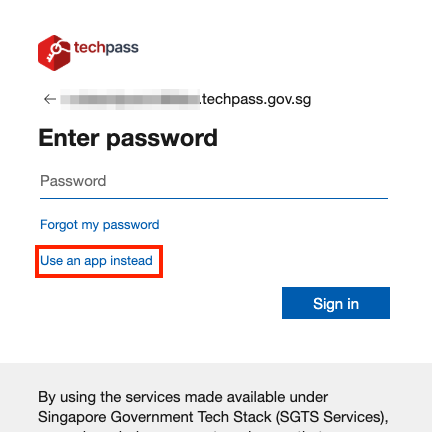
It may take a few minutes for the “Use app instead” option to be available if passwordless sign-in was recently set up.
If it still does not prompt for passwordless sign-in and the “Use app instead” option is not available after an hour:
- Verify that the passwordless sign-in setup is registered by following the steps in Verify passwordless setup
- Raise a ticket with us.
When do I need to transition from Authy or Google Authenticator apps to use Microsoft Authenticator passwordless sign-in?
Accounts in the affected list, the transition to use Microsoft Authenticator passwordless sign-in should be done by 3 June 2026.
What are the supported authenticators?
Only the Microsoft Authenticator app is supported for passwordless sign-in. Other authenticators and passkeys are not supported. Raise a ticket with us if there are special circumstances where you cannot bring your mobile device into your work premises.