Manage JSM users
Subscription Admins (SAs) and Project Admins (PAs) can manage user access and roles for Jira Service Management (JSM) projects created under a SHIP-HATS project. User access and roles are managed directly within the Jira Service Management interface.
Prerequisites
Ensure the following:
- You are a Subscription Admin (SA) for the subscription, or a Project Admin (PA) for a SHIP-HATS project within the subscription.
- The user has been provisioned with a Jira Service Management (JSM) licence to be assigned as an Agent or Administrator.
See Provision JSM licences.
Steps
In Console, go to Products > SHIP-HATS, and select the required subscription to open the Workspace.
For detailed steps, see Access Workspace.
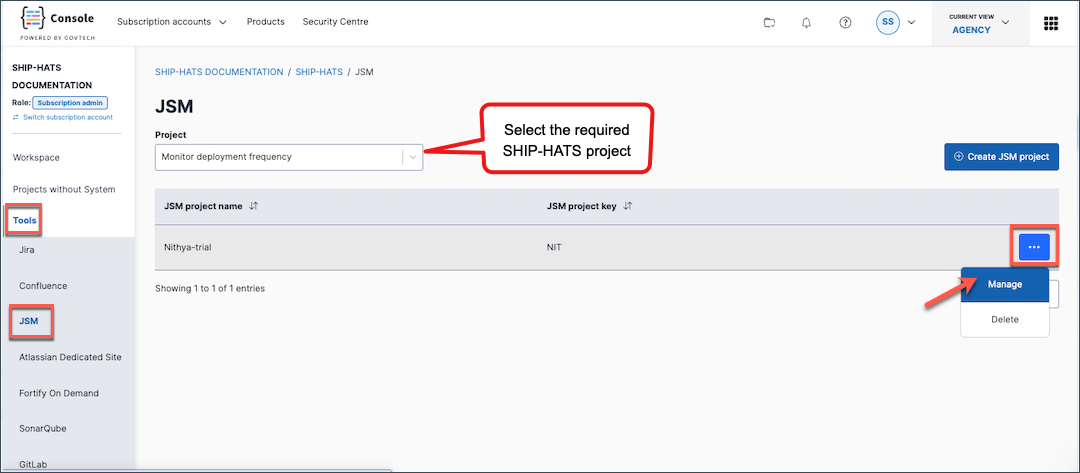
Click Tools > Jira Service Management.
Select the required SHIP-HATS project.
Click the ellipsis (…) next to the JSM project, then select Manage.
In the Manage users tab, follow the on-screen instructions to:
- Add users as Agents
- Assign or modify project roles
- Remove users from the JSM project
Things to note
- Users assigned as Agents or Administrators must have a JSM licence.
- Removing a user from a JSM project does not remove their licence from the SHIP-HATS subscription.
