Create Atlassian Dedicated Site
Subscription Admins (SAs) and Project Admins (PAs) can create an Atlassian Dedicated Site for a SHIP-HATS project by submitting a Service Request (SR).
Dedicated sites are provisioned by the SHIP-HATS team after the request is reviewed and approved.
Prerequisites
Ensure the following:
- You are a Subscription Admin (SA) for the subscription, or a Project Admin (PA) for a SHIP-HATS project within the subscription.
- Your subscription includes Atlassian Dedicated Site.
See Subscribe to Atlassian Dedicated Site. - At least one SHIP-HATS project exists in the subscription.
See View SHIP-HATS projects.
Steps
In Console, go to Products > SHIP-HATS, and select the required subscription to open the Workspace.
For detailed steps, see Access Workspace.
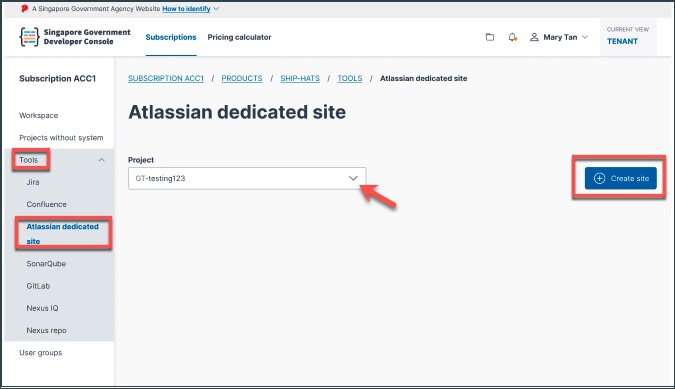
Click Tools > Atlassian Dedicated Site.
Select the SHIP-HATS project for which you want to create the dedicated site.
Click Create site.
Provide the following information:
Information Description Preferred site names Enter three preferred site names in order of preference. All fields are mandatory. The final site URL follows the format sitename.atlassian.net.User tier Select the user tier for the dedicated site (for example 100, 200, 300). This defines the maximum number of users who can be added to the site. Terms and conditions Review and accept the Terms and Conditions to proceed with the request.
Note
- Site names must be globally unique across Atlassian Cloud.
- If all preferred names are unavailable, the SHIP-HATS team will contact you to discuss alternative names.
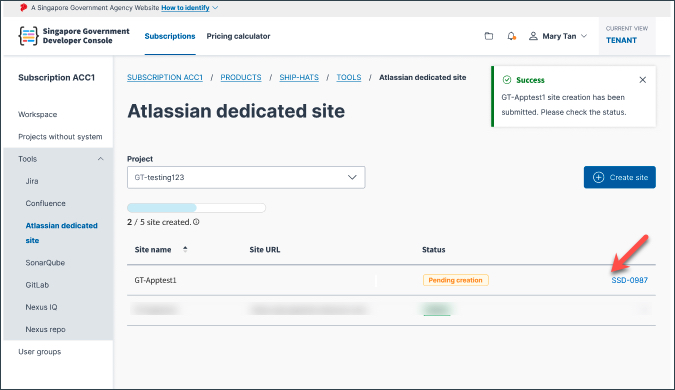
Submit the request.
A Service Request (SR) is automatically created and the issue key is displayed in DevConsole.
What happens next
The SHIP-HATS team reviews and processes the request.
Once approved, the Atlassian Dedicated Site is provisioned.
By default, the following applications are enabled for the site:
- Jira
- Confluence
- Jira Service Management (JSM)
Subscription Admins (SAs) and Project Admins (PAs) with valid Atlassian licences are assigned the site administrator role.
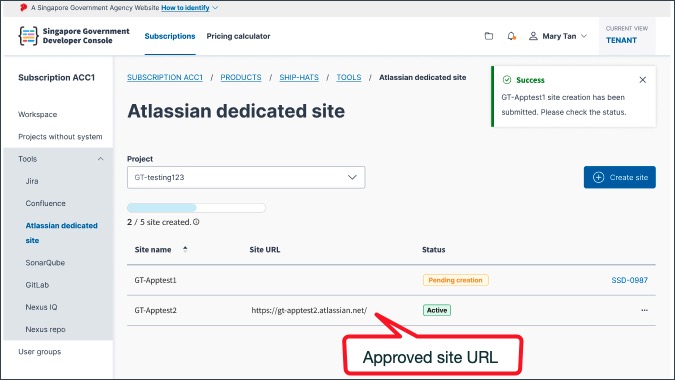
The approved site URL appears in DevConsole once provisioning is complete.
Billing starts once the dedicated site is provisioned.
