View and access Atlassian Dedicated Sites
When a request to create an Atlassian Dedicated Site is approved, the site is provisioned with the following applications:
- Jira
- Confluence
- Jira Service Management (JSM)
Subscription Admins (SAs) and Project Admins (PAs) can view:
- Available dedicated sites and their details
- Site creation requests that are still pending
Steps
Log in to Console using your non-SE GSIB, COMET, or GMD (SEED) device.
Go to Products > SHIP-HATS and select the required subscription.
In the left menu, click Tools > Atlassian Dedicated Site.
Select the required SHIP-HATS Project to view its dedicated sites.
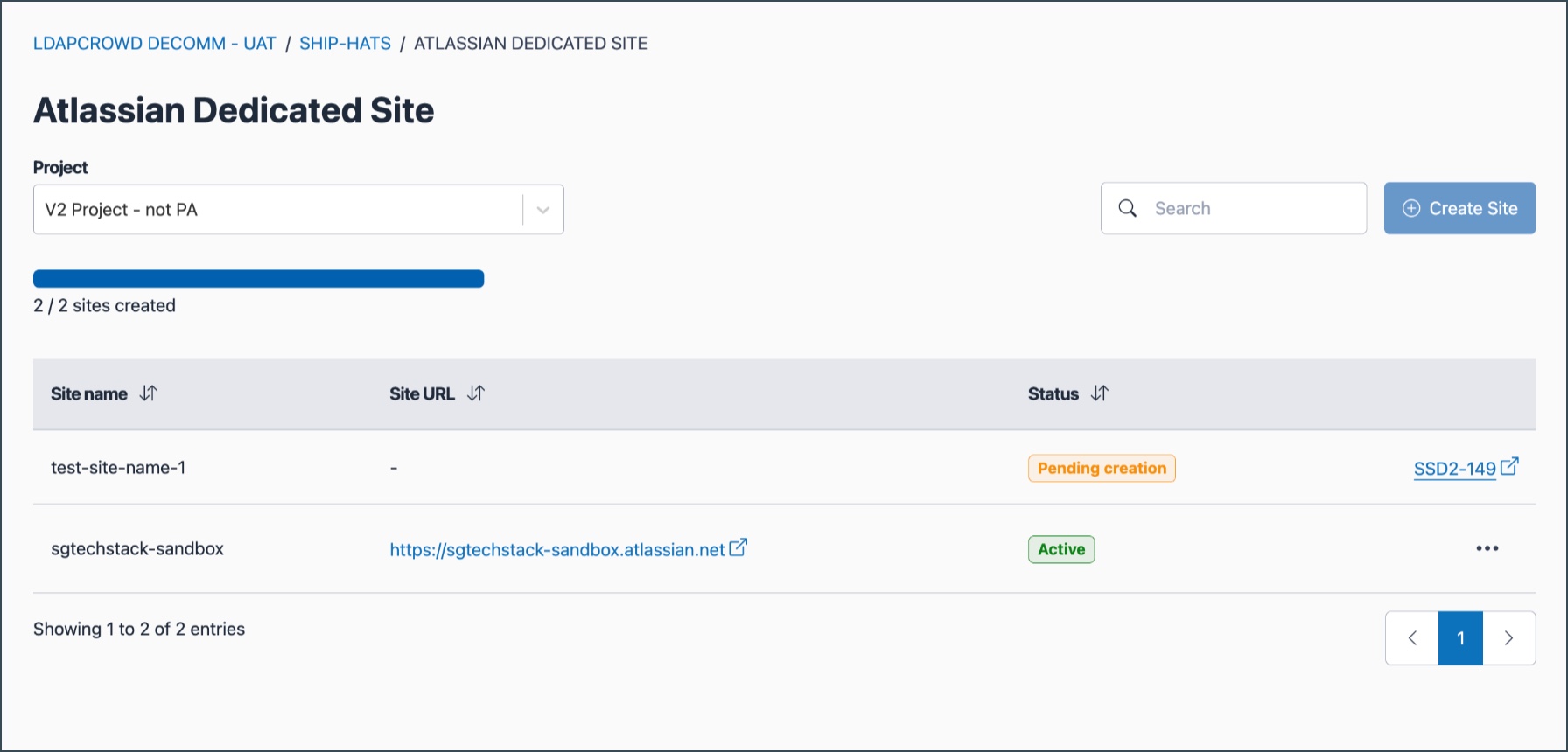
Each dedicated site displays the following details:
Field Description Site name Name of the dedicated site. If the status is Pending, the name may change after approval. Site URL The approved URL for the site. Click to open the site. Status Current state of the site (see status descriptions below). Actions Available actions based on the site’s status. Site status
Status Description Available action Pending creation Request submitted and awaiting approval. Click to view request details (SSD link). Active Site has been provisioned and is ready to use. Click the ellipsis (⋯) to manage the site. To access your dedicated site, locate an Active site and click its Site URL.
Ensure you have the required tool licences and permissions before accessing Jira, Confluence, or JSM.
Related topics
