SEED overview
SEED and SEED+ are security solutions for managing and protecting engineering endpoint devices used in government projects. This page explains what SEED and SEED+ are, how they work, and what users can expect during and after onboarding.
SEED vs SEED+: At a glance
| Feature | SEED | SEED+ |
|---|---|---|
| Who it is for | Users working in Singapore on government engineering systems | Users working outside Singapore for government projects. Note: SEED+ applies to users working in GovTech Qualified Overseas Development Centres (ODCs) or those ODCs self-assessed by Agencies. New users will receive an email invitation to onboard to SEED. Both new and existing SEED+ users can refer to the SEED+ section of this documentation for more details. |
| Device types | macOS and Windows | macOS and Windows |
| Admin rights | Retained by user | Removed (Idira used for elevation) |
| USB storage blocking | No | Yes (storage only) |
| DNS configuration | No Preset DNS | Preset Cloudflare DNS (1.1.1.1, 1.0.0.1) |
| Onboarding flow | Standard SEED onboarding | Standard SEED onboarding |
Know which one applies to you?
What is SEED
Security Suite for Engineering Endpoint Devices (SEED) is the Singapore Government’s implementation of Identity and Access Management (IAM) and Zero Trust framework. It aims to protect the Government’s engineering resources, such as Government on Commercial Cloud (GCC) and the Singapore Government Tech Stack (SGTS), against unauthorised access.
Zero Trust replaces traditional Virtual Private Network (VPN) connections and network-based security policies with a standardised central identity provider. This enforces access policies, ensuring that only authorised users with devices compliant with device postures gain access.
Why do we need SEED?
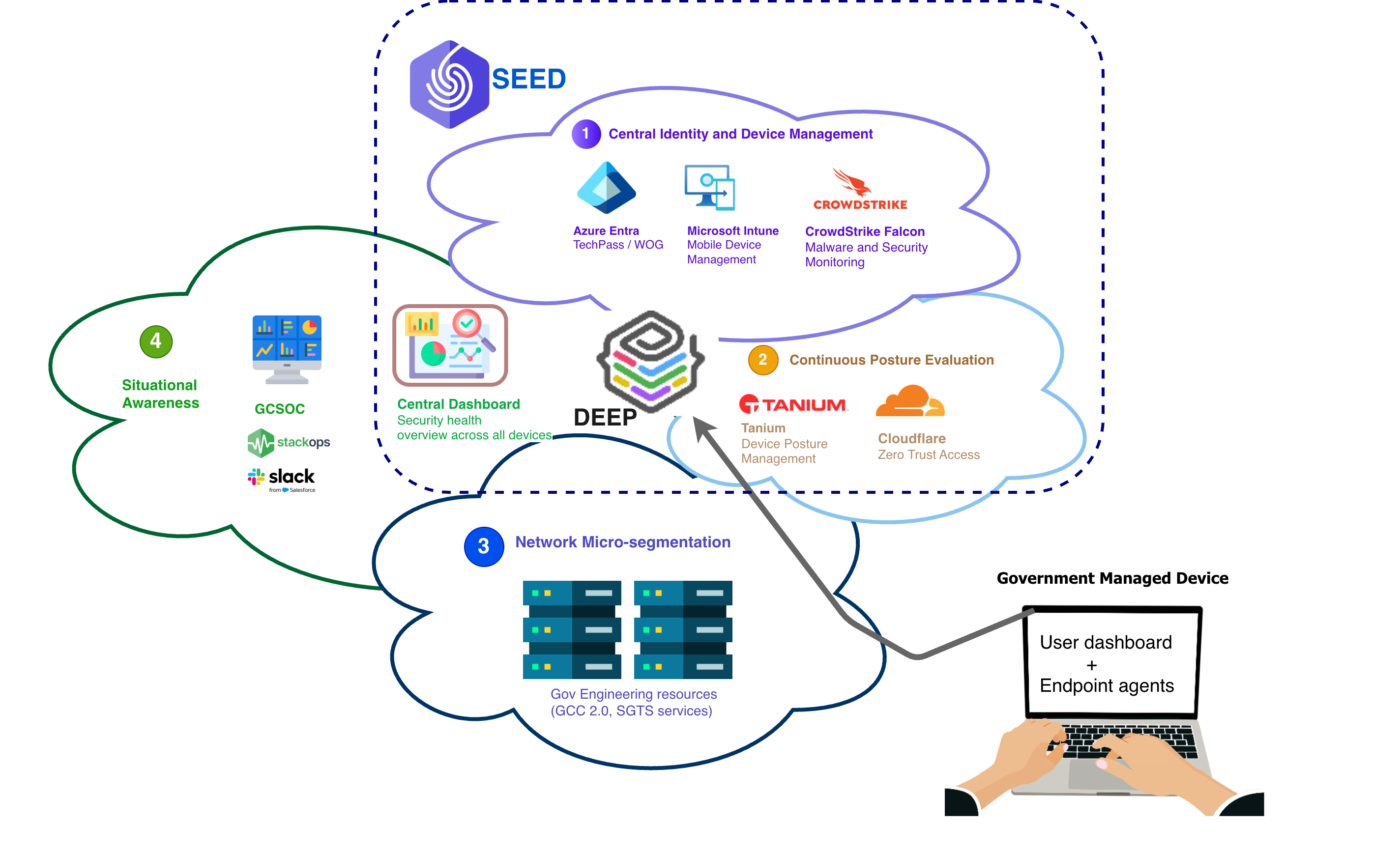
- Detects and provides remediation steps for known malware.
- Verifies if the endpoint meets the required security hardening baseline based on the corresponding Centre of Internet Security (CIS) benchmark for the installed endpoint operating system.
- Detects if the endpoint’s operating system version and security patches are up to date.
- Prevents access to the resources of GCC and the SGTS services if the above requirements are not satisfied.
How does SEED work?
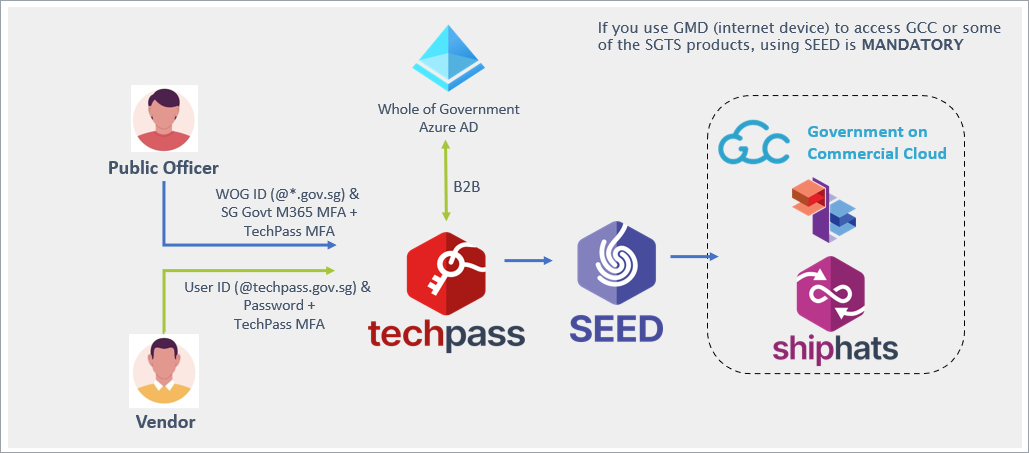
SEED comprises three key components:
- TechPass
- Cloudflare
- SEED Dashboard
What can SEED do on my device?
| SEED capabilities | Supported |
|---|---|
| View device information such as model number and OS version | ✔️ |
| View the names of installed applications | ✔️ |
| Identify your device by name | ✔️ |
| Reset a lost or stolen device to factory settings | ✔️ |
| View browsing history | ❌ |
| Access emails, contacts, and calendar | ❌ |
| Access documents | ❌ |
What data can I store on my device?
Government Managed Devices (GMDs) are cleared to access data classified up to CCE and are intended to facilitate development work that requires secure access to GCC 2.0 and SGTS. Do not store production or live data on GMDs.
Production or live data includes, but is not limited to:
- Actual citizen or business information.
- Live operational or transactional logs.
- System data that directly impacts production environments.
- Information that can affect real users or services.
Next steps for SEED users
If SEED applies to you, you can proceed directly with onboarding.
Go to the Onboard to SEED section in the sidebar.
What is SEED+
SEED+ extends SEED to provide additional security for offshore development centres (ODCs) — users working outside Singapore on government projects.
Who is SEED+ for
SEED+ is intended for:
- Users working outside Singapore on projects sponsored by Singapore Government agencies
- macOS or Windows devices
- Users with an active TechPass account
- Users onboarded with POC approval
A POC (point-of-contact) is a designated officer from the sponsoring agency who is responsible for approving your onboarding and access requests.
What SEED+ includes
SEED+ uses the same baseline protection as SEED, with additional controls for offshore use:
Idira Endpoint Privilege Manager (EPM) (formerly CyberArk) Removes administrative rights and requires POC approval for elevated access.
USB storage blocking
Blocks storage devices only. Peripherals like mouse and keyboard are allowed.Cloudflare One
Always stays on and connected.DNS IP address preset
Cloudflare DNS:1.1.1.1and1.0.0.1
What to expect
- You will not have superuser access. All
sudoor install-level actions must be approved via elevation requests. - Elevation requests will be routed to your POC for approval.
- Devices that are idle for more than 30 days may be offboarded automatically.
Next steps for SEED+ users
If SEED+ applies to you, follow the Onboard as a vendor guide to begin.
After onboarding, go to the SEED+ section in the sidebar to learn more about:
