Manage Users
Subscription Admins and Technical Admins can add and remove users in an APEX Organization using the TechBiz portal.
Important: Subscription and Technical Admins must add themselves as users and assign their own roles in the necessary Environments and Resources (Organizations). This is not done automatically.
For a step-by-step guide, refer to the TechBiz documentation for managing user access. TechBiz documentation may use the term Tool. In APEX, this refers to the Resource or APEX Organization.
In the User Management tab, select an APEX environment. The resources available is displayed.
- APEX Staging Portal
- APEX Production Portal
- APEX Marketplace Portal
- APEX StackOps (Monitoring Tool)
Click the Manage button that corresponds to the resource with the specific APEX role that you want to manage, either Org-Admin, User, or StackOps Operator. Refer to APEX User Roles.
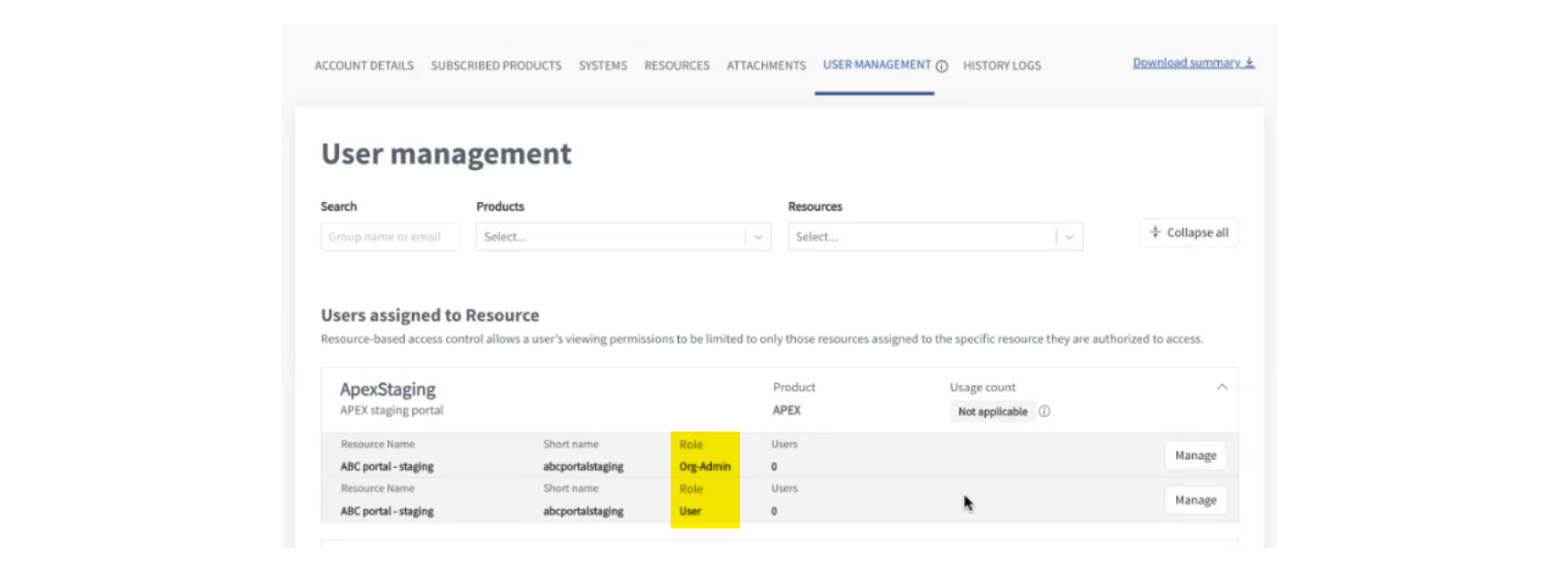
On the Users page, add the user details and submit.
APEX Roles
| Resource Type | Description | User Roles Available |
|---|---|---|
| ApexStaging | APEX Staging Intranet and Internet environments | • OrgAdmin • User |
| ApexProduction | APEX Production Intranet and Internet environments | • OrgAdmin • User |
| ApexFtStackOpsStg | APEX Monitoring Tool (StackOps) Staging | • StackOpsOperator |
| ApexFtStackOpsProd | APEX Monitoring Tool (StackOps) Production | • StackOpsOperator |
Note: User management is unified across Internet and Intranet environments.
Org Admin
The Org Admin role has the following permissions:
- Publish and manage APIs
- Approve API requests
- Consume APIs
- Create applications to consume APIs
User
The User role has the following permissions:
- Consume APIs
- Create applications to consume APIs
StackOps Operator
The StackOps Operator role has the following permission:
- View dashboards and API logs using APEX Monitoring Tool
We value your feedback! Please take a moment to share your thoughts at go.gov.sg/apex-techbiz-feedback to help us enhance your onboarding experience.
