Sample Codes
Want to see these steps in context? Follow the JWT Auth interactive walkthrough.
JWKS Endpoint
These are sample codes to help the Developer in generating a JWKS endpoint. Do note that these are for reference only and not intended for production use.
JWKS - Node JS
'use strict';
// DEPENDENCIES
const jose = require('node-jose');
const crypto = require('crypto');
// CREATE JWKS
async function jwks() {
/*
CREATE JWK
*/
let key = crypto.generateKeyPairSync('ec', {
namedCurve: 'prime256v1',
publicKeyEncoding: {
type: 'spki',
format: 'pem',
},
privateKeyEncoding: {
type: 'pkcs8',
format: 'pem',
},
});
let cryptoKey = await jose.JWK.asKey(key.privateKey, 'pem');
let publicKeyJSON = cryptoKey.toJSON();
let privateKeyJSON = cryptoKey.toJSON(true);
let jwksEndpoint = {
keys: [{...publicKeyJSON,
...{use: "sig"},
...{crv: "P-256"},
...{alg: "ES256"},
}]};
console.log("Public keys:");
console.log(publicKeyJSON);
console.log("JWKS Endpoint:");
console.log(jwksEndpoint);
// console.log("Private keys:");
// console.log(privateKeyJSON);
// console.log("Private keys(PEM):");
// console.log(cryptoKey.toPEM(true));
}
jwks();
% node create-keys.js
Public keys:
{
"kty": "EC",
"kid": "vyaeBP-ohJ5RF_cEEU1v0h3IEIoWCa24YKZK4ddb4-U",
"crv": "P-256",
"x": "RYvFyXBZLa7TWEDlk3sqqyhxXkTYGkEEl5AuANZ70Ps",
"y": "JKobI-7Z4xBCGDKDubtBF-sHvC69F6sKGbRX3RIaGhY"
}
JWKS Endpoint:
{
"keys": [
{
"kty": "EC",
"kid": "vyaeBP-ohJ5RF_cEEU1v0h3IEIoWCa24YKZK4ddb4-U",
"crv": "P-256",
"x": "RYvFyXBZLa7TWEDlk3sqqyhxXkTYGkEEl5AuANZ70Ps",
"y": "JKobI-7Z4xBCGDKDubtBF-sHvC69F6sKGbRX3RIaGhY",
"use": "sig",
"alg": "ES256"
}
]
}JWT Authentication
These are sample codes to help the Developer in coding for the JWT header. Do note that these are for reference only and not intended for production use.
Start your testing with the hello world API for more information.
JWT Auth Node JS
'use strict';
// DEPENDENCIES
const crypto = require('crypto');
const fs = require('fs');
const jose = require('jose');
const jwt = require('jsonwebtoken');
const {v4: uuidv4} = require('uuid');
/*
FUNCTION TO RETURN STRINGIFY OUTPUT
*/
function stringify(json) {
return JSON.stringify(json,null);
}
/*
***** FUNCTION TO RETURN SHA-256 ENCODING *****
*/
function sha256Hash(string) {
return crypto.createHash('sha256').update(string).digest('hex');
}
/*
***** FUNCTION TO RETURN PRIVATE KEY IN PKCS8 FORMAT *****
*/
const importKey = async(key) => {
const importedKey = await jose.importJWK(key, 'ES256')
const privateKeyPKCS8 = await jose.exportPKCS8(importedKey);
return privateKeyPKCS8;
}
/*
***** FUNCTION TO GENERATE JWT ******
*/
const getJWT = async (iss, sub, kid, aud, hash, privateKey) => {
/*
***** GET THE PKCS8 Signing Key *****
This can be from a file or generated by a JWK in Endian format.
*/
// const caPrivateKey = fs.readFileSync('./private.key', 'utf8');
const caPrivateKey = await importKey(privateKey);
const signOptions = {
algorithm: 'ES256',
keyid: kid,
expiresIn: '180s',
jwtid: uuidv4(),
issuer: iss,
audience: aud,
subject: sub,
};
const payload = {
data: hash,
};
/*
***** CREATE JWT *****
The JWT is created here to be used for the authentication header.
*/
var jwtAuth = jwt.sign(payload, caPrivateKey, signOptions);
var jwtDecoded = jwt.decode(jwtAuth,{complete:true});
console.log(`JWT-\n${jwtAuth}\n`);
console.log(`Decoded JWT-\n${stringify(jwtDecoded.header)}.${stringify(jwtDecoded.payload)}\n`);
return jwtAuth;
};
/*
***** START OF PROGRAM *****
*/
/*
***** DEFINE SIGNING VARIABLES *****
Here the following JWT claims are defined:
- issuer : API Key(s) with the format: (1) api-key-1 or (2) api-key-1,api-key2
- subject
- key ID
- audience
- JSON payload
- private key
- payload hash (data)
The code below contains a sample private key.
In a real scenario this will be in a secure vault and should not be in program code.
*/
const issuer = 'xxxxxxxx-xxxx-xxxx-xxxx-xxxxxxxxxxx,yyyyyyyy-yyyy-yyyy-yyyy-yyyyyyyyyyy';
const subject = 'POST';
const keyId = 'apex-example';
const audience = 'https://public-stg.api.gov.sg/agency/api';
// d-coordinate of this sample private key is redacted
const privateKey = {
kty: 'EC',
crv: 'P-256',
x: 'usZhq9AL4aC-hkzGCBK3RuJjmxKE6zqEdFyp-tQ8kh4',
y: 'wHI1r6rQCHQQSAdNxaJDA0Tw5Fq3B-icq-mbMVlLZA4',
d: '---------------------------------------------',
use: 'sig',
kid: 'apex-example',
alg: 'ES256',
};
const payload = {payload: 'data'};
const payloadString = JSON.stringify(payload);
const hash = sha256Hash(payloadString);
console.log(`Payload-\n${payloadString}\n`);
console.log(`Hash-\n${hash}\n`);
getJWT(issuer, subject, keyId, audience, hash, privateKey);
Java
Private Key in JWK format
import java.security.MessageDigest;
import java.security.interfaces.ECPrivateKey;
import java.security.spec.InvalidKeySpecException;
import java.security.NoSuchAlgorithmException;
import java.util.Date;
import java.util.UUID;
import java.io.IOException;
import java.nio.file.Files;
import java.nio.file.Paths;
import java.text.ParseException;
import com.nimbusds.jose.JOSEException;
import com.nimbusds.jose.JWSHeader;
import com.nimbusds.jose.JWSAlgorithm;
import com.nimbusds.jose.JOSEObjectType;
import com.nimbusds.jose.crypto.ECDSASigner;
import com.nimbusds.jwt.JWTClaimsSet;
import com.nimbusds.jwt.SignedJWT;
import com.nimbusds.jose.jwk.JWK;
public class JwtWithJwkPrivateKey {
public static void main(String[] args)
throws NoSuchAlgorithmException, JOSEException, IOException, InvalidKeySpecException, ParseException {
/*
***** SIGNING VARIABLES *****
* JWT sign values and claims are defined:
* - jti : UUID V4 (jwtID)
* - sub : Method
* - aud : Endpoint
* - iss : API Key(s) with the format: (1) api-key-1 or (2) api-key-1,api-key2
* - kid : Key ID
* - iat : Current date and time
* - exp : Expiry date and time
* - payload : JSON payload (empty string if there are no payload)
* - hashPayload : Hash the payload with SHA-256
*
* For more information, refer to documents JWT Authentication > Generating JWT.
* https://https://go.gov.sg/apex-generating-jwt
*/
String jti = UUID.randomUUID().toString();
String sub = "POST";
String aud = "https://public-stg.api.gov.sg/helloworld/jwt";
String iss = "xxxxxxxx-xxxx-xxxx-xxxx-xxxxxxxxxxx";
String kid = "apex-example";
Date iat = new Date();
Date exp = new Date(iat.getTime() + 180 * 1000);
String jsonstring = "{\"payload\":\"data\"}";
MessageDigest md = MessageDigest.getInstance("SHA-256");
byte[] digest = md.digest(jsonstring.getBytes("UTF-8"));
StringBuilder sb = new StringBuilder();
for (byte b : digest) {
sb.append(String.format("%02x", b));
}
String hashPayload = sb.toString();
/*
***** PRIVATE KEY *****
* ecPrivateKey : Private key in JWK to sign JWT.
*
* Create new file e.g. jwk.json and input your JWK.
* ------ Example of jwk.json -------
* {
* "kty": "EC",
* "crv": "P-256",
* "x": "xxxxxxxx-xxxx-xxxx-xxxx-xxxxxxxxxxx",
* "y": "yyyyyyyy-yyyy-yyyy-yyyy-yyyyyyyyyyy",
* "d": "zzzzzzzz-zzzz-zzzz-zzzz-zzzzzzzzzzz",
* "use": "sig",
* "kid": "apex-example",
* "alg": "ES256"
* }
* -----------------------------------
* For quick guide to generate JWK for testing purpose,
* refer to https://go.gov.sg/apex-generating-jwks
*/
String jwkString = new String(Files.readAllBytes(Paths.get("path/to/jwk.json")));
JWK jwk = JWK.parse(jwkString);
ECPrivateKey ecPrivateKey = (ECPrivateKey) jwk.toECKey().toECPrivateKey();
/*
***** CREATE JWT *****
* signedJWT.serialize() : JWT to append in header (x-apex-jwt).
*/
JWSHeader jwsHeader = new JWSHeader.Builder(JWSAlgorithm.ES256)
.keyID(kid)
.type(JOSEObjectType.JWT)
.build();
JWTClaimsSet claimSet = new JWTClaimsSet.Builder()
.issuer(iss)
.subject(sub)
.issueTime(iat)
.jwtID(jti)
.expirationTime(exp)
.claim("data", hashPayload)
.claim("aud", aud)
.build();
SignedJWT signedJWT = new SignedJWT(jwsHeader, claimSet);
signedJWT.sign(new ECDSASigner(ecPrivateKey));
System.out.println(signedJWT.serialize());
}
}Private Key in PEM format
import java.security.MessageDigest;
import java.security.KeyPair;
import java.security.interfaces.ECPrivateKey;
import java.security.spec.InvalidKeySpecException;
import java.security.NoSuchAlgorithmException;
import java.util.Date;
import java.util.UUID;
import java.io.FileReader;
import java.io.File;
import java.io.IOException;
import com.nimbusds.jose.JOSEException;
import com.nimbusds.jose.JWSHeader;
import com.nimbusds.jose.JWSAlgorithm;
import com.nimbusds.jose.JOSEObjectType;
import com.nimbusds.jose.crypto.ECDSASigner;
import com.nimbusds.jwt.JWTClaimsSet;
import com.nimbusds.jwt.SignedJWT;
import org.bouncycastle.openssl.PEMParser;
import org.bouncycastle.openssl.PEMKeyPair;
import org.bouncycastle.openssl.jcajce.JcaPEMKeyConverter;
public class Jwt {
public static void main(String[] args)
throws NoSuchAlgorithmException, JOSEException, IOException, InvalidKeySpecException {
/*
***** SIGNING VARIABLES *****
* JWT sign values and claims are defined:
* - jti : UUID V4 (jwtID)
* - sub : Method
* - aud : Endpoint
* - iss : API Key(s) with the format: (1) api-key-1 or (2) api-key-1,api-key2
* - kid : Key ID
* - iat : Current date and time
* - exp : Expiry date and time
* - payload : JSON payload (empty string if there are no payload)
* - hashPayload : Hash the payload with SHA-256
*
* For more information, refer to documents JWT Authentication > Generating JWT.
* https://go.gov.sg/apex-generating-jwt
*/
String jti = UUID.randomUUID().toString();
String sub = "POST";
String aud = "https://public-stg.api.gov.sg/helloworld/jwt";
String iss = "xxxxxxxx-xxxx-xxxx-xxxx-xxxxxxxxxxx";
String kid = "apex-example";
Date iat = new Date();
Date exp = new Date(iat.getTime() + 180 * 1000);
String jsonstring = "{\"payload\":\"data\"}";
MessageDigest md = MessageDigest.getInstance("SHA-256");
byte[] digest = md.digest(jsonstring.getBytes("UTF-8"));
StringBuilder sb = new StringBuilder();
for (byte b : digest) {
sb.append(String.format("%02x", b));
}
String hashPayload = sb.toString();
/*
***** READ PRIVATE KEY *****
* ecPrivateKey : Private key to sign JWT
*
* Note:
* - If you have issue generating the correct private key format,
* consider using java sample code with JWK private key.
*/
PEMParser pemParser = new PEMParser(new FileReader(new File("relativepath/to/privatekey.pem")));
Object object = pemParser.readObject();
JcaPEMKeyConverter converter = new JcaPEMKeyConverter();
KeyPair kp = converter.getKeyPair(((PEMKeyPair) object));
ECPrivateKey ecPrivateKey = (ECPrivateKey) kp.getPrivate();
/*
***** CREATE JWT *****
* signedJWT.serialize() : JWT to append in header (x-apex-jwt).
*/
JWSHeader jwsHeader = new JWSHeader.Builder(JWSAlgorithm.ES256)
.keyID(kid)
.type(JOSEObjectType.JWT)
.build();
JWTClaimsSet claimSet = new JWTClaimsSet.Builder()
.issuer(iss)
.subject(sub)
.issueTime(iat)
.jwtID(jti)
.expirationTime(exp)
.claim("data", hashPayload)
.claim("aud", aud)
.build();
SignedJWT signedJWT = new SignedJWT(jwsHeader, claimSet);
signedJWT.sign(new ECDSASigner(ecPrivateKey));
System.out.println(signedJWT.serialize());
}
}C#
// DEPENDENCIES
using System.Security.Cryptography;
using System.IdentityModel.Tokens.Jwt;
using Microsoft.IdentityModel.JsonWebTokens;
using Microsoft.IdentityModel.Tokens;
using System.Text.Json;
using System.Text.Json.Serialization;
using System;
using System.Text;
using System.Diagnostics;
namespace ApexExample
{
public class PayloadJson
{
public string? payload { get; set; }
}
public class Program
{
static string ComputeSha256Hash(string rawData)
{
using (SHA256 sha256Hash = SHA256.Create())
{
byte[] bytes = sha256Hash.ComputeHash(Encoding.UTF8.GetBytes(rawData));
StringBuilder builder = new StringBuilder();
for (int i = 0; i < bytes.Length; i++)
{
builder.Append(bytes[i].ToString("x2"));
}
return builder.ToString();
}
}
/*
***** START OF PROGRAM *****
*/
public static void Main()
{
/*
***** DEFINE SIGNING VARIABLES *****
Here the following JWT claims are defined:
- issuer : API Key(s) with the format: (1) api-key-1 or (2) api-key-1,api-key2
- subject
- key ID
- audience
- JSON payload
- private key
- payload hash (data)
The code below contains a sample private key.
In a real scenario this will be in a secure vault and should not be in program code.
*/
var jti = Guid.NewGuid().ToString();
var iss = "xxxxxxxx-xxxx-xxxx-xxxx-xxxxxxxxxxx,yyyyyyyy-yyyy-yyyy-yyyy-yyyyyyyyyyy";
var aud = "https://public-dev.api.gov.sg/helloworld/jwt";
var exp = 180;
var sub = "POST";
var kid = "apex-example";
var alg = "ES256";
var payloadJson = new PayloadJson
{
payload = "data"
};
string payload = JsonSerializer.Serialize(payloadJson);
string hash = ComputeSha256Hash(payload);
Console.WriteLine($"Payload-\n{payload}\n");
Console.WriteLine($"Hash-\n{hash}\n");
/*
***** IMPORT PRIVATE KEY ******
Private Key Import Using Curve Coordinates
For production use, these key coordinates should be stored in a vault.
*/
var crv = "P-256";
var x = "usZhq9AL4aC-hkzGCBK3RuJjmxKE6zqEdFyp-tQ8kh4";
var y = "wHI1r6rQCHQQSAdNxaJDA0Tw5Fq3B-icq-mbMVlLZA4";
var d = "w55YEByLRumO-Rnsc8jg2_MaYXfEiT_ioFVoGgrCTlg";
var curve = crv switch
{
"P-256" => ECCurve.NamedCurves.nistP256,
"P-384" => ECCurve.NamedCurves.nistP384,
"P-521" => ECCurve.NamedCurves.nistP521,
_ => throw new NotSupportedException()
};
ECDsa key = ECDsa.Create(new ECParameters
{
Curve = curve,
D = Base64UrlEncoder.DecodeBytes(d),
Q = new ECPoint
{
X = Base64UrlEncoder.DecodeBytes(x),
Y = Base64UrlEncoder.DecodeBytes(y)
},
});
// Private Key Import Using PEM file
// var eccPem = File.ReadAllText("privatekey.pem");
// ECDsa key = ECDsa.Create();
// key.ImportFromPem(eccPem);
/*
***** CREATE JWT *****
The JWT is created here to be used for the authentication header.
*/
var now = DateTime.UtcNow;
var handler = new JsonWebTokenHandler();
string token = handler.CreateToken(new SecurityTokenDescriptor
{
Issuer = iss,
Audience = aud,
Expires = now.AddSeconds(exp),
IssuedAt = now,
Claims = new Dictionary<string, object> { { "sub", sub }, { "data", hash }, { "jti", jti } },
SigningCredentials = new SigningCredentials(new ECDsaSecurityKey(key) { KeyId = kid }, alg),
});
Console.WriteLine($"JWT-\n{token}\n");
/*
***** DECODE JWT *****
The JWT is decoded here to verify claims which are signed.
*/
var securityHandler = new JwtSecurityTokenHandler();
var jsonToken = securityHandler.ReadToken(token);
var tokenString = jsonToken as JwtSecurityToken;
Console.WriteLine($"Decoded JWT-\n{tokenString}\n");
}
}
}Sample Output
Payload =
{"payload":"data"}
Hash =
cc575c4ed557481e31d9a2a0580bc464e84b3a79c5fc94e4fd94ba33b3e54dbc
JWT =
eyJhbGciOiJFUzI1NiIsInR5cCI6IkpXVCIsImtpZCI6ImFwZXgtZXhhbXBsZSJ9.eyJkYXRhIjoiY2M1NzVjNGVkNTU3NDgxZTMxZDlhMmEwNTgwYmM0NjRlODRiM2E3OWM1ZmM5NGU0ZmQ5NGJhMzNiM2U1NGRiYyIsImlhdCI6MTY2NzI3MzUwNiwiZXhwIjoxNjY3MjczNjg2LCJhdWQiOiJodHRwczovL3B1YmxpYy1zdGcuYXBpLmdvdi5zZy9hZ2VuY3kvYXBpIiwiaXNzIjoieHh4eHh4eHgteHh4eC14eHh4LXh4eHgteHh4eHh4eHh4eHgseXl5eXl5eXkteXl5eS15eXl5LXl5eXkteXl5eXl5eXl5eXkiLCJzdWIiOiJQT1NUIiwianRpIjoiZWYxYzJjN2EtNTlhNi00NjZiLThlNTQtZDFlZTM5MWVhYTE3In0.IArhd2SJ1hoIkJlek1KKwoGPXahYOJ5bmgJTMnuUdPDiBR57iPdLY3SvqJj3qP-KHmdCt6HCDjM-6nawGYIJ6Q
Decoded JWT =
{"alg":"ES256","typ":"JWT","kid":"apex-example"}.{"data":"cc575c4ed557481e31d9a2a0580bc464e84b3a79c5fc94e4fd94ba33b3e54dbc","iat":1667273506,"exp":1667273686,"aud":"https://public-stg.api.gov.sg/agency/api","iss":"xxxxxxxx-xxxx-xxxx-xxxx-xxxxxxxxxxx,yyyyyyyy-yyyy-yyyy-yyyy-yyyyyyyyyyy","sub":"POST","jti":"ef1c2c7a-59a6-466b-8e54-d1ee391eaa17"},"signature":"IArhd2SJ1hoIkJlek1KKwoGPXahYOJ5bmgJTMnuUdPDiBR57iPdLY3SvqJj3qP-KHmdCt6HCDjM-6nawGYIJ6Q"}Note that the output for C# will include nbf but this will not be inspected.
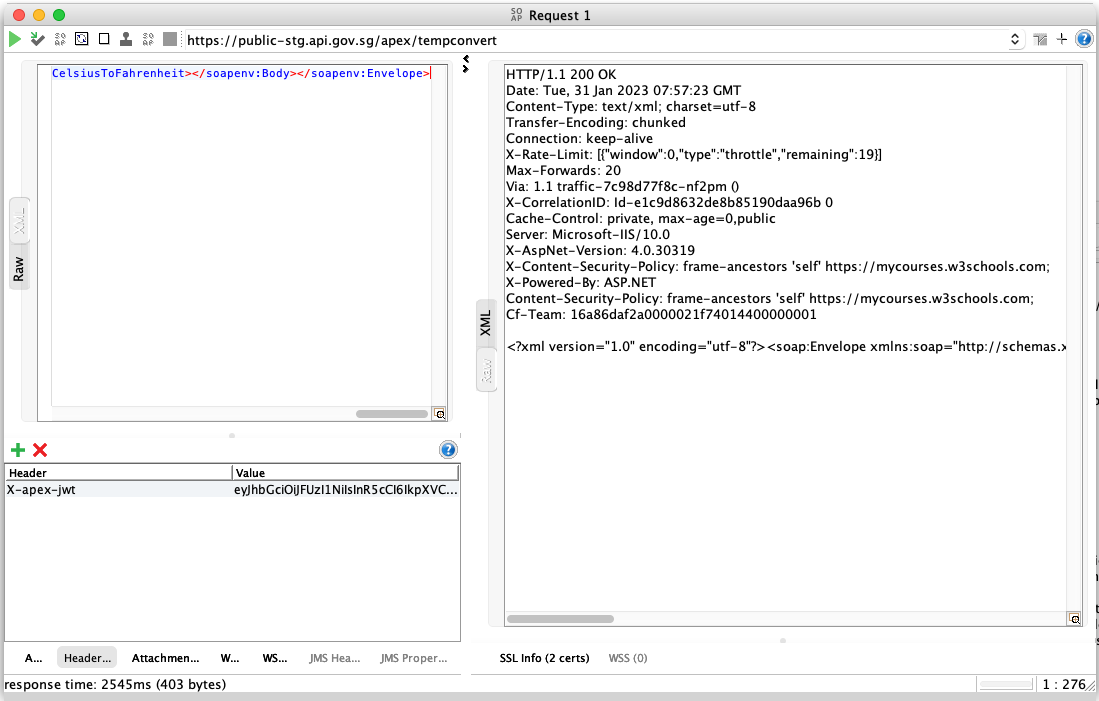
SOAP Requests
The HTTP header may be required to be injected to a SOAP request (see below for example).
Original SOAP payload

Formatted SOAP payload
- It is recommended but not mandatory that the payloads have new-lines removed (CRLF: 0x0D,0x0A and LF: 0x0A).
- In the case where payloads do not have new-lines removed, the replacement of CRLF to LF should be carried out before any hashing is carried out, in line with XML standards
<soapenv:Envelope xmlns:soapenv="http://schemas.xmlsoap.org/soap/envelope/" xmlns:ns="https://www.w3schools.com/xml/"><soapenv:Header/><soapenv:Body><ns:CelsiusToFahrenheit><!--Optional:--><ns:Celsius>23</ns:Celsius></ns:CelsiusToFahrenheit></soapenv:Body></soapenv:Envelope>SOAPUI using formatted SOAP payload with header injection