Learn how SearchSG works
Introduction
SearchSG maintains our own fleet of web crawlers that helps to automate the process of fetching your website’s content and indexing for search.
This means that our site search engine is able to automatically get up-to-date content information from your sites with least amount of maintenance effort by the webmaster, instead of having to host your content with us or build pipelines to push and upload data from your various content repositories.
How does SearchSG crawl and index your website?
SearchSG’s web crawler visits each page of your website at least once per day to get the latest updated content information for search.
However, not all pages in your website may be relevant to be indexed for search.
For example, let’s say National Archives wants to exclude their archival search results (https://www.nas.gov.sg/archivesonline/search) since this does not provide meaningful search results. In this case, they can choose to exclude indexing any documents in the path /archivesonline/search.
Below are a few ways this restriction can be applied.
1. Robots.txt
SearchSG’s web crawlers honour your robots.txt rules listed at the root of your domain (<yourdomain>/robots.txt).
You may use the robots.txt on your website to specify Disallow rules to control the url paths on your website that should not be indexed, giving you control on which pages will be searchable in our search results.
Note: Unless you specify otherwise in your robots.txt file, all files are implicitly allowed for crawling.
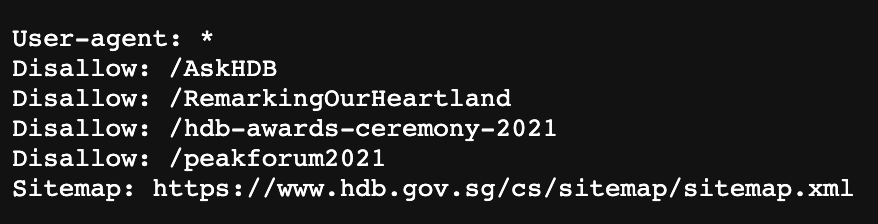
For example, if we read MOM’s robots.txt located at https://www.mom.gov.sg/robots.txt, URL paths that are marked Disallow will not be crawled and be excluded from search results.
2. Sitemap.xml
SearchSG’s web crawlers also read your robots.txt to discover where your sitemap.xml is located.
URLs listed in the sitemap.xml will be prioritised for scraping, in addition to the crawling of your website to find other pages not listed in the sitemap.
You may use the sitemap to control the list of pages that you would like to see in your search results.
For sites without robots.txt, we have also taken the discretion to skip certain paths in your site that gives poor results. (e.g. site search results pages)
3. Additional SearchSG Path Whitelist / Blacklist Configurations
Other than robots.txt and sitemap.xml, you can also request to whitelist/blacklist a list of custom URL patterns only for SearchSG site search while not affecting your Google search results.
We use Google’s match pattern here. You can find an extensive list of examples in the link.
4. Summing it all up…
SearchSG respects your website’s robots.txt, sitemap.xml and allows for additional whitelist/blacklist configurations to support your search use case.
Putting them together, this is the final truth table for whether we will scrape a particular page of your site:
| Robots.txt | Sitemap | Blacklist | Whitelist | Final result of whether page is allowed to appear in search results | Remarks |
|---|---|---|---|---|---|
No robots.txt |
Not in sitemap | - | - | Allow | If all 4 set of configurations are not present, we will crawl and index all URLs on your site. |
robots.txt present;No Disallow for SearchSG |
In sitemap | - | - | Allow | If sitemap is present, we will scrape the sitemap and crawl to discover URLs on your site for indexing. |
robots.txt present;Disallow for SearchSG |
Any1 | Any1 | Any1 | Disallow | If robots.txt disallow visiting for SearchSG, we will honour robots.txt and skip crawling and indexing of that page. |
| Any1 | Any1 | Blacklist specified; URL in blacklist |
Any1 | Disallow | Regardless of whitelist, if the URL is disallowed on either the blacklist or robots.txt, we will not crawl and index that page for your search results. |
| Any1 | Any1 | Any1 | Whitelist specified; URL not in whitelist |
Disallow | If whitelist is defined & the URL is not on the whitelist, we will not crawl and index that page. |
robots.txt present;No Disallow for SearchSG |
Any1 | Blacklist specified; URL not in blacklist |
Whitelist specified; URL in whitelist |
Allow | If both blacklist and whitelist are defined & the URL is not on the blacklist & the URL is on the whitelist, we will crawl and index that page. |
1: The ‘Any’ value it means that it does not matter what value this is. It could be no list, allow, or disallow. It will not affect the final result.
To illustrate with an example:
robots.txt:Disallow /contact-us- whitelist: [
https://gov.sg/contact-us/*,https://gov.sg/,https://sgpc.gov.sg/*] - blacklist: [
https://gov.sg/contact-us/test-site]
Will allow us to crawl and index:
gov.sgstarting page- All pages under the subdomain
sgpc.gov.sg, includingsgpc.gov.sg/itself - All pages under the page path
/contact-us, including/contact-us/itself, but excluding/contact-us/test-siteas it is blacklisted - We ignore
Disallow /contact-usinrobots.txtunless it explicitly applies toUser-Agent: SearchSG
How does SearchSG handle links to external sites found on my page?
By default, only links to pages within your website’s domain and subdomains will be crawled and indexed. We do not continue to crawl or index any links pointing to external sites.
External sites are defined as URLs that are not part of the starting domain that you have specified.
For example,
| Search Domain | What we consider internal sites which will be automatically included in search results | What we consider external sites (by default not included in your results) |
|---|---|---|
| hdb.gov.sg | hdb.gov.sg mynicehome.hdb.gov.sg (subdomain of hdb.gov.sg) |
gov.sg cpf.gov.sg youtube.com |
