Data Connectors & Indexing Features
SearchSG offers a comprehensive suite of data connector features that streamline the compilation and continuous updating of your content for search. By utilising these connectors and advanced tagging capabilities, you can create a well-organised search experience for your users.
This section will help you understand and configure the right data sources to support available features, including:
- Website Search – enables users to search across connected content sources
- Directory Search - enables high-volume keyword and location searches across directory listings such as courses and events.
- SmartRecommend – provides ML-based content recommendations via dynamic banners
To support these features, SearchSG integrates with a variety of data source types:
- Web Data Source – for crawling the content and files of government websites
- API Data Source – for polling your configured endpoints on an hourly basis to retrieve structured content
- Push API Data Source – for pushing your updated content and files by sending data to our API endpoints at your preferred timing
1. Support for Various Data Connectors
Configure various data connectors in the SearchSG Admin Portal to set up your application’s functionality. For step-by-step instructions, please refer to User Guide or the setup guide table below.
| Data Source | Feature | Setup Reference |
|---|---|---|
| Web Data Source | Website Search | Setup a Web Data Source |
| SmartRecommend | Setup a Web Data Source | |
| Directory Search | Setup a Web Data Source | |
| API Data Source | Website Search | Setup an API Data Source |
| SmartRecommend | Setup an API Data Source | |
| Directory Search | Setup an API Data Source | |
| Push API Data Source | Website Search | Setup a Push API Data Source |
| Directory Search | Setup a Push API Data Source | |
| OneGov Enterprise Search | Coming Soon | |
| Platform Data Source | OneGov Enterprise Search | Coming Soon |
Within your project, you can create indexes that define your knowledge base and specify searchable content using Web, API, or Push API data sources.
Easily set up a federated search across multiple data sources by connecting more than 1 data source.
a. Web Data Source
SearchSG operates a robust fleet of web crawlers designed to automate the discovery, retrieval, and indexing of government website’s content.
By adding a web data source during Index setup, you utilise SearchSG’s web crawlers to automatically scrape and index the latest content and files from your website daily. For more info, see our guide on types of content on your site indexed.
This feature ensures that your search index remains updated with minimal effort required from your webmaster. You won’t need to host your content with us or develop complex systems to push data from your various content repositories — our solution simplifies the entire process.
b. API Data Source
This API connector allows agencies to index custom API data that may be protected or not publicly available. Our API connector polls your configured endpoints hourly, to process changes in your content and updates your index automatically.
Authorisation options such as OAuth2 and API keys are supported to enable secure connections to your protected APIs, ensuring sensitive data can be indexed without compromising security.
How it works
To use API data source, your APIs should return an HTTP 200 response, with a Content-Type header set to application/json. The API response must contain a list of JSON records representing searchable content items. Each record must include the following mandatory attributes:
urltitlecontent
Any records missing one or more of these mandatory attributes will be automatically filtered out and will not be indexed. Each API data source supports processing of up to maximum of 10,000 JSON items, with a maximum combined response payload size of 100 MB.
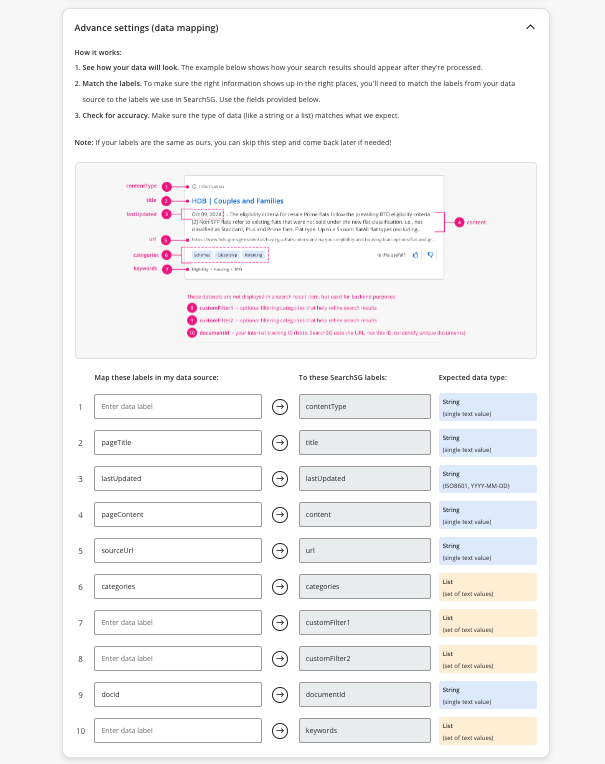
Within the API connector, a data attribute mapping feature is provided to allow you to transform and link your data attributes to corresponding fields in our index, without needing to modify the data structure of your existing API.
SearchSG Index Fields
// Required data fields in the Index
[
{
// Mandatory Fields
"url": "https://www.search.gov.sg/content1",
"title": "title1",
"content": "content1",
// Optional Fields
"documentId": "docId1",
"lastUpdated": "2024-09-01T08:00:00.000Z",
"contentType": "FAQ",
"categories": ["AgencyCustomCategories1"],
"keywords": ["AgencyCustomCategories1"]
},
...
]API Connector Data Attribute Mapping
Example:
This sample API response can be mapped to SearchSG’s required index fields using the data attribute mapping tool found in the API Datasource connector within the admin portal.
See sample below.
// Example of agencies' API HTTP response body
[
{
"docId": "docId1",
"sourceUrl": "https://www.search.gov.sg/content1",
"pageTitle": "title1",
"pageContent": "content1",
"lastUpdated": "2024-09-01T08:00:00.000Z",
"categories": ["AgencyCustomCategories1"]
},
{
"docId": "docId2",
"sourceUrl": "https://www.search.gov.sg/content2",
"pageTitle": "title2",
"pageContent": "content2",
"lastUpdated": "2024-09-01T08:00:00.000Z",
"categories": ["AgencyCustomCategories2"]
}
]See the following screenshot for example on how that can be mapped to SearchSG’s required index fields in our admin portal. Note: Please check the SearchSG Admin Portal for the latest supported index fields and their expected data formats.
c. Push API Data Source
The Push API Data Source allows you to proactively send updated content and files to SearchSG whenever your data changes. With near real-time synchronisation, it bypasses the need for polling, and it’s especially useful for websites with time-sensitive data.
By connecting directly to our secure API endpoints, you gain flexible control to add, update, or delete content dynamically to ensure your search index remains accurate and up-to-date.
To obtain secure access to our API endpoints, please submit your request through our Contact Us Form.
- Under Ticket Request Type, select “Service Request”.
- For Email, use your registered work email associated with TechPass and ensure you have successfully logged into the SearchSG Admin Portal before submitting. New users can register for the Admin Portal here.
- In the Details of Request, clearly state that you require authentication access to our API endpoint to utilise the Push API data source.
Our team will provision the API credentials which will mirror your Admin Portal access rights within 3 working days.
For detailed instructions on how to consume our API endpoints, please refer to the API Documentation.
Sample API Payload Format of PushAPI for Reference:
{
documentsToAdd: [
{
documentId: 'doc-1',
url: 'https://example.com/doc-1',
title: 'This is the searchable title of Document 1',
content: 'This is the searchable content of document 1.',
lastUpdated: '2023-01-01T00:00:00Z',
contentType: 'FAQ',
categories: ['category1', 'category2']
}
],
documentsToDelete: ['doc-2']
}documentsToAdd: Array of documents with metadata (documentId, title, url, etc) to add.documentsToDelete: Array of document Ids to remove.
d. Platform Data Source (Coming soon)
SearchSG team is working to offer the capability to securely index and search common enterprise / internal data sources, such as SharePoint and Microsoft Teams.
This feature is essential for organisations that require access to internal documents and communications, making information retrieval across multiple knowledge bases seamless. With the ability to configure the integrations with common intranet data sources, internal information from various sources can be aggregated into a unified search, reducing the time spent sifting through each knowledge base individually.
2. Public Web vs. Directory Index
SearchSG supports two main index types to cater to different search and performance needs.
The Directory Index is optimised for fast, high-volume keyword searches with support for location filtering and sorting. It’s ideal for structured queries that require low latency and scalability.
In contrast, the Public Web Index offers semantic search capabilities, enabling it to understand natural language and deliver smarter, more relevant results. It powers features like SmartSnippet and SmartAnswer, making it better suited for conversational or open-ended search queries, though typically with higher latency than Directory Index.
3. Feature & Data Source Compatibility Matrix
The table below outlines feature compatibility across various index types and data sources.
The Directory Index additionally supports the latlon field in both API Data Source and Push API Data Source, enabling location-based search.
| Feature | Index Type | Web Data Source | API Data Source | Push API Data Source |
Platform Data Source (Coming soon) |
|---|---|---|---|---|---|
| Website Search | Public Web Index | Yes | Yes | Yes | No |
| SmartRecommend | Recommendation Index | Yes | Yes | No | No |
| Directory Search | Directory Index | Yes | Yes (latlon supported) |
Yes (latlon supported) |
No |
| OneGov Enterprise Search (Coming Soon) |
Enterprise Index | Yes | Yes | Yes | Yes |
4. Support for Automatic Generated / Custom Content Labels
a. Automatically Generated Content Labels
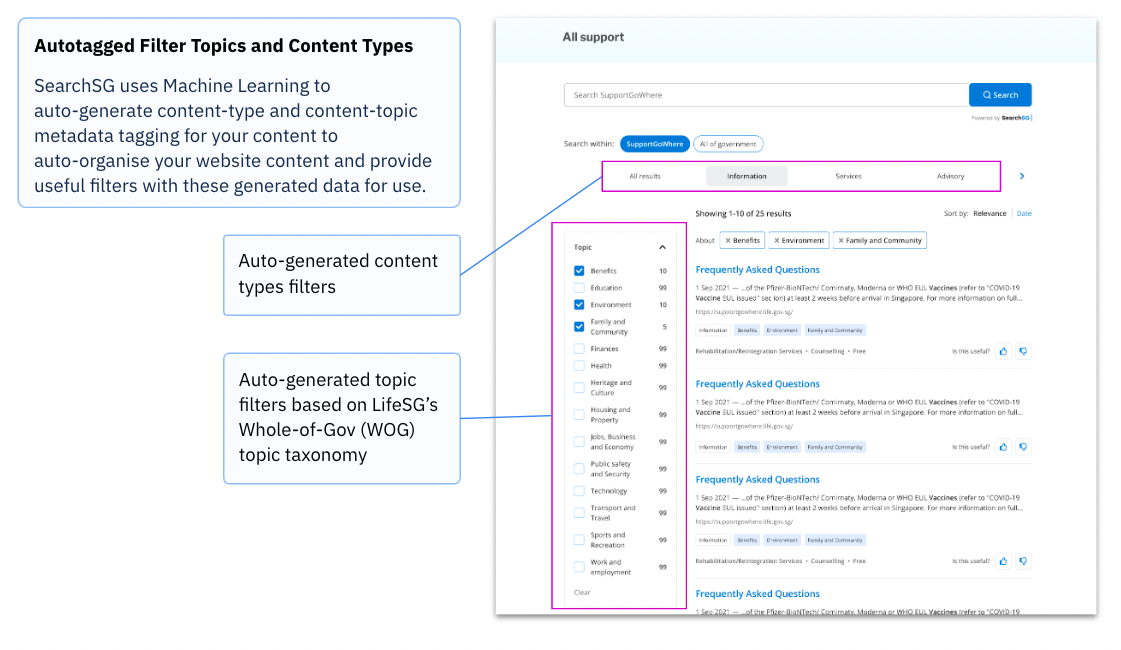
SearchSG employs custom machine learning algorithms to automatically tag content by topic and type. This automated labelling streamlines the organisation of your website content, making it easier for users to find relevant information quickly. With intelligent tagging, users can navigate your content more efficiently, enhancing their overall search experience.
b. Custom Metadata and Content Labels
In addition to automatically generated content labels, SearchSG allows agencies to publish their own custom structured metadata (e.g. content labels) on their website and index these metadata for search using our web datasource. This feature provides the flexibility to define specific content labels that align with your business needs.
Custom metadata can be utilised for:
- Filter Customisation: Create tailored filters that allow users to refine their search results based on your unique metadata.
- Enhanced Result Item Fields: Display additional fields in search results that highlight key information relevant to your audience, making it easier for them to find what they need.
