Sealed Secrets
Sealed Secrets are used for sensitive credentials that your application needs to function properly. These include:
- API tokens (e.g., OpenAI)
- Database credentials for SQL connections
Why Sealed Secrets?
By default, Kubernetes secrets are encoded in base64. However, embedding base64-encoded secrets directly into repositories poses security risks for users using our platform. Sealed Secrets addresses this issue by ensuring that secret values stored in repositories are securely encrypted.
Public Keys
If you’re sealing secrets for CStack Internet app
Use a Government-managed device with SEED and Cloudflare WARP enabled to access the Kubeseal web utility and select your required public key. Refer to Using Kubeseal web utility.
Alternatively, download the Internet Public Key Certificate for your current environment using a Government-managed device with SEED and Cloudflare WARP enabled.
Note: Selecting one of the links below generates and saves a copy of the public key locally. It is your responsibility to ensure that the latest key is being used to encrypt Secrets as keys may be rotated.
Environment Endpoint Staging https://publickey.stg.e01.container.stack.gov.sg/v1/cert.pem Production https://publickey.e01.container.stack.gov.sg/v1/cert.pem
If you’re sealing secrets for CStack GEN app
Use a GSIB device to access the Kubeseal web utility and select your required public key. Refer to Using Kubeseal web utility.
Alternatively, download the GEN Public Key Certificate for your current environment using a GSIB device.
Note: Selecting one of the links below generates and saves a copy of the public key locally. It is your responsibility to ensure that the latest key is being used to encrypt Secrets as keys may be rotated.
Environment Endpoint Staging https://publickey.stg.gen-e01.container.stack.gov.sg/v1/cert.pem Production https://publickey.gen-e01.container.stack.gov.sg/v1/cert.pem
Using Kubeseal web utility
Access the kubeseal web utility.
For Internet app: https://kubeseal-web.e01.app.gov.sg/
For GEN app: https://kubeseal-web.gen-e01.app.gov.sg/
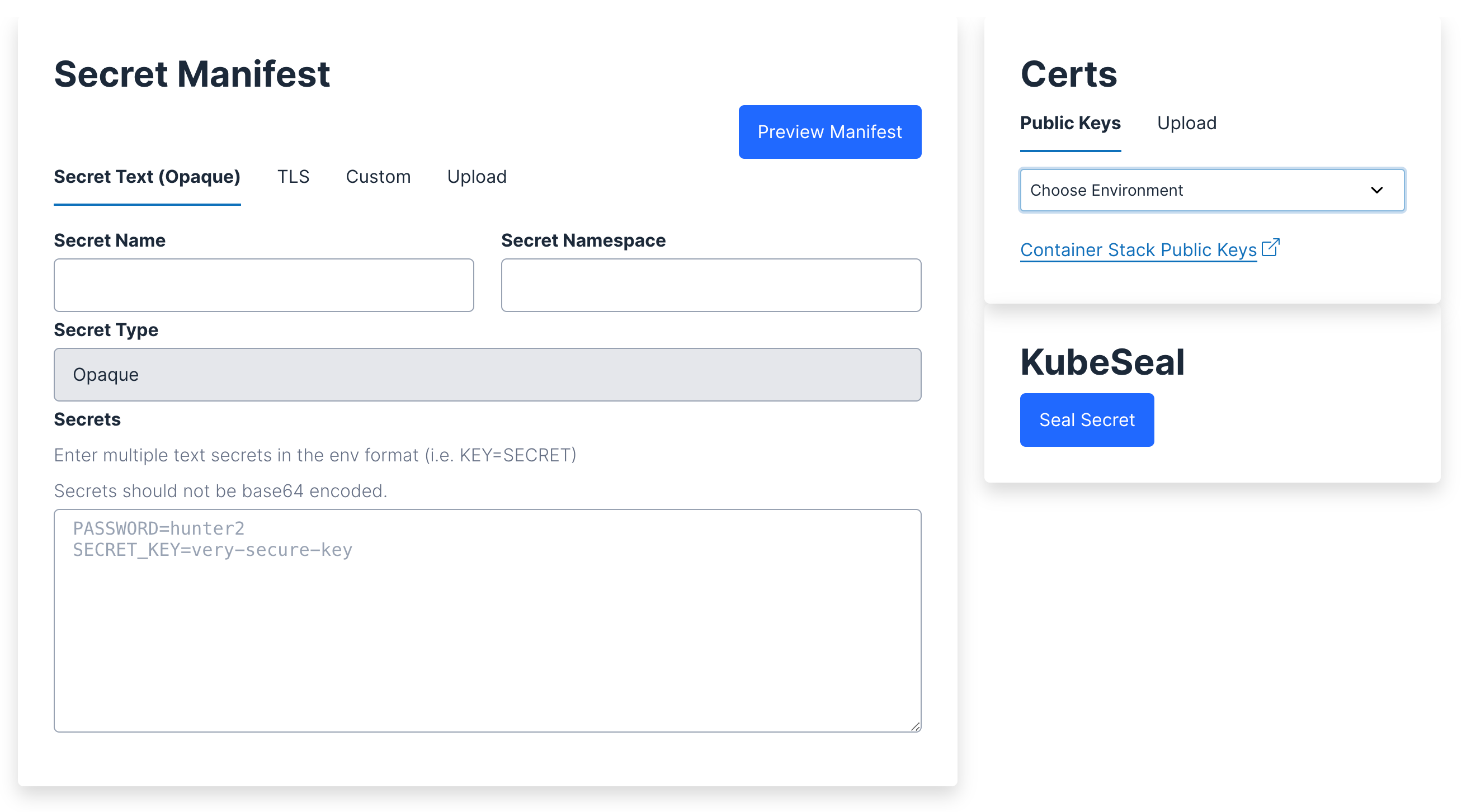
Enter the Secret details in the Secret Manifest section.
Field Description Sample values Secret Name Should ideally contain only lowercase alphanumeric and hyphen characters. • my-secret
•db-secret
•api-secretSecret Namespace Should follow the Kubernetes namespace standards. Take note of the prefix and suffix in the following example. • t-gvt-cstack-demo-dev
•t-gvt-cstack-demo-gen-prdSecrets Should follow the key=valueformat. Multiple text secrets can be added in each new line.PASSWORD=Password-valueSECRET_KEY=secure-key-valueNote: Secrets should not be base64 encoded.
In the Certs section, select the public key certificate for your environment from the drop-down. Alternatively, you can manually upload your public key certificate in the Upload tab.
Click Seal Secret, then copy or download the generated Sealed Secret object.
Using Kubeseal CLI
Note: This section is for advanced users. Please use the web utility if you’re generating sealed secrets for the first time.
Before you proceed, ensure that kubeseal is installed.
For MAC:
brew install kubesealFor Linux:
# Change the version in the link to the latest one wget https://github.com/bitnami-labs/sealed-secrets/releases/download/v0.12.1/kubeseal-linux-amd64 -O kubeseal sudo install -m 755 kubeseal /usr/local/bin/kubesealFor other OS/versions, get your Kubeseal version here.
Start with a regular secret as described.
# unsealed-secret.yaml # # Take note that you need the -n option when you create encoded secret: # echo -n {plain_secret} | base64 # # There may be restrictions on allowable characters, depending on the # service that would be using the secrets. For instance, RDS passwords # can only contain printable ASCII characters besides '/', '@', '\"' # # You would need to create a sealed secret for each environment (dev/stg/prd) # and namespace. apiVersion: v1 data: password: SGVsbDBDU3RhY2sh # base64 for "Hell0CStack!" kind: Secret metadata: name: my-secret namespace: my-tenant-namespace type: OpaqueEncrypt it using
kubeseal. Refer to Public Keys for the steps on generating your key.# The angle brackets here are literal, and are used to perform stdin and stdout redirection kubeseal --cert {env}-certificate.pem --format yaml < unsealed-secret.yaml > sealed-secret.yamlA SealedSecret object should be created:
# sealed-secret.yaml apiVersion: bitnami.com/v1alpha1 kind: SealedSecret metadata: creationTimestamp: null name: my-secret namespace: my-tenant-namespace spec: encryptedData: password: AgAmIU4S9kUZabJyE516... template: metadata: creationTimestamp: null name: my-secret namespace: my-tenant-namespace type: OpaqueUpload the SealedSecret object onto the cluster using either:
- Kubectl (if applicable), or
- GitOps (just place it in your
cstack-manifestsrepository)