Nexus IQ policies
Nexus IQ policies define rules used to evaluate open-source components during scans. These policies help identify security vulnerabilities, malicious code, licence risks, and suspicious packages.
During a Nexus IQ scan, dependencies are evaluated against these policies and any violations appear in the evaluation report.
SHIP-HATS uses Sonatype Nexus Firewall and additional security policies to detect malicious or suspicious packages downloaded through Nexus Repository proxies. Firewall configuration is managed centrally and cannot be modified by users.
Default policy
A default policy is automatically applied when Nexus IQ is set up.
This policy evaluates components for:
- Known security vulnerabilities
- Licence compliance risks
- Suspicious or malicious dependencies
For more information about policy configuration, refer to the Sonatype documentation:
https://help.sonatype.com/iqserver/reporting/dashboard
Add a policy
You can create additional policies in the Nexus IQ portal.
Steps
- Log in to Nexus IQ.
- Click IQ Server Dashboard.
- In the left navigation, go to Orgs and Policies → Organizations → App.
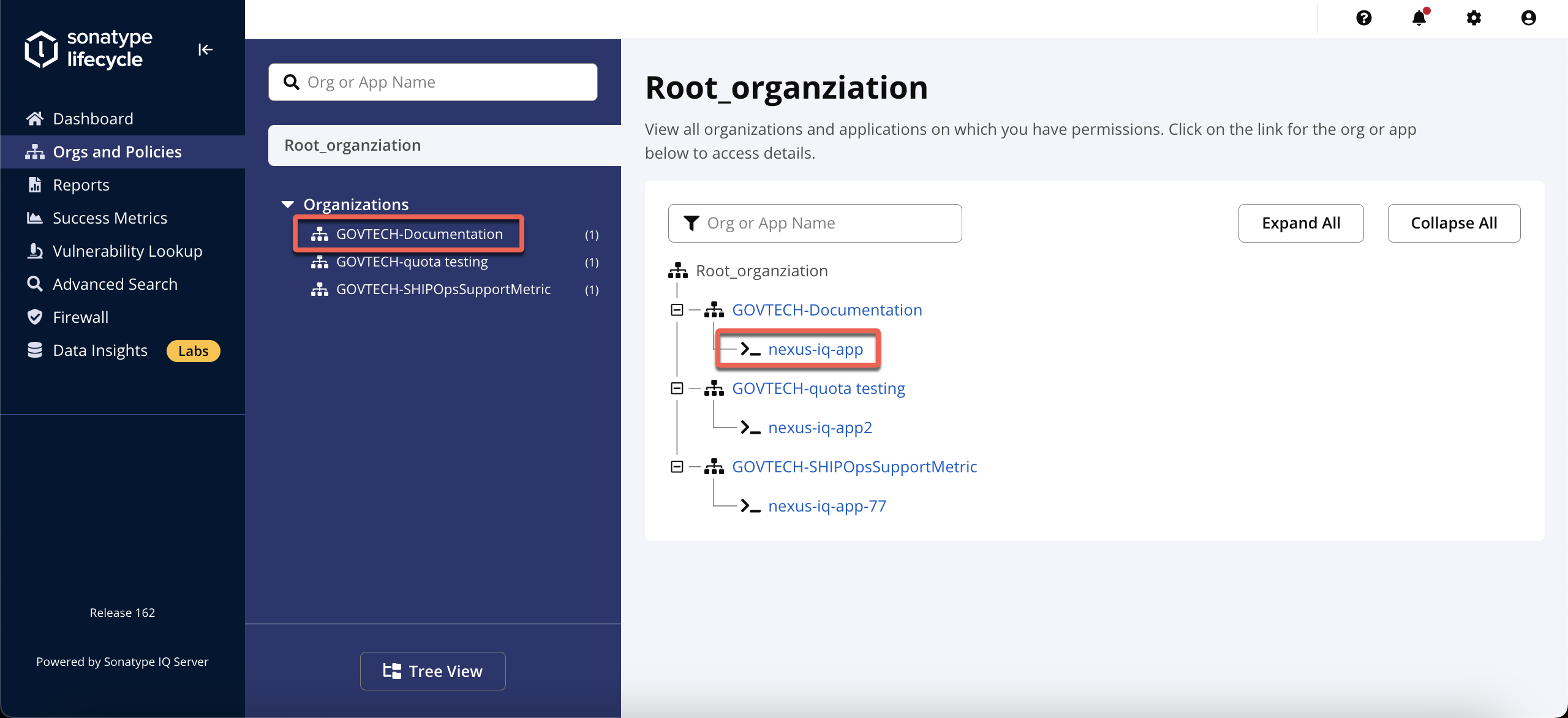Click Add a Policy.

Configure the policy conditions according to your requirements.
You can also configure email notifications to receive alerts when:
a build fails
a security vulnerability is detected

Click Create.

Additional SHIP-HATS policies
SHIP-HATS includes several additional security policies to detect malicious or suspicious packages. These policies are preconfigured and cannot be modified.
| Policy | Purpose |
|---|---|
| Security-Critical | Detect components with critical vulnerabilities |
| FW-Malicious Code – Severe | Detect packages containing malicious code |
| Integrity-Rating Suspicious | Detect suspicious packages |
| FW-Security Namespaces Conflict | Detect namespace impersonation attacks |
Impact of additional policies
When these policies detect suspicious or malicious packages, Nexus IQ may generate warnings during scans.
These warnings appear when packages are downloaded through SHIP-HATS Nexus Repository proxies (for example npm-proxy).
Currently:
- Violations appear as warnings
- Builds are not blocked
However, malicious or suspicious packages may be blocked from passing through Nexus Repository proxies to improve security.
If a package is blocked:
- Review the dependency source.
- Verify whether the package is legitimate.
- Replace the dependency with a trusted version if necessary.
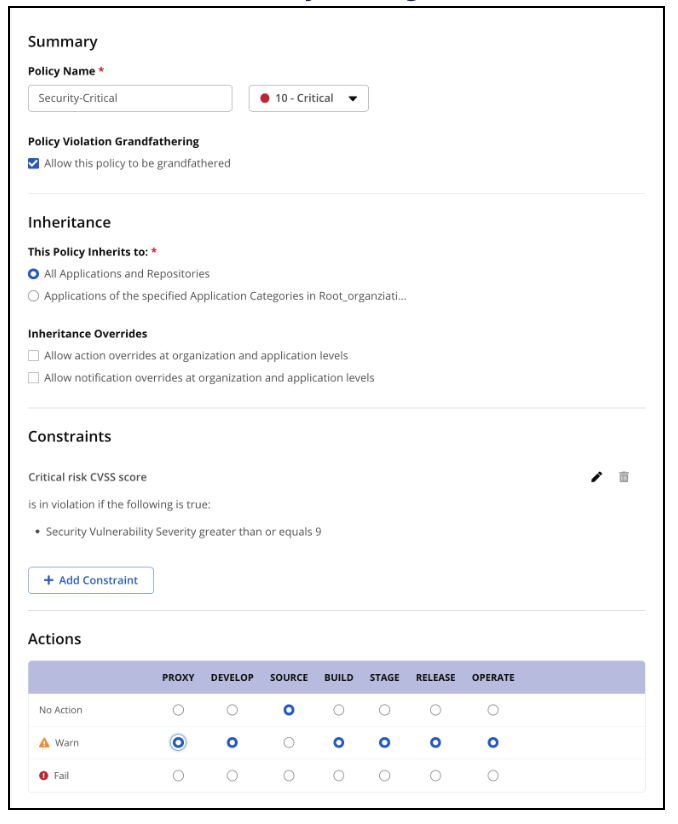
Security-Critical
Policy to monitor critical severity vulnerabilities.
FW-Malicious Code – Severe
Policy to detect packages containing known malicious code.

Integrity-Rating Suspicious
Policy to monitor packages with suspicious integrity ratings.

FW-Security Namespaces Conflict
Policy to detect packages that impersonate legitimate libraries.

Related topics
Additional resources
Nexus Firewall setup and policy configuration
https://learn.sonatype.com/courses/jump-start-for-developers-firewall/Understanding Nexus IQ policies
https://help.sonatype.com/iqserver/managing/policy-management/understanding-the-parts-of-a-policy
Best practices
Enforce downloading from Nexus Repository Manager and Nexus Firewall
https://community.sonatype.com/t/best-practice-enforce-downloading-from-nexus-repository-manager-and-nexus-firewall/3542Protect against day-zero attacks
https://community.sonatype.com/t/reach-full-protection-from-day-zero-attacks-by-performing-these-five-checks/9097Release integrity best practices
https://help.sonatype.com/fw/best-practices/release-integrity-best-practices
Additional SHIP-HATS policies
SHIP-HATS includes additional security policies that help detect malicious or suspicious packages.
These policies are preconfigured and cannot be modified.
| Policy | Purpose |
|---|---|
| Security-Critical | Detect components with critical security vulnerabilities |
| FW-Malicious Code – Severe | Detect packages containing known malicious code |
| Integrity-Rating Suspicious | Detect suspicious packages based on integrity rating |
| FW-Security Namespaces Conflict | Detect packages impersonating legitimate libraries |
Impact of policies
When these policies detect suspicious or malicious packages, Nexus IQ may generate warnings during scans.
These warnings appear when packages are downloaded through Nexus Repository proxies (for example npm-proxy).
Depending on the policy configuration:
- A warning may appear in the scan report.
- A build may fail if the violation severity exceeds the allowed threshold.
- A package may be blocked from passing through Nexus Repository proxies.
If a package is blocked, review the dependency and replace it with a trusted version.
