Delete Fortify on Demand (FOD) application
Subscription Admins (SAs) and Project Admins (PAs) can delete Fortify on Demand (FOD) applications.
Important
- Deleting an application permanently removes it from the selected SHIP-HATS project.
- All associated releases, scan history, and configuration data will no longer be accessible.
- This action cannot be undone. Ensure the application is no longer required before proceeding.
Prerequisites
Ensure the following:
- You are a Subscription Admin (SA) for the subscription, or a Project Admin (PA) for a SHIP-HATS project within the subscription.
Steps
In Console, go to Products > SHIP-HATS, and select the required subscription to open the Workspace.
For detailed steps, see Access Workspace.
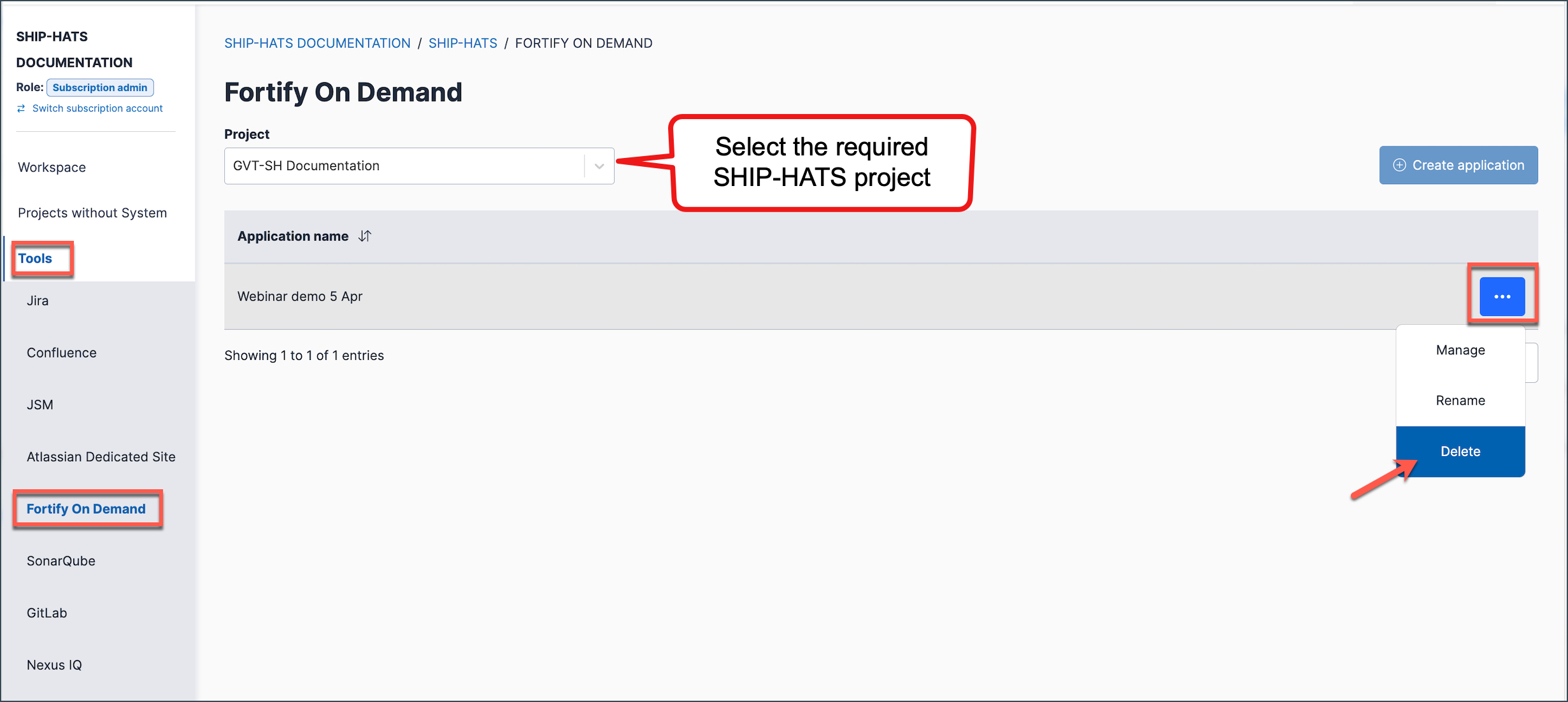
Click Tools > FOD.
Select the required SHIP-HATS project.
Click the ellipsis (…) next to the required Application name, then select Delete.
Type the application name to confirm the deletion.
Click Confirm.
Things to note
- If you need to reuse the name of a deleted application, wait 72 hours after deletion before creating a new application with the same name.
