How to Adopt Agile?
Agile is an iterative approach for design and development, jointly delivered by business and IT teams. This way of working creates a user-centric and value-driven product development approach. This will in turn deliver features that bring value to users.
In this section, we share some key steps and activities in product development - from when an idea is born to its implementation.
You may notice the following sections cover Scrum as the framework of choice to share first. Why Scrum?
To date, Scrum remains the most popular Agile methodology. 66% of Agile practitioners1 identify it as the methodology they adopt to address complex problems and deliver products of high value.
Discovering what Scrum is about may be relatively easy with the abundance of reading material online like from Scrum.org or Scrum Alliance. It is however difficult to master and requires discipline like all agile practices.
Thus, we hope to share some of the potential pitfalls in a Scrum delivery, with tips that may help you out!
In the next section, you’ll also find some good practice information about the Kanban method that maintenance and operations teams can use to more holistically manage their work. The emphasis is on evolutionary change vs drastic revolutionary change, and is focused on improving from the customer/ users’ perspective.
Step 1: Alignment

Setting a Product Vision and strategy is an essential exercise. It aligns all stakeholders and development team in a product’s development about the shared objectives they are trying to achieve with this product.
Vision statements are aspirational and communicate concisely why you are creating a product and what your company hopes to accomplish with it in the future.
For example, Google’s vision statement is to “provide access to the world’s information in one click.”
After setting the Product Vision and setting the goals, e.g. Objectives and Key Results (OKRs), the team can come up with a list of initiatives required to meet these OKRs and fill in the details on high-level features (a.k.a Epics) on a Product Roadmap.
Step 2: Ideation
User journeys for a user-centric design
One way to start designing for the user is to define the user journey maps or experience maps for your target users through ethnographic research. This makes easy to compare multiple experience maps and identify gaps that to close.

Levarage on user insights through Design Thinking Workshops
A design thinking workshop leverages insights from users to ensure the ‘right thing’ is built to slve the ‘user problem or capture an opportunity.
A typical design thinking workshop goes with the following agenda:
- Framing the problem with “How might we…” statements
- Encouraging divergent thinking through rapid prototyping and ideation activities
- Converging ideas through votes
- Defining the “Minimum Viable Product (MVP)” for launch to market
The MVP can be broken down further into Epics and User Stories for prioritisation in the backlog, obtain early user feedback and validate assumptions. This helps to make sure we’re not investing time and effort to build the wrong solution.
Step 3: Inception
Setting Up to Start Right After the ideation and discovery activities, the team can plan the set of Inception activities to kick off and be ready for development. This differs from the traditional project kick-off which primarily focused on the scope, work items and schedule. Inception aims to brings everyone together involved in the development of the product to:
Share about the project or product such as the problem statement and target user audiences, their vision and measure of success
Share artefacts that could help the team understand better the problem to solve or opportunity to capture, the envisioned journey and functionalities such as the user research, storyboard, service journey, service blueprint, user journey map, user story map, etc.
Conduct preliminary activities to tie down the understanding of the agile practices that the team will adopt as part of delivering the project or product.
There are many ways to run an inception. For the example illustrated in this section, we will assume the team wants to adopt the Agile methodology, Scrum, for the delivery of this project or product.
In Scrum, the areas that will be discussed and planned for the inception are:
Minimum Viable Product Definition
During the inception, it is of utmost importance to provide the overall scope of the project by defining the ‘Minimum Viable Product’ (MVP) - the smallest set of features that can be built with the least effort to obtain user feedback and validate the user need (hypothesis).
Scrum advocates that the team should have a working part of the product at the end of every sprint. However, while the team often may have a working part of the product at the end of a sprint, it might not have the features needed to provide sufficient value to the users, from a product level perspective. For example, if we are building a flight booking system, we might have the ability for users to log into the booking system. But without the ability to book any flight, the product might not be considered ‘viable’.
Defining the MVP allow the team to more effectively consider the minimum user journey. For this, it is helpful to look into the product backlog and perform the next activity, product backlog refinement.
Product Backlog Refinement
A Product Backlog Item or PBI, is a piece of written information which describes a piece of work that is required for the project. They can be:
- Epics: Epics are used to group user stories. Epics can be used to define a functionality to be provided. For e.g. An admin dashboard epic could have multiple user stories for implementing this functionality.
- User Story: User stories are product features that are written from the user perspective.
- Tech Chore: This is technical work required to facilitate the progress of user stories. For example, the setup of infrastructure is required so that the application can be hosted on a platform for the customer to perform a transaction.
Refining stories means to clarify ahead of development the value and customer needs. This ensures a steady supply of near-term stories that the team can commit to in the upcoming sprint.
Definition of Ready and Definition of Done
To facilitate the tracking of the overall status of a PBI, there are 2 key states that are important and require discussions and agreement within the team. They are:
- Definition of Ready: when a PBI is ready to be picked up and worked upon
- Definition of Done: when a PBI is considered ready and shippable
Sprint Cadence
A sprint is a timebox, usually less than 4 weeks during which the team work to deliver a set of PBIs.
A sprint cadence can be defined by coming up with what happens in a sprint, and when. What would be typically covered in this discussion are:
- The days and timings for the conduct of sprint ceremonies like the daily Scrum, Sprint Planning, Sprint Review and Sprint Retrospective.
RAID and Parking Lot
During inception, the team would also identify the potential risks or/and aspects that are unclear at the time of the inception.
These items are tracked and monitored as the project progresses to see if they can be addressed and updated.
Social Contract
As a sprint is usually a short period of time (less than 4 weeks), it is imperative that the team is clear on the behavior and expectations every member expects of one another.
The purpose of the social contract is an activity where the team will be able to share the ‘acceptable’ forms of behaviours that they would like to see from each other. For example, it could be something like ‘being punctual to meetings’ to ‘code should be picked up for review within 4 hours from when it was opened for review’.
By doing so, it would minimise the occurrence of misunderstandings. It would also reduce the amount of time spent trying to clarify or assume why someone reacted the way they did.
Step 4: Starting a Sprint
SCRUM 3-5-3 framework
| 3 Scrum roles | 5 Scrum events | 3 Scrum artifacts |
|---|---|---|
| Product Owner (PO) A member of the Scrum Team responsible for defining Stories and prioritizing the Team Backlog items according to their value. |
Sprint The heartbeat of Scrum, where ideas are turned into value. |
Product Backlog An emergent, ordered list of what is needed to improve the product. It is the single source of work undertaken by the Scrum Team. |
| Scrum Master A member of the Scrum Team who is in charge of ensuring the team is following the proper Scrum structure. |
Sprint Planning Sprint Planning initiates the Sprint by laying out the work to be performed for the Sprint. This resulting plan is created by the collaborative work of the entire Scrum Team. |
Sprint Backlog A highly visible, real-time picture of the work that developers plan to accomplish during the Sprint in order to achieve the Sprint Goal. |
| Development Tea: The development team consists of cross-functional members in the Scrum Team that are committed to creating any aspect of a usable increment each sprint. |
Daily Scrum To inspect progress towards the Sprint Goal and adapt the Sprint Backlog as necessary. |
Increment A concrete stepping stone towards the Product Goal. |
| Sprint Review To inspect the outcome of the Sprint and determine future adaptations. |
||
| Sprint Retrospective To plan ways to increase quality and effectiveness. |
3 Scrum Roles - Roles & Responsibilities
| Product Owner (PO) | Scrum Master | Development Team |
|---|---|---|
| Have a product vision Help to align the vision with the Development Team and key stakeholders to achieve it. |
Act as a coach/mentor/defender of the Development Team When there’s a bottleneck in the process, Scrum Masters should readily and aggressively remove the barrier to make sure the team’s work goes smoothly. Encourage the team towards continuous improvement and delivering value. |
Own the Sprint Backlog A strong Development Team should possess self-organising and self-managing individuals who can decide their own processes and the deliverables that they are working on within a Sprint. No changes can be made to the log without the team’s approval. |
| Be in constant communication with the team Provide guidance while monitoring the progress of the work, making sure it is aligned with the vision. |
Innovate While ensuring the team adheres to the Scrum framework, Scrum Masters should be on the lookout for creative and innovative approaches to working with the team. |
Work with PO to create the Sprint Goal Consult with the PO to determine what goes into a Sprint. |
| Communicate with stakeholders and customers Gather and assess information and requirements that can help the project. Showcase work for everyone to see it early and often. |
||
| Trust the Development Team Trust that they have the skills and knowledge to realise the vision. |
||
| This is a full-time role, and the PO’s responsibilities should be assigned to a specific person and not a committee, |
Conducting the 5 Scrum Events
Sprint
A fixed-length event of one month or less where the team will work to achieve the Product Goal. A new Sprint starts immediately after the conclusion of the previous Sprint.
(1) Spring Planning (max 8hrs for a 1-mth Sprint)
A collaborative discussion to lay out the work to be performed for the Sprint.
The PO ensures that attendees are prepared to discuss the most important Product Backlog items and how they may contribute to the Product Goal. The Scrum Team may invite others to attend Sprint Planning to provide advice.
What is a Sprint Goal?
The PO proposes how the product could increase its value and utility in the current sprint. The whole Scrum Team then collaborates to define a Sprint Goal that communicates why the Sprint is valuable to stakeholders.
What can be done this Sprint?
Through discussion with the PO, the developers select items from the Product Backlog to include in the current Sprint. These items may be refined during this process.
How will the chosen work get done?
For each selected Product Backlog item, the developers plan the work necessary to create an Increment that meets the Definition of Done through decomposing Product Backlog items into smaller work items of one day or less.
(2) Daily Stand-up (15min event for the Developers)
To inspect progress towards the Sprint Goal and adapt the Sprint Backlog as necessary. To consider discussing the following:
- Work that has been done the day before
- Work that is planned today
- Blockers (if any)
(3) Sprint Review (max 4hrs for a 1-mth Sprint)
The Scrum Team presents the results of their work to the PO and discuss their progress towards the Product Goal. During the event, the Scrum Team and stakeholders review what was accomplished in the Sprint and what has changed in their environment. Based on this information, attendees collaborate on what to do next.
(4) Sprint Retrospective (max 3hrs for a 1-mth Sprint)
The Scrum Team inspects how the last Sprint went with regards to individuals, interactions, processes, tools, and their Definition of Done. Assumptions that led them astray are identified and their origins explored.
The Scrum Team discusses what went well during the Sprint, what problems it encountered, and how those problems were (or were not) solved.
The Scrum Team identifies the most helpful changes to improve its effectiveness, and records them as action items for the next Sprint.
Preparing the 3 Artifacts
| Product Backlog | Sprint Backlog | Product Increment |
|---|---|---|
| What is a Product Backlog? The Product Backlog is a prioritised list of Product Backlog Items (PBI). It captures the requirements of a product. Items at the top of the list are detailed and ready to work on, whereas PBIs lower down on the list can be higher level, to be refined further if prioritised. Read more on this in the Product Backlog Management section below. |
What is a Sprint Backlog? The Sprint Backlog consists of the Sprint Goal (Why?), the PBIs selected for the Sprint (What?), and an actionable plan for delivering the Product Increment (how?). |
What is a Product Increment? A Product Increment must be usable and potentially releasable in order to be valuable. It is developed by the Development Team at the end of each sprint. |
| Who is accountable? One Product Owner is accountable for One Product Backlog per Product. The Product Owner does not work alone and can seek the team’s help to refine the PBIs together. |
Sprint Goal The Sprint Goal is crafted during the Sprint Planning Event and then added to the Sprint Backlog. It is the single objective of the sprint. It creates coherence and focus for the Scrum Team to work together rather than on separate initiatives. |
Potentially Releasable For a product to be potentially releasable, the increment must be - High Quality - Well-tested - Complete |
| Prioritisation by Market Value The PBIs are prioritised by market or business value. |
Who is accountable? The developers are accountable for creating a plan for the Sprint and the Sprint backlog. |
Step 5: Measuring success of Agile delivery with SCRUM
Potentially Useful Metrics
| 1. Customer Satisfaction and Profitability | Rationale: To measure business impact and value creation |
|---|---|
| 2. Employee Satisfaction | Rationale: To measure team morale and sustainability of development. Behind every great product is a great product team, and they need to be taken care of. |
| 3. Number of Releases | Rationale: High number of releases means the team experiences a fast flow of work. Developers are able to make and deploy changes to production easily. Small units of work can be quickly and frequently merged into production environments. |
| 4. Sprint Burndown | Rationale: The shape of the burndown allows for development team to inspect bottlenecks and adapt to improve agile practices. However, this should not be used as a measure of productivity. |
Tip!
Try not to focus too much on the metrics and the numbers. Instead, focus on who sets them and how they use the metrics for themselves.
Product Backlog Management
Product backlog management involves the ongoing process of maintaining, refining, and prioritizing the list of work items required to deliver a product in Agile development. It encompasses activities such as adding, updating, and removing items based on evolving requirements, estimating and prioritizing items, and ensuring that the backlog remains transparent, aligned with business objectives, and adaptable to changing needs.
Regular product backlog management and adopting the good practices is essential for effective planning, prioritization, and delivering valuable increments of work.
Step 1: Establishing the Product Backlog
The Product Backlog serves as the single source of truth, representing all work required for product delivery. Modern tools such as Jira are typically adopted to help manage the Product Backlog, providing accessibility to team members assigning and receiving work. This aligns with the Agile principle of transparency, providing visibility into all functional, non-functional, and technical tasks, as well as pre-go live activities.
Step 2: Planning and Prioritization
The Product Owner, with input from the Development Team, should review the product backlog, plan and prioritize the Product Backlog Items at least once every iteration such as conducting the product backlog refinement to ensure the most valuable and essential items are addressed first. As part of the discussion, Product backlog items should be added, updated, and removed based on evolved requirements. The Rolling Wave Planning is a useful technique to be adopted as it -ensure short-term product backlog items (for upcoming 2 sprints) are ready for implementation, -while longer-term items are conducted at a higher level, focusing on broader objectives and milestones. This aligns with the Agile principle of inspection and adaptation, allowing for flexibility in adapting to evolving requirements and changing priorities. The Product Owner, with input from the Development Team, should review and prioritize the Product Backlog at least once every iteration such as conducting the product backlog refinement to ensure the most valuable and essential items are addressed first. As part of the discussion, Product backlog items should be added, updated, and removed based on evolved requirements.
Step 3: Getting Product Backlog Items Ready for Development
Once the product backlog is reviewed and prioritise for the upcoming 1-2 sprints, teams can apply the INVEST principles to ensure product backlog items are well-defined, valuable, and feasible for implementation in the upcoming sprints. A product backlog item is made up of at least 1 user story.
INVEST principle:
- Independent: Each user story is self-contained and independent, allowing for flexibility and prioritization of individual features.
- Negotiable: The user stories should be open for discussion and negotiation, allowing for collaboration and refinement.
- Valuable: Each user story delivers tangible value to the end-users or stakeholders, contributing to the overall objectives of the product.
- Estimable: The user stories are clear and specific enough to allow for estimation of relative complexity and effort, enabling effective planning and prioritization.
- Small: Each user story is small enough to be completed within a single iteration or sprint, allowing for incremental delivery and feedback.
- Testable: Each user story is testable, ensuring that its completion can be objectively verified through testing to deliver the intended value.
By following these steps and principles, the frequent product backlog management ensures transparency across the team, adaptability, and effective delivery of valuable increments of work in Agile development.
Agile Estimation
Agile estimation is a key practice in agile software development. It involves the process of estimating the time, effort and resources to complete various user stories and tasks. While product owners gather requirements from the business, they may not always have a comprehensive understanding of the implementation details. Hence, estimation plays a crucial role in providing the product owner and stakeholders with a reasonable understanding of how long it will take to deliver a particular piece of work.
Nevertheless, agile estimation is simply an estimate and not a commitment. Estimates will always be off. Relying on estimates to forecast and commit to a timeline can create excessive pressure for the development team. Hence, it is crucial to regularly assess the completed work and revise the estimates for the remaining tasks.
Agile Estimation is a Team Sport
Ensuring the involvement of every team member, including developers, designers, testers and others, is crucial. This is because each individual brings a unique perspective of the required work to deliver a user story. Their experience has taught them about potential challenges and hidden complexities that may arise during the software development.
Excluding any relevant team members during the estimation process leads to lower quality estimates, reduced morale because key contributors do not feel included, and compromises to the overall quality of software.
Therefore, it is crucial to avoid making estimates in isolation without involving the entire team. Such an approach only sets the team up for failure. Collaboration and input from all team members are essential for comprehensive estimations that support successful project outcomes.
Story Points vs. Man-Days/Hours
Traditional software teams typically provide estimates using time-based formats such as days, weeks, or months. However agile teams have shifted towards utilizing story points as a more effective estimation approach. Story points serve as units of measurement to estimate the overall effort required for implementing a PBI. These points are assigned by teams based on factors like work complexity, the amount of work, and risks or uncertainty involved.
Assigning story points facilitates the breakdown of work into smaller, more manageable pieces, allowing teams to address uncertainties and mitigate risks. As time progresses, this approach enables teams to develop a clear understanding of their productivity and capacity within a given timeframe. Moreover, it fosters consensus and commitment to the solution.
Estimation Techniques
Planning Poker
Agile teams generally starts the user stories estimation using Planning Poker. Planning Poker is a consensus-based estimation and planning technique. In this technique, the product owner starts by providing a detailed explanation of the user story to the estimators.
Each estimator is equipped with a deck of Planning Poker cards containing values such as 0, 1, 2, 3, 5, 8, 13 and so on, typically following the Fibonacci sequence. The estimators engage in discussions about the user story, seeking clarifications from the product owner if any. Once the user story has been thoroughly explored, each estimator privately selects a card representing their estimate. All cards are then revealed simultaneously.
If all estimators choose the same card value, the value becomes the agreed-upon estimate (story points) for the user story, and the product owner can proceed to discuss the next PBI. In case of differing estimates, the estimators engage in further discussion and clarifications to better understand and reconcile their estimates. Particularly, the high and low estimators should share their reasoning behind their respective estimates. After further deliberation, the planning poker process is repeated until a consensus is reached among the estimators.
The Planning Poker technique promotes collaborative decision-making and encourages open discussions to converge on a shared estimation. It ensures that the entire team participates in the estimation process, fostering transparency and collective ownership of the estimations.
Relative Estimation
A method that focuses on relative sizing rather than precise measurements. It involves comparing the effort required against a reference item (preferably an item that the development team has completed). This approach often results in faster and more accurate estimates while avoiding the drawbacks of over-analyzing a user story.
T-Shirt Size Estimation
Instead of providing a specific numeric values like story points or time duration, the team assigns T-shirt sizes (such as XS, S, M, L, XL) to represent the magnitude of work involved.
Function Point Estimation
A method used to measure the size and complexity of software systems. Instead of focusing on the technical details, this method looks at the functionality the software provides from a user’s perspective.
Tracking Sprint Progress
Sprint Burn-down Chart
A Sprint Burn-down Chart is a visual representation that tracks the progress of work completed during a sprint. It helps the Scrum Team understand how much work is remaining and whether the team is on track to complete all the planned tasks within the sprint.
The chart typically has time in days on the x-axis, representing the duration of the sprint.
The y-axis represents the amount of work remaining in the sprint.
The chart includes a guideline that shows the ideal progress of work throughout the sprint. It represents the amount of work that should be completed each day.
The chart also tracks the actual work completed by the team. Each day, the team updates the chart by plotting the remaining work.
The primary purpose of a Sprint Burn-down Chart is to provide visibility into the progress of work during a sprint. It helps the team identify if they are ahead, behind or on schedule to complete the planned work.
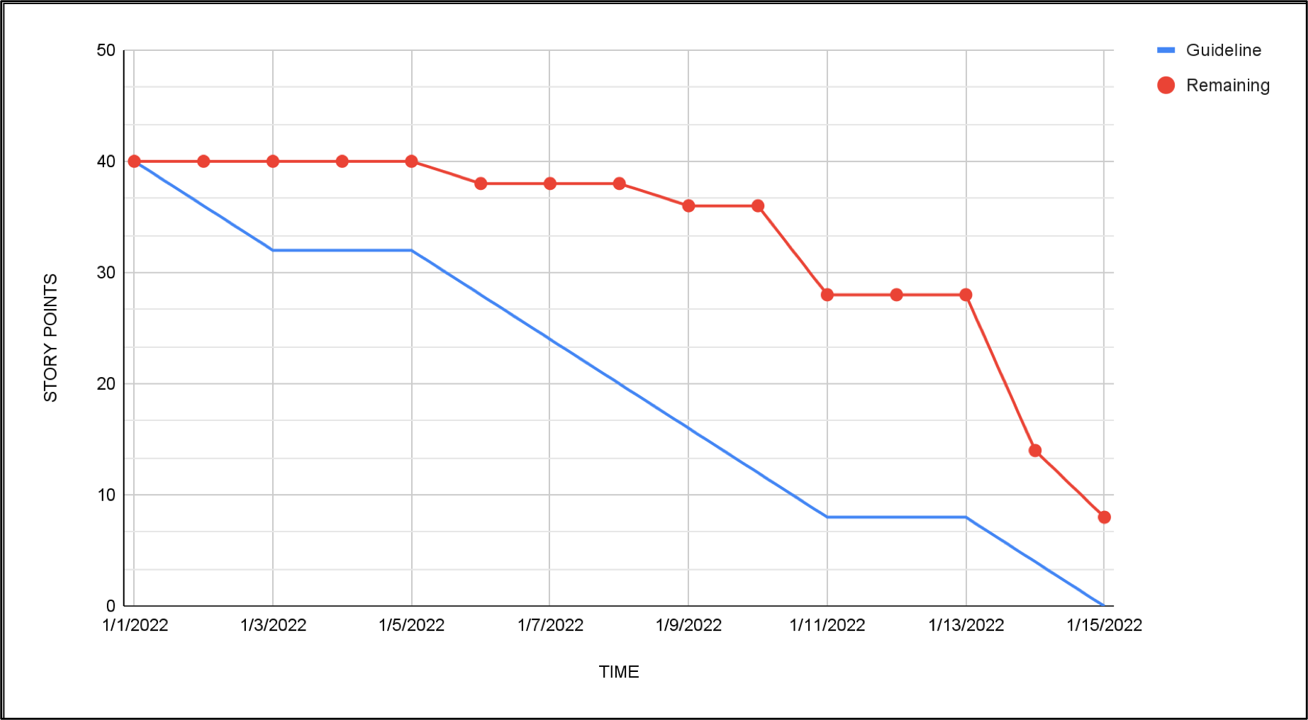
The Sprint Burn-down Chart can also be used to gain insights and patterns of the Scrum Team. With reference to the chart above, what could have happened?
- The Product Owner was accepting user stories near the end of Sprint
- Is it due to wrong/changing requirements resulting in to-and-fro clarifications between the developers and the Product Owner?
- The Development Team delivered most of the user stories near the end of sprint
- Is it due to user stories only pushed to Quality Engineers for testing near the end of sprint?
It is always best to validate these assumptions with the Scrum Team before taking any mitigating actions.
Release Forecasting
Release Burn-up Chart
A Release Burn-Up Chart is a visual representation that tracks the progress of work completed vs the work planned for a software release. It provides a graphical illustration of how the scope and completion of work has evolved over time.
As the project progresses, the release burn-up chart shows the cumulative completion of work. As tasks or user stories are completed, the chart’s line grows, indicating the progress made. The chart includes multiple forecasted lines to indicate the expected progress based on the team’s velocity.
The release burn-up chart provide several benefits. It offers stakeholders, the product owner and the development team a clear visualization of the project’s progress and how it aligns with the planned scope. It also helps to identify any deviations from the original plan. By tracking the completion of work over time, the release burn-up chart provides valuable insights into the project’s overall progress. This enables informed decision making and facilitates effective communication among team members and stakeholders.
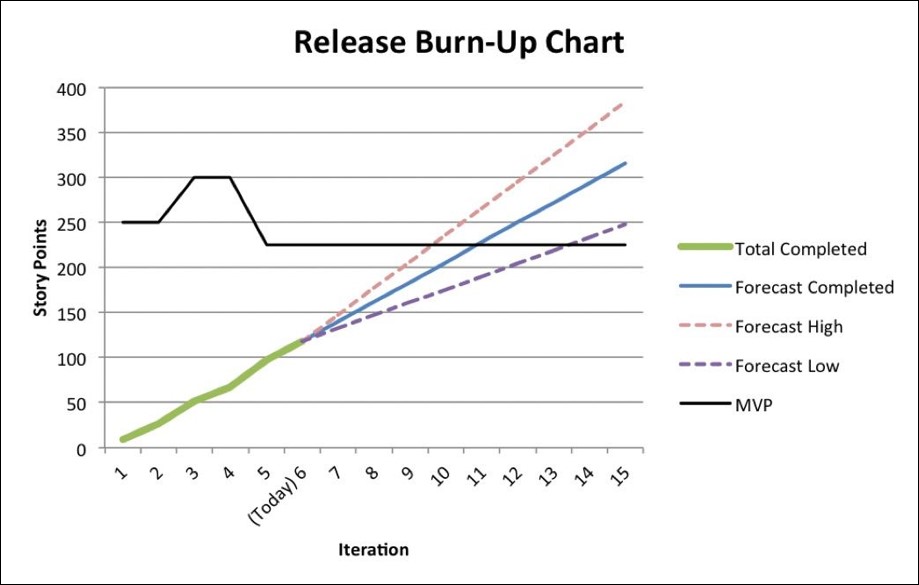
With reference from the chart above:
- Total Completed shows the cumulative completion of work over the sprints
- MVP shows the total amount of worked planned for release
- Forecast Completed shows the forecast based on the team’s average velocity over the last 3 sprints
- Forecast High shows the best-case forecast based on the team’s highest velocity in the last 3 sprints
- Forecast Low shows the worst-case forecast based on the team’s lowest velocity in the last 3 sprint
Common Bad Smells
During the Sprint
Continuously changing the rhythm and cadence (no. of weeks) of the sprint reduces predictability of the velocity the team can achieve, which impacts timeline estimation.
Extending the number of days on a sprint to ensure a “done” sprint reduces predictability of the velocity the team can achieve, which impacts timeline estimation.
Pressurising the team to deliver a fixed set of stories within a sprint can cause burnout. You will notice team members starting to over-buffer story points which reduces transparency. Teams would also be reluctant to accept changes, leading to the tendency to fall back on contract negotiation instead of collaboration.
Tip!
Tip! Discuss with the team to have a sprint backlog with a good mix of must-haves and good-to-haves for the team to prioritise their work and not be expected to deliver everything. This also creates a buffer to meet stakeholders’ expectations.Using a hardening sprint can tie up loose ends like technical debt and bugs identified during early sprints
Tip!
Inspect and adapt your Definition of Done to align the team on quality standards to prevent a build-up of technical debt and bugs.Comparing sprint velocity across teams creates an unhealthy climate of competitiveness. Pushing teams to increase velocity over time will result in a trade-off of quality to gain more output. Additionally, each team has its own unique way of doing story points estimation.
Tips!
Monitor the sprint velocity of individual teams over time to gauge their effectiveness and ability to handle more complex tasks. Aim to achieve stable velocity to improve the predictability of release timelines.
During Sprint Planning
Having a Product Owner who does not have a sprint goal in mind means the Development Team will not be able to determine the user stories to fill the sprint backlog. There is also a risk that the team will work on lower priority items.
Tip!
The Scrum Master can guide the Product Owner to craft a sprint goal, by identifying objectives which tie up the user stories prioritised for the sprint.Having an unrefined Product Backlog means that teams will not be able to give a good estimation and may over-buffer story points due to high uncertainty. There is also a high risk of the story not being delivered if important requirements are missed out.
Tip!
Consider preparing a Definition of Ready, for the Product Owner and Development Team to be able to agree on what is the baseline criteria for a user story to be considered “ready” for the team to take up in the coming sprint. Also, Product Owners can reserve some time for product backlog refinement with the development team and stakeholders to ensure a steady supply of “ready” stories.
Not knowing the velocity and capacity of the team means a risk of not delivering committed stories if the story points planned for the sprint far exceed the average velocity of the team. Remember that team members going on leave would further reduce the team’s capacity.
Tip!
Start off the sprint planning by asking for the team members’ leave plans to set proper expectations on the velocity the team can commit to for that sprint.
During Daily Stand-up
Not doing the daily stand-up everyday means a looser feedback loop and a lost opportunity for the team to inspect and adapt their sprint backlog.
Using the daily stand-up as a status update to the Scrum Master undermines the purpose of the daily stand-up, which is meant for the development team to inspect and adapt their progress against the sprint goal. Reporting unrelated sprint goal items will cause the daily stand-up to take longer than required.
Tip!
Consider the use of powerful questions for focus, and a burndown chart for the team to inspect and adapt during the stand-up.Examples of powerful questions:
- “Are we on track to meeting our sprint goal?”
- If not on track: “What can we do to get back on track?”
- “Are we on track to meeting our sprint goal?”
Not updating the sprint backlog or user stories during the daily stand-up reduces the transparency of work done.
During Sprint Review
Showing the demo only to the Product Owner instead of including the stakeholders means a missed opportunity to gather feedback from the stakeholders. Setting aside another time for “User Acceptance Test (UAT)” to let stakeholders and users see the product means reverting to the “Waterfall” mentality, where it may be too late and expensive to incorporate big design changes.
Tip!
Adopt an open mindset to receiving feedback and synthesising input from stakeholders. By inviting stakeholders to the Sprint Review, you can fail fast and succeed early.Remember that the Product Owner has the final say on the product vision.
Cancelling the Sprint Review as there is nothing to demonstrate. While this may sound like the sprint had failed, make the best out of it by using it as an opportunity for feedback to improve in the next sprint.
Not letting the Development Team attend the Sprint Review means a missed opportunity for the Development Team to receive direct feedback for their work, and for them to understand the business user’s perspective, both of which would help them build better products.
During Sprint Retrospective
Not investing in a Sprint Retrospective because it seems like a waste of productive time means a missed opportunity to inspect and adapt a team’s processes and ways of working to improve the performance of the next sprint.
Tip!
Think of the Sprint Retrospective as an opportunity to “sharpen your axe”, so you can cut trees more effectively.Using the same format of “What went well”, “What didn’t go so well”, and “Actions we can do to improve” all the time. Applying the same retrospective format is not only dull, but it fails to help the team look at their performance through different lenses.
Tip!
Make the retrospective a fun and insightful activity by using different templates and icebreakers.Not making anyone in the team accountable for the actions to improve turns the Sprint Retrospective into a ranting session, where the team inspects but fails to adapt and improve.
Tip!
Always end the retrospective by getting accountability from the members for each action item.Consider using “Who”, “What” and “When” for each item to drive accountability.
