Automated testing plays a key role in supporting reliable, maintainable software systems. It helps teams validate functionality early, catch regressions quickly, and deliver changes. When adopted effectively, automated tests become part of the feedback loop that improves both delivery speed and system quality over time. When adopted effectively, automated testing can provide several benefits across the development and deployment process.
Benefits of Automated Testing
Speed
Running a suite of automated tests can be significantly faster than manual testing. This enables new workflows, allowing developers using them to get quicker feedback on the correctness of their code and ultimately the team being able to launch to production more frequently.
Shifting Left
Automated testing shifts the responsibility for quality left into the hands of developers, rather than relying on other roles or teams to manage coding issues.
By reducing the number of bugs to be caught later in the lifecycle, we allow Quality Assurance teams to focus on higher value activities like automation, Exploratory Testing, edge cases and product validation.
Repeatability
A reliable automated test suite produces consistent results with every run. This makes it easier to detect regressions and maintain trust in the system’s stability over time.
Confidence
If our automated test suite has enough meaningful code coverage to give us high confidence that our software works, it lets us change the software without fear that we’re breaking it.
Combined with the speed to run them frequently, this is a powerful concept - enabling us to continually refactor the code much more aggressively to make it more maintainable, and ultimately to make adding new features easier.
Living documentation
Most documentation is detached from the code it refers to - either one can be moved or changed, rendering it obsolete or even misleading. Tests also explain the intended functionality of the code, and can be run at any time to prove their veracity.
More subtly, they also document the developer’s decisions - if they wrote a test for it, it must be there for a reason, and should be changed with caution.
Types of Tests
Different classifications of automated tests have slightly definitions to different people, but can still be useful distinctions.
Unit Tests
A unit test verifies the behavior of a small, isolated piece of code—typically a single function or method. These tests are fast, deterministic, and run in-memory without external dependencies. They ensure that individual units of logic work correctly in isolation.
Example: Testing that a function correctly calculates tax based on a given input.
Goal: Validate logic correctness at the smallest scale.
Integration Test
An integration test verifies the desired behaviour across a larger section of a single component, or even multiple components in integration. These tests check that the integrated parts work together as expected and that data flows correctly between them.
Example: Testing that an API endpoint correctly saves data to a database and returns the expected result.
Goal: Detect issues in the way components interact.
End-to-End Test
An end-to-end (E2E) test simulates real user behavior by exercising the entire application stack—from the user interface down to the backend systems and external dependencies. These tests verify that the system delivers the expected functionality from the user’s perspective.
Example: Automatically opening a browser, logging in as a user, and creating a new record through the UI.
Goal: Validate full workflows and user journeys.
Contract Tests
Sometimes we might not be able, or want, to include all parts of the real system in a test. It may be owned by another team, unreliable or unavailable, external or not even exist yet.* Contract Testing (or Consumer Driven Contracts) is a pattern that helps us reduce the pain of having to test against a dependency like this, while reducing the risk of not testing against it at all.
If we can test against a contract, a shared abstraction that sits in between the two components, and then test that both sides adhere to the contract, we will have decoupled them and made our lives easier. We can develop and test against our side of the contract, with confidence that our code will work in the real integration.
The form the contract takes depends on the nature of the interaction between the two systems - for example, a JSON request-response specification for a REST API call. In a contract-testing framework, this can be used to generate two artefacts that validate the two sides of the contract:
- A mock server that responds in the specified way. This represents the producer system and can be used to test our consuming code.
- A suite of tests that can be run against the producer, sending the requests and expecting the responses in the contract.
In practice, the producer tests will probably be run on a timer to check that the system still conforms to their side of the contract and get early feedback on any breaking changes.
*In the special case of where the producer doesn’t exist yet, the contract becomes a future pact to build the integration in the agreed way. This enables the two sides to start implementation at the same time, or even ahead of each other - but things will almost always change during development, and so it’s important for the contracting parties to stay in good communication with each other throughout.
Contract testing can also be used within the same system, owned by the same team, to replace the need to stand up a particular component for integration testing.
Example: Testing that a consumer service sends requests in the correct format and the provider service responds with expected fields and types.
Goal: Ensure compatibility and prevent integration failures due to mismatched assumptions.
Balance of Tests
Qualities of a good test suite
- Completeness - a high level of coverage gives us confidence
- Speed - a fast run time encourages running many or all of the tests frequently
- Reliability - Tests failing for the wrong reasons break our trust
- Maintainability - if we test what we care about, we won’t have to update tests unexpectedly
- Expressiveness - make our intentions clear
Testing Pyramid
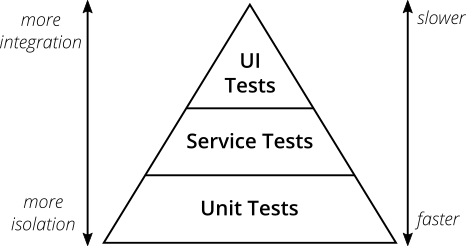 Image credit: Ham Vocke
The Testing Pyramid is a way of visualising the ideal balance of different types of tests in a test suite.
Unit Tests are small, fast to write and fast to run, deterministic and each cover a small piece of functionality.
E2E tests (UI tests in this case) cover a lot, and give us a lot of confidence that our app is working when they pass - but they are accordingly hard to set up, slow to run and there is a lot that can go wrong in addition to the failures we want to catch.
To balance these trade-offs, we can have a lot of unit tests that validate their pieces of logic in isolation, along a few E2E tests that check the components of the system are wired up and talking to each other correctly. A common rule of thumb is to test “happy path” use cases at the E2E level, since these give us confidence that our users can perform these critical actions, and enumerate out edge cases using unit tests.
Testing Trophy
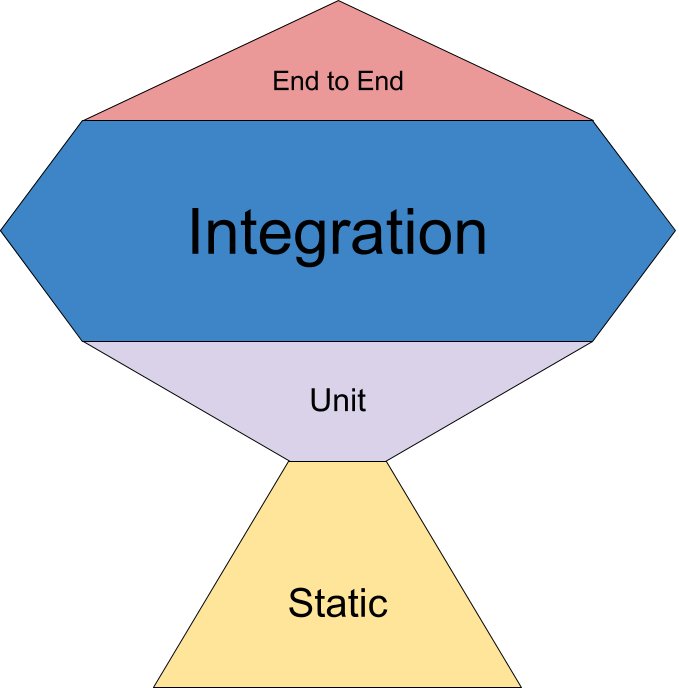
Image credit: Kent C. Dodds
The original Test Pyramid is predicated on the fact that integration tests are slow and non-deterministic. With increases in computing power and the rise of integration testing frameworks for modern languages, this doesn’t have to be true.
The Testing Trophy - not what you get when your tests pass, but a diagram with an updated shape - modernises the Test Pyramid by adding the following concepts:
Pervasive integration testing - if integration tests within one component are easy to write, deterministic and fast to run, then we can have more of them, freeing us to choose the testing boundary based on the behaviour we want to assert.
Static checks - making use of automated tools like typed languages and linters to get even faster feedback than with unit tests.
Both of these expanded checks reduce the number of unit tests we need to write to get meaningful coverage. The admonitions about having too many E2E tests still apply.
Tests you don’t have to write
Static checks like the ones advocated for in the Testing Trophy can be thought of as the first line of defence, catching classes of errors without even having to write a test. Coupled with local scripts, watchers or IDE integration, they can give you feedback on your code as you write it.
Some examples of these tools include:
Compilers
IDEs use the language’s compiler to highlight problems in the code in real time, and make suggestions for fixes and optimisations. Heeding these warnings and implementing the suggestions can help to bake idiomatic best practices into your code, yielding readability or even performance improvements.
Making full use of your chosen language’s type system gives the compiler more to go on, helping you avoid even more errors. Interpreted, dynamic languages, or those without a strong type system, can’t give as much feedback on correctness through the IDE and benefit from more checking through automated tests.
Linters
Beyond the syntax strictly necessary to run the code, language-specific linters can be configured to catch potential runtime problems in interpreted languages. Some of these problems can even be fixed automatically as you type.
Code Coverage
Code coverage is a metric we can use to highlight areas of the codebase that are not covered by tests. It measures how much of the code is exercised when the tests are run. This can be evaluated in different ways:
- Line coverage: the percentage of lines of code executed during the test run
- Branch coverage: the logical branches of code executed (which indicates different scenarios exercised)
- Path coverage: the combination of all possible paths through the code (including nested or sequential conditions)
Code coverage of unit tests is easier to measure, since the test runner is directly calling the code under test. Unit testing frameworks often provide a coverage option when running tests, giving the developer fast feedback on any gaps in the coverage.
Integration and end-to-end tests, if they run in a separate process to the application under test, require a bit more setup to measure coverage - the app code can be “instrumented”, that is special hooks compiled into a version of the app, which then record when they have been executed and produce a report. This instrumented app can then be started up, tests run against it and a report generated.
It’s important to note that high code coverage does not guarantee high-quality tests — poorly written tests can execute code without actually verifying behavior. See Writing Good Automated Tests for tips on how to make tests meaningful.
The discipline of Test Driven Development (TDD) builds mechanisms into the development workflow which ensure high code coverage and meaningful tests.
Quality Metric: Code Coverage
The higher the better, although tests still have to be meaningful. Logical branch coverage can show this more clearly than line coverage.
Summary
The end goal of automated testing is to give the team confidence that the software works as expected, and will work when deployed to production - and to do this in a faster, more repeatable way than manual testing. If we do this successfully, it takes the fear factor out of changing the code, enabling us to keep it maintainable and add new features sustainably for the business lifetime of the product.
