User stories are the foundational units of work in agile software development. They represent small, user-centered features or enhancements that deliver value. When framed well, a user story helps the team understand what needs to be built, why it matters, and how it can be verified. But effective story writing also involves understanding how stories are sliced, assessed, and tracked alongside other types of work.
Structuring Work With Vertical Slices
User stories should be written as vertical slices of functionality. This approach cuts through all layers of the system (UI, API, business logic, database, etc.) to deliver a complete, testable feature. A vertical slice adds some capability to the system that provides immediate value to the user and avoids the pitfalls of partially complete work, such as isolated backend logic or unfinished UI components.
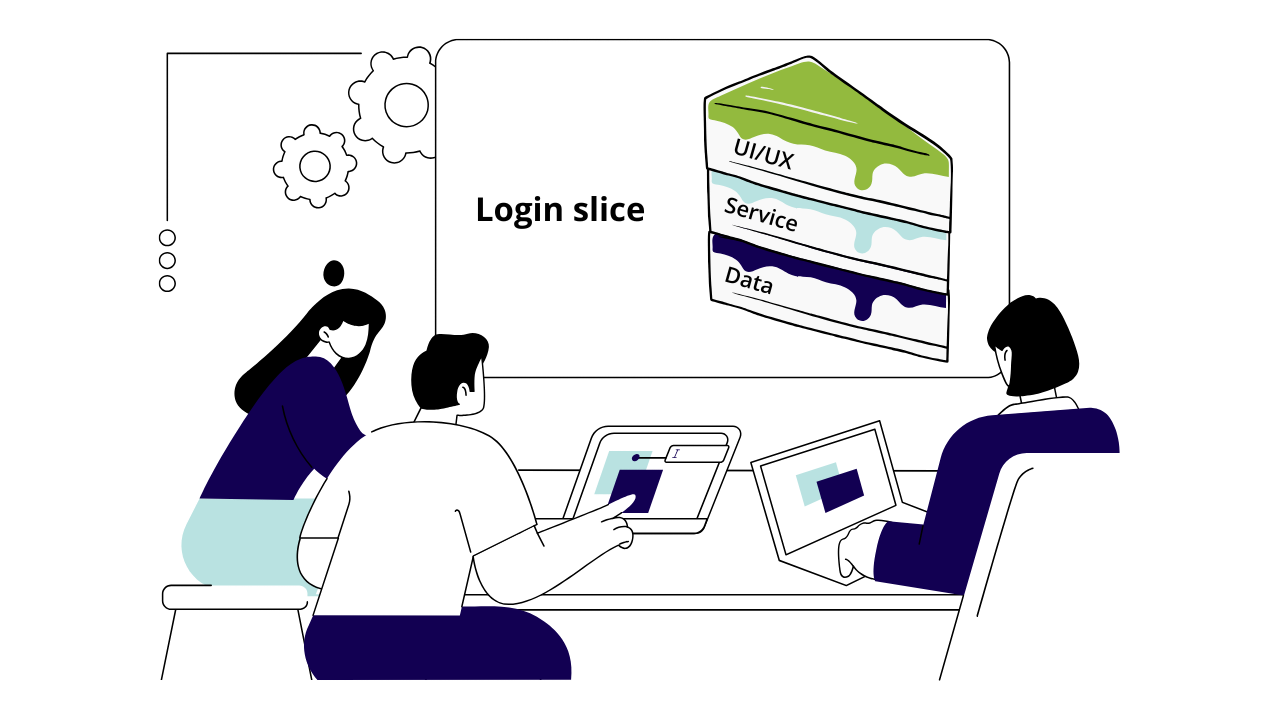
Instead of creating separate stories for front-end, back-end, and database work, a single vertical slice story covers all aspects of a user flow. For instance:
“As a user, I want to reset my password so that I can regain access to my account.”
This story encompasses:
- Frontend UI for entering a reset request
- Backend service for sending reset tokens
- Email dispatch logic
- Data persistence for reset tokens
Delivering software in vertical slices ensures that each story is a meaningful piece of user value that can be shipped to production.
Anatomy of a User Story
Title
A short, descriptive title allows the team to refer to the user story without looking it up in a work tracking system, and is an indication that the scope and purpose of the story is well understood by all. It makes it easy to scan the backlog and see that the stories make sense in the prioritised order.
The title can succinctly describe the capability that the story adds to the system, and the user persona that benefits:
Sarah (the Sales Rep) can download a Sales Proposal as a PDF
It’s common to see various tags prepended to the title of a story, such as epics, IDs or statuses - but if these are so long that they obscure the title itself then maybe there are other fields available to store this data in instead.
Description
The description expands on the title to outline the user value that the story is delivering, and for whom:
AS Sarah the Sales Rep
I WANT TO download a PDF version of a Sales Proposal
SO THAT I can email it to a prospective customer
The SO THAT section is particularly important as it describes the value, or “why,” behind the story. Understanding the business value of a feature helps developers make decisions that support this goal - and if it’s hard to articulate, we have to ask ourselves if the story is really valuable.
Acceptance Criteria
Acceptance Criteria break down the story into exactly what should happen from a user perspective in different scenarios. Clear acceptance criteria are an important part of the definition of done for each story - they let developers know when they are done with the implementation, and can even be converted into automated tests.
We can use the GIVEN WHEN THEN structure to encourage clear acceptance criteria:
GIVEN a starting state of the system
WHEN an action is performed
THEN the system is transitioned to a resulting state
For example:
GIVEN I am logged in as a Sales Rep
AND I visit the Sales Proposal Summary Page
WHEN I click the “Download PDF” button
THEN a download of the PDF for that Sales Proposal is downloaded to my computer
Note the use of AND to specify multiple starting conditions for this story. This is okay in the GIVEN and THEN sections, but each action performed (WHEN) should have its own set of Acceptance Criteria.
This GIVEN WHEN THEN syntax was originally developed for a Behaviour-Driven Development (BDD) automated testing framework, and so the different phases of the scenario when written in this way can easily be translated into automated tests.
A user story can contain more than one set of Acceptance Criteria related to the feature, enumerating the happy path scenario and edge cases - or the team can elect to split the edge cases out into different stories in order to give them a different priority and get earlier feedback on the main feature. Either way, they should be released at the same time to make this vertical slice of functionality conform to the team’s definition of done.
What a user story doesn’t contain - implementation details
The Acceptance Criteria above specify the requirements from a user perspective. It’s up to the developers to decide how best to make this happen, using their context on the technical options available and their tradeoffs. Including implementation details in a user story can constrain developers’ creativity, limit flexibility, and blur the line between product and engineering responsibilities.
Supporting resources
Without trying to dictate implementation details, it’s still helpful for developers to know as much as possible about the restrictions they are operating within and the options they have at their disposal to implement the user story. Relevant supporting information could include:
- UX design files and assets
- Downstream system API contracts and documentation
- URLs for integration points in different environments
- Testing accounts and credentials
The INVEST Mnemonic
To ensure stories are well-formed and manageable, teams may refer to the INVEST mnemonic as a checklist:
Independent: Stories should be self-contained so they can be worked on and released independently.
Negotiable: Stories are not contracts—they should foster conversation and refinement.
Valuable: Every story must deliver value to the user or customer.
Estimable: Teams should be able to estimate the size or complexity of a story.
Small: Stories should be small enough to complete within a sprint (while still being big enough to contain a vertical slice of user value.)
Testable: Stories must have clear acceptance criteria to confirm when they’re done.
When a story meets all the INVEST criteria, it is more likely to flow smoothly through development, testing, and deployment.
Tracking Other Work
While user stories are the primary unit of value delivery, not all work fits neatly into the user story format. Teams must also track bugs and technical tasks to maintain and improve system quality.
Bugs
Bugs refer to defects in existing functionality that must be addressed to preserve product integrity. Bugs should be triaged, prioritized, and tracked separately from new feature stories, though they may be grouped into sprints or Kanban flows alongside them. Each bug should be:
Clearly described with reproduction steps
Linked to the affected user story or component
Assigned severity and priority levels to inform triage
Technical Tasks
Technical tasks are necessary for system maintenance, performance improvements, or architectural evolution, even if they do not directly deliver user-visible value. Examples include:
Upgrading frameworks or dependencies
Refactoring legacy code
Adding automated test coverage
These technical tasks should still be visible on the team board and planned like any other work item. They may be:
Included in sprints explicitly
Tied to upcoming user stories (e.g., as prerequisites)
Tracked in a technical backlog for continuous improvement
Making all work visible—whether it’s feature development, bug fixing, or technical upkeep—helps the team plan realistically and maintain a sustainable pace.
