This first part of the CI/CD process checks that any new code changes are still working in integration with the existing code. So, if the developers working on the new code have only tested it in isolation, the pipeline can catch any incompatibility or regression caused by sharing the changes with the team.
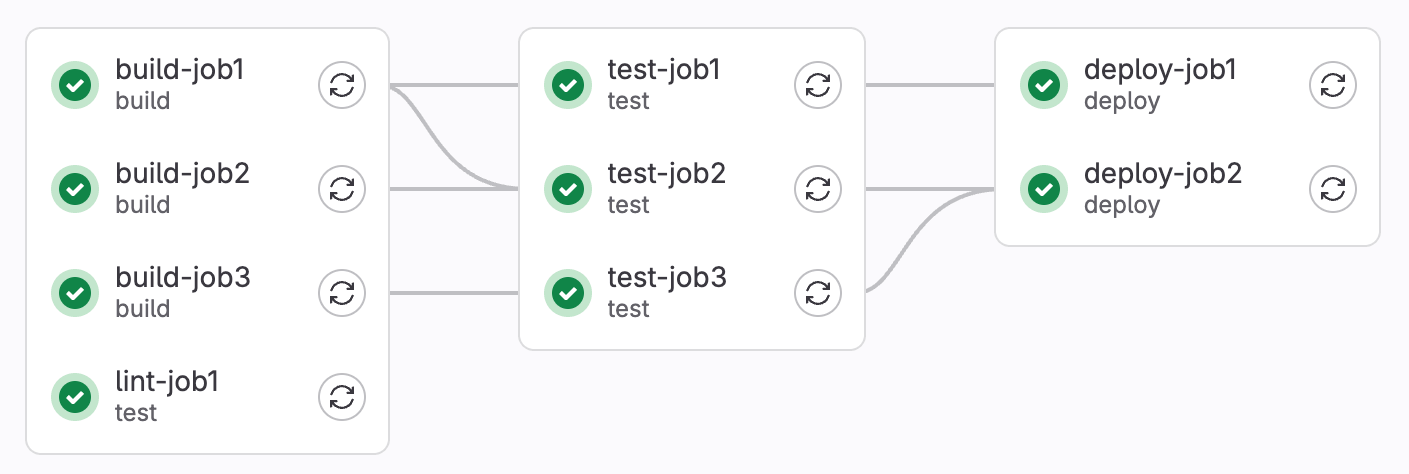
To do that, it runs various checks against the codebase, in series when they depend on each other, or in parallel when possible to speed things up. If the checks at any stage fail, the pipeline will stop and prevent the new code progressing on to the Continuous Delivery phase. The codebase is now in a known bad state which should not be built upon, and so it’s vital that the team is alerted that the pipeline is broken, and diverts resources to getting the delivery conveyor belt running smoothly again as soon as possible.
The CI pipeline can also be run against code before integrating it into the trunk of development, to make sure it will merge cleanly – this helps partially automate a code review process using merge requests.
To run a tool on a CI pipeline it must be scriptable, that is automatable without human intervention. Some examples of checks that can be run on CI:
Automated Tests
Automated tests are there to check the correctness of the code, so it is natural to use them as a gate on CI. Because the CI pipeline runs in the background, out of the immediate flow of developers’ local work, it can run more automated tests than the developer might do before pushing new code. In fact, with the right optimisation of both the pipeline and the test suite, it can run all available automated tests before allowing changes to pass. Depending on the effectiveness of your test suite, this can give great confidence that the change is compatible and has not caused any regressions, enabling practices like Continuous Delivery.
Unit tests are usually easy to run in CI, because they often have a scripting command (eg. npm test or mvn test) and do not require starting any application processes. They should be independent, and can successfully be parallelized, with other types of tests and among themselves.
Integration tests that require standing up part or all of the application under test (such as API tests) can be more troublesome to set up, since the script to start the app must work in the CI context, and then run in the background so that the tests can proceed. Some testing frameworks have features to run the relevant parts of the code in the test process itself.
An option for End-to-End (E2E) tests that include the whole application, is to deploy the latest version of the system to a production-like environment and run the tests against that instance. This has the advantage of also testing the environment configuration, giving greater confidence the application will work when promoted to UAT. The CI runner, where the tests run, must be able to talk to the CI environment to deploy code and access the application. This CI testing deployment is a good use case for an ephemeral environment.
Code Coverage
The amount of code coverage given by the tests can be output as a file in a standard format and measured in the CI pipeline. If the coverage goes below an agreed threshold the build will be blocked, giving higher confidence in automated promotion and Continuous Delivery.
Quality Metric: Code Coverage
The higher the better, although tests still have to be meaningful. Logical branch coverage can show this more clearly than line coverage.
If you’re using SHIP-HATS Gitlab pipeline templates, code coverage reports generated by testing tools are read, displayed on a dashboard and used as a gate in the CI/CD pipeline.
Quality Metric: Pipeline success rate
A failing pipeline means it’s catching an issue, but if it’s happening a lot, maybe we can shift it even further left to local development.
We want our CI/CD pipeline to accurately represent our current ability to deploy software. For this, we need it to fail for the right reasons - because it’s catching genuine issues, not because it’s misconfigured - so it’s important to put the effort in to get it running correctly. We also want it to be reliable and repeatable – if it passes and fails unpredictably on subsequent runs without any relevant code changes, it becomes annoying and easier to ignore. We must diagnose the root cause of this flakiness and fix it - one common cause is flakey tests.
Code quality
Static analysis tools and linters that run as part of a CI/CD pipeline can analyse source code and give a report on code quality, including comparing to previous runs, to give the team visibility into whether new changes introduce any quality issues (or instead clean up the code.)
The code quality report can be generated and shown in the pipeline, and changes that lower quality can be blocked from being promoted. Fix linting errors and use refactoring techniques to address code smells introduced and bring quality back up to par.
Quality Metric: Code quality
Changes should not introduce too many new issues, and quality should remain high over time as more code is added.
SHIP-HATS Gitlab templates include a code quality report stage in the pipeline.
Security
The CI pipeline is a great place to help shift security left, getting feedback on our security risk throughout the development process - rather than in one session when we want to go to production, where it can be more expensive to fix and delay getting our software into the hands of users.
There are several types of security tools that can be run as stages in the pipeline, probing our application in different ways and generating reports on open vulnerabilities.
SAST
IM8 Policy: SD-4: Static Analysis
Set up a static analysis job in the Continuous Integration Pipeline, and remediate or risk accept true positive vulnerability findings before deploying to production.
Static Analysis Security Testing tools look at the source code of the application and can infer security issues from there, based on known exploits and patterns in the code.
SAST scanners can also look at Infrastructure as Code (IaC) and other configuration files and infer insecure misconfigurations.
Vulnerabilities are reported by severity according to the Common Vulnerability Scoring System (CVSS), helping to prioritise remediation.
Dependency Scanning
IM8 Policy: SD-5: Dependency Scanning
Schedule a scan in the CI pipeline to identify the use of vulnerable software libraries.
It’s not just the source code we write ourselves that can be vulnerable; chances are we’re reusing a lot of code in the form of software libraries as well. Software Composition Analysis (SCA) tools look at the list of libraries we include directly, and their transitive dependencies, and flag up any known vulnerabilities in the versions of these libraries our software is using – prompting us to update these libraries to a version that includes a patch.
Container Scanning
The widespread containerization of build and runtime environments introduces an opportunity for security vulnerabilities in the running container images themselves. Container scanning tools, an extension of SCA, call out issues at the operating system level and other runtime dependencies of our application used in the base image.
Secret Detection
IM8 Policy: SD-6: Secret Detection
Set up secret detection in the CI pipeline and remediate true positives.
SAST tools can be configured to detect when sensitive information such has API keys or passwords have been inadvertently committed to the codebase. Or the CI/CD pipeline itself may also provide these features, such as SHIP-HATS Gitlab.
IM8 Control: ST-5: Vulnerability Management
Triage and then remediate or risk accept all true positive vulnerability findings discovered through security testing within a timeframe based on severity and the system’s risk profile.
Quality Metric: Open vulnerabilities
Combined vulnerabilities from SAST, DAST, Dependency & Container Scanning and Secret Detection caught in the CI pipeline should go down over time as they are remediated based on severity.
Pipeline Security
IM8 Policy: SD-7: CI Environment Variable Secrets Management
Protect environment variable secrets used in CI jobs by limiting them to protected pipelines and masking them in job logs.
Are we ready to deploy?
If our CI pipeline is configured properly and contains all the appropriate automated checks and quality gates to give us confidence, it answers an important question: are we ready to go live?
To support releasing frequently, when it makes sense for the business, we need to make sure all technical blockers are out of the way. For this reason, the current status of the CI pipeline, our software delivery production line, is the whole team’s concern.
If the pipeline is red, our production line is down and we are blocked. Resources should be diverted to getting it going again as soon as possible.
If the pipeline is green, the answer is “Yes!” and we can proceed to Continuous Delivery.
Summary
Configuration of a CI pipeline is an investment worth making for the time saved by getting early feedback and catching issues before they make it into higher environments. Using SHIP-HATS Gitlab templates can help you get up and running quickly!
