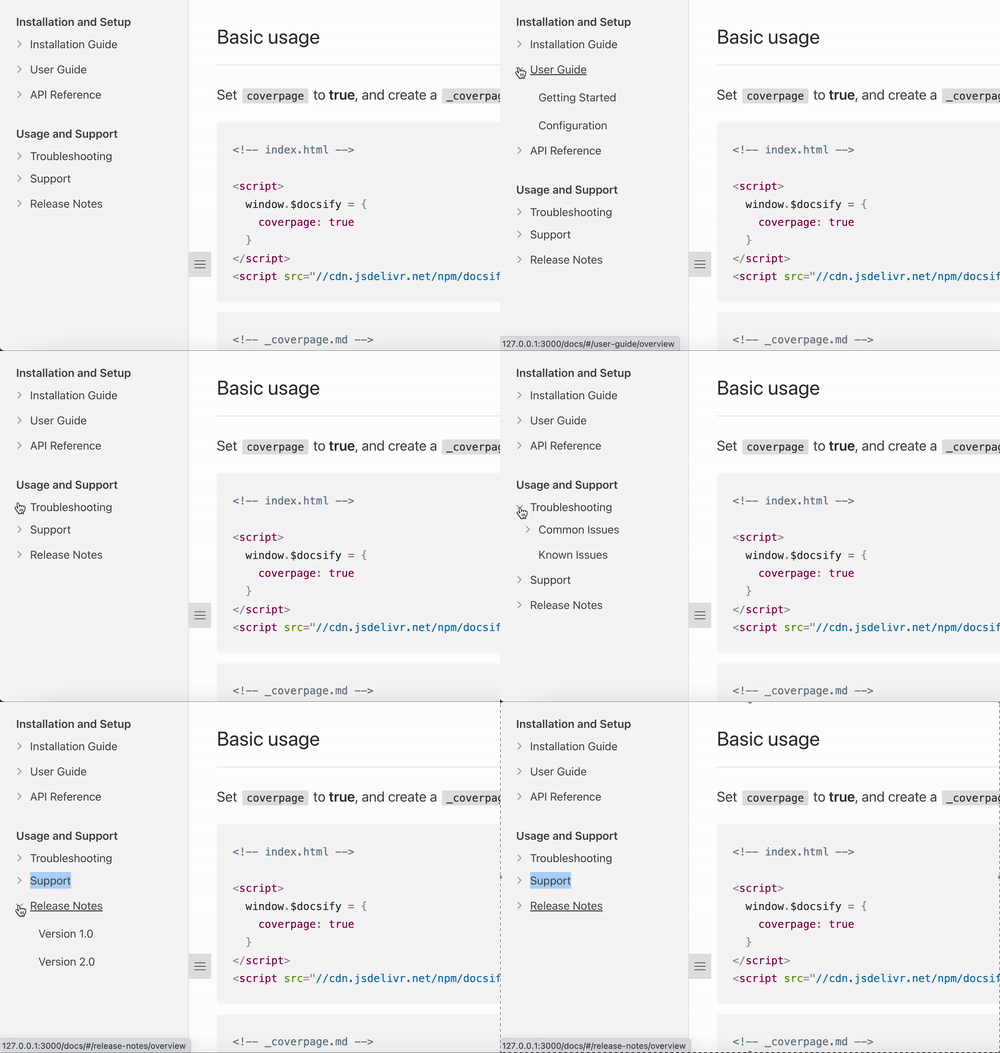
Using the sidebar plugin
For publishers who want collapsible nested navigation in the sidebar.
The Sidebar plugin allows you to nest your page links into interactive folders you can collapse and uncollapse!
Setup
Step 1: Configure docsify-sidebar-collapse plugin
Add the following to your window.$docsify configuration:
window.$docsify = {
enableSidebarCollapse: true
};Step 2: Add styles and scripts
Add the sidebar collapse CSS to your <head>:
<head>
<link rel="stylesheet" href="https://docs.developer.tech.gov.sg/static/dist/doc.latest.css" />
<link rel="stylesheet" href="https://cdn.jsdelivr.net/npm/@developerportalsg/docsify-sidebar-collapse@2.2.0/dist/index.css" />
</head>Add the sidebar collapse script to your <body>:
<body>
<script defer src="https://cdn.jsdelivr.net/npm/@developerportalsg/docsify-sidebar-collapse@2.2.0/dist/index.js"></script>
</body>For the complete index.html template with all portal plugins, see Docsify configuration.
Step 3: Create/Update your sidebar markdown file
To create a top level category/section:
Category/Section
- Links
...To create a folder:
- Folder
- [Link](link/to/file)To create a link folder:
- [Link Folder](link/to/file)
- [Nested Link](link/to/another/file)Example
Markdown
Installation and Setup
- Installation Guide
- [Windows Installation](install-guide/windows)
- [Mac Installation](install-guide/mac)
- [Linux Installation](install-guide/linux)
- [User Guide](user-guide/overview)
- [Getting Started](user-guide/getting-started)
- [Configuration](user-guide/configuration)
- API Reference
- [API Documentation](api-reference/api-documentation)
Usage and Support
- Troubleshooting
- Common Issues
- [Error Messages](troubleshooting/error-messages)
- [Troubleshooting FAQ](troubleshooting/faq)
- [Known Issues](troubleshooting/known-issues)
- Support
- [Contact Us](support/contact-us)
- [Community Forums](support/community-forums)
- [Release Notes](release-notes/overview)
- [Version 1.0](release-notes/v1.0)
- [Version 2.0](release-notes/v2.0)Output