Default configuration
For publishers who want to customise Docsify settings beyond the defaults.
The Documentation Portal uses a set of default Docsify settings and styles to render your documentation.
It does not read from your repository’s index.html file.
Some of these settings are configurable from the portal.
To preview your documentation locally as it would appear on the portal, use the following index.html template. This matches the portal’s exact CDN versions and plugin configuration.
The portal uses a custom Docsify fork (@developerportalsg/docsify@4.12.18) with non-standard link resolution. Using stock Docsify from cdn.jsdelivr.net/npm/docsify gives different link behaviour — document links that work locally may break in production. Always use the template below.
<!doctype html>
<html>
<head>
<meta charset="UTF-8" />
<title>My New Documentation</title>
<meta http-equiv="X-UA-Compatible" content="IE=edge,chrome=1" />
<meta name="viewport" content="width=device-width, user-scalable=no, initial-scale=1.0, maximum-scale=1.0, minimum-scale=1.0" />
<meta name="description" content="My Documentation Description" />
<link href="https://fonts.googleapis.com/css2?family=Source+Sans+Pro:wght@100;300;400;700;900&display=swap" rel="stylesheet" />
<script defer src="https://cdnjs.cloudflare.com/ajax/libs/dompurify/2.2.7/purify.min.js"></script>
<!-- Portal styles -->
<link rel="stylesheet" href="https://docs.developer.tech.gov.sg/static/dist/doc.latest.css" />
<link rel="stylesheet" href="https://unpkg.com/@developerportalsg/docsify-plugin-toc@2.1.10/dist/light.css" />
<link rel="stylesheet" href="https://unpkg.com/@developerportalsg/docsify-accordion-plugin@1.0.14/dist/accordion.css" />
<link rel="stylesheet" href="https://cdn.jsdelivr.net/npm/@developerportalsg/docsify-sidebar-collapse@2.2.0/dist/index.css" />
<style>
:root { --theme-color: #0076d6; }
</style>
</head>
<body>
<div id="app"></div>
<script src="https://cdn.jsdelivr.net/npm/mermaid@9.1.7/dist/mermaid.min.js"></script>
<script>
var num = 0;
mermaid.initialize({ startOnLoad: false });
window.$docsify = {
name: "My Documentation", // Configurable when publishing
hideSidebar: false, // Configurable when publishing
basePath: "", // Configurable when publishing
homepage: "README.md", // Configurable when publishing
subMaxLevel: 2, // Configurable when publishing
el: "#app",
routerMode: "history",
auto2top: true,
loadSidebar: true,
enableSidebarCollapse: true,
themeColor: "#0076d6",
markdown: {
renderer: {
code: function (code, lang) {
if (lang === "mermaid") {
return '<div class="mermaid">' + mermaid.render("mermaid-svg-" + num++, code) + "</div>";
}
return this.origin.code.apply(this, arguments);
},
},
},
toc: {
tocMaxLevel: 5,
target: "h2, h3, h4, h5, h6",
ignoreHeaders: ["<!-- {docsify-ignore} -->", "<!-- {docsify-ignore-all} -->"],
},
};
</script>
<!-- Docsify core (custom fork — NOT stock docsify) -->
<script src="https://cdn.jsdelivr.net/npm/@developerportalsg/docsify@4.12.18/lib/docsify.min.js"></script>
<!-- External plugins -->
<script defer src="https://cdn.jsdelivr.net/npm/docsify-tabs@1.4.4/dist/docsify-tabs.min.js"></script>
<script defer src="https://cdn.jsdelivr.net/npm/docsify-copy-code@2.1.1/dist/docsify-copy-code.min.js"></script>
<script defer src="https://cdn.jsdelivr.net/npm/docsify@4.12.1/lib/plugins/zoom-image.min.js"></script>
<script defer src="https://cdn.jsdelivr.net/npm/docsify-pagination@2.6.1/dist/docsify-pagination.min.js"></script>
<!-- Portal-built plugins -->
<script defer src="https://cdn.jsdelivr.net/npm/@developerportalsg/docsify-sidebar-collapse@2.2.0/dist/index.js"></script>
<script defer src="https://unpkg.com/@developerportalsg/docsify-plugin-toc@2.1.10/dist/docsify-plugin-toc.min.js"></script>
<script defer src="https://unpkg.com/@developerportalsg/docsify-accordion-plugin@1.0.14/dist/docsify-accordion-plugin.js"></script>
</body>
</html>Manual configuration
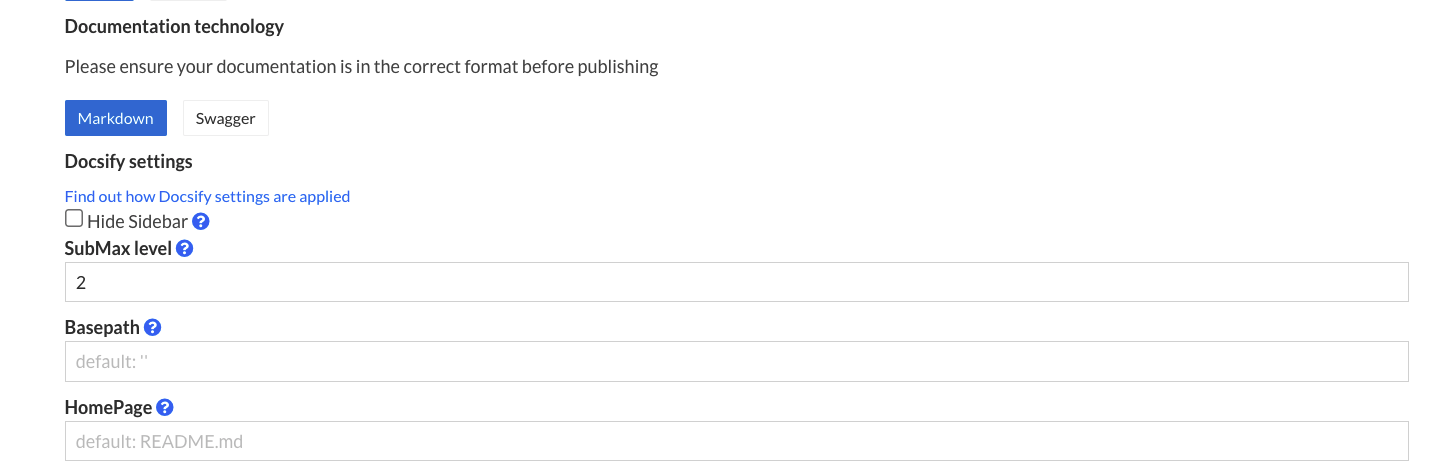
You can specify certain configurations that would be present on thewindow.$docsify object when publishing.
Documentation display name
This takes the value set for your documentation’s display name, which would show up in places such as links to your documentation, the sidebar and the title of the HTML document seen by readers.
hideSidebar
Enable this to completely hide your sidebar.
Defaults to false.
basePath
If have your markdown files or other assets reside in an inner directory of your git repo, set this to the name of that directory.
Defaults to empty string (''), which results in the root folder of your repository being served.
homepage
File name for your home page, which is the page that gets served when readers navigate to your doc, e.g. readme.md, README.md, home.md.
Defaults to README.md